Saltar al contenido principal
Únete a la Comunidad de Reparación - Crear Cuenta

El OP-1 es una estación de trabajo musical portátil que incorpora un sintetizador, sampler, secuenciador, grabador multipista, caja de ritmos, mezclador y controlador. Fue lanzado en 2011.

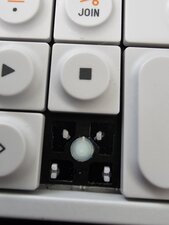
Is this button broken?

I put a tightly fitting case on my original OP-1 and the shift key was pried off. Originally the scissor switch disassembled, but I got the two halves back together successfully.

I'm having a hard time getting it to snap back onto the board. I can't tell that anything has snapped off, but I'm just comparing to references on ebay.

Do I need a replacement button, or is there a trick to getting the buttons back on the board?

Imagen
Imagen
Imagen

Update (09/25/26)

I kept playing with it...

There are several small features across the key, scissor mechanism, and board that stop you from assembling pieces backwards.

However, there is a way to put the scissor together backwards, and at least my pieces allowed the inner scissor component to swivel 360°, so there are 4 possible configurations to try to assemble the key to the board, but only one is correct :)

Basically in the original orientation, the two pieces were not working together to create the scissor motion. I could get the piece to hinge on those brackets on the board and then it would fall back off.

In my case, I broke or fatigued the mounting feature on the key when I got what i believe was the correct orientation for it all. Replacement piece it is.

Imagen
Contesta esta pregunta Yo también tengo este problema

Es esta una buena pregunta?

Puntuación 0
Agregar un comentario

2 Respuestas

From the pictures, I don’t see an obvious broken piece on the button itself. It looks more like the keycap isn’t engaging the little retaining tabs on the scissor mechanism correctly.

I’d try this with the faceplate off: line up the four small tabs on the underside of the keycap with the scissor assembly, get all four started, then press straight down evenly. Don’t force one corner down by itself or you can pop the scissor back apart.

Since you said it works with the faceplate removed, I’d also check that the faceplate isn’t slightly warped/cracked and pushing the key sideways. If you can, try the key with the faceplate loosely sitting in place but without the screws. If it works until you tighten the screws, the shell is what’s causing the problem, not the button.

Fue útil esta respuesta?

Puntuación 0
Agregar un comentario

From the photos it doesn”t look broken. You just need to make sure that you clip the little tabs back into the clips on the keyboard to get the spring action.

Imagen
Imagen

Fue útil esta respuesta?

Puntuación 0
Agregar un comentario

Añadir tu respuesta

yake estará eternamente agradecido.
Ver Estadísticas:

Ultimas 24 horas: 21

Ultimos 7 días: 21

Ultimos 30 días: 21

Todo El Tiempo: 21