

Is the keyboard replaceable?
Hi ifixit community,
I got this laptop, and two keys are not working. Is it possible to fix those keys or replace the keyboard?
Es esta una buena pregunta?
Puntuación
1
Rep: 23
 1
1
 1
1
Hi ifixit community,
I got this laptop, and two keys are not working. Is it possible to fix those keys or replace the keyboard?
Es esta una buena pregunta?
Rep: 550.3mil
11
425
 1.6mil
Hi @c0mputist
You can replace the keyboard/top cover assembly (it's a complete module), but to do so requires that the entire laptop be disassembled.
Here's the maintenance and service guide, taken from this support webpage for the laptop.
Go to p.74 to view what needs to be done i.e. start on p.43
Also on p74 you will find the HP part numbers for the type of keyboard/top cover assembly and the country that the keyboard is designed to be used in.
Search online for the part number appropriate to your particular keyboard type to find suppliers that suit you best.
Some examples are:
Keyboard with top cover, backlit, USA = M36312-001
Keyboard with top cover, not backlit, Saudi Arabia = M36310-171
Fue útil esta respuesta?
Thank you so much.
Rep: 13
2
There is the official video from HP.
Fue útil esta respuesta?
Thank you very much. The video was really helpful.
Rep: 1
1
Hello @jayeff and @mathieuhetu,
I need to replace my keyboard because I have to change the frame. Unfortunately, I’m not sure how to proceed. I watched several teardown videos but couldn't find any information on disassembling the keyboard. It appears to be riveted to the frame (see pictrure attached).
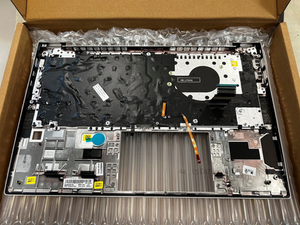
The new frame i bought also seems to have specific holdings for the rivets.
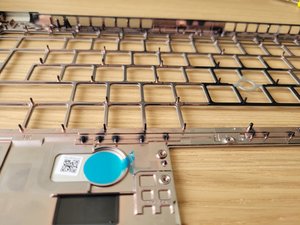
Could you please provide some guidance on how to remove the keyboard?
Fue útil esta respuesta?
Hi @bluecorn
Are they metal rivets or plastic?
In any event most probably you will either have to drill out the rivets (if metal) or cut/melt them (if plastic) and then insert the keyboard into the new frame and then affix it as best you can at the rivet points using an epoxy adhesive.
Ultimas 24 horas: 7
Ultimos 7 días: 50
Ultimos 30 días: 198
Todo El Tiempo: 6,784



