Saltar al contenido principal

Envío gratis en pedidos nacionales de $75+

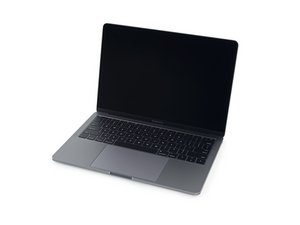
A1708 / EMC 2978 — Lanzado en octubre de 2016, este MacBook Pro de nivel básico conserva sus teclas de función tradicionales (a diferencia de la Touch Bar OLED). La versión con teclas de función incluye un procesador Intel Core i5 y dos puertos Thunderbolt 3.

Screen continuous flashing problem

Hi all,

I’ve facing screen flashing problem last few week.

I’ve tried SMC & NVRAM reset. But not work for me. Screen still flickering/flashing.

I’ve also format my Macbook and install fresh copy of macOS High Sierra. Yesterday, I’ve update macOS Mojave. Still facing flickering/flashing problem.

Note: When I’ve moving the cursor “screen doesn’t flickering/flashing”.

Also If I’ve play any video(only) in any player or play youtube video “screen doesn’t flickering/flashing”.

If I’ve Minimize the player or bowser “screen flickering/flashing”.

**I’ve tried plug in the power cord & remove the plug of power cord, still facing the problem.

Check the video and Please advice me.

Contestado! Ver respuesta Yo también tengo este problema

Es esta una buena pregunta?

Puntuación 4
Agregar un comentario

2 Respuestas

Solución Elegida

It seems to me from the video you got a stagelights effect too on the bottom. That might be usually caused by the screen itself, screen connector, or by resistors along the backlight circuitry. You can try reseating the connector (turn off and disconnect battery connector first) and clean the cable end with a couple drops >90% alcohol. Other than that there’s not much one can do apart from testing the logic board and/or trying out a different panel. Anything unusual happened to the Mac in the near past, bump or excessive humidity exposure ?

Fue útil esta respuesta?

Puntuación 3

5 comentarios:

Reference the answer to this question Black shadows from the bottom of the screen

- de Compartir

Here's a second question on the same subject Screen issues, Back light dims & goes out

- de Compartir

@danj I had missed that one..it seems like a flood as with the old GPU issue on A1286, and just two years after release of brand new machines. Probably it's just the beginning. It should be like bread and butter for a lawyer with some good will. I hope it will serve well Apple's soldering and glueing craze.

- de Compartir

Sadly it's a design issue with the newer interconnection cables between the system and lid (2016 and through 2018 models). I've now have seen 14 systems! All with either the stage lighting effect (backlight ribbon) of display wink out when the screen is tilted more than 45 degree's or (datas cable from T-CON board).

- de Compartir

@danj I haven't been crossing any so far, but that's probably due to the fact that in Europe we have two years warranty by law and they're expiring right now. I'll brace for impact, it seems it's just a matter of time.

- de Compartir

Agregar un comentario

New Program

13-inch MacBook Pro Display Backlight Service Program

https://www.apple.com/support/13-inch-ma...

Fue útil esta respuesta?

Puntuación 2
Agregar un comentario

Añadir tu respuesta

Imam Hossain estará eternamente agradecido.
Ver Estadísticas:

Ultimas 24 horas: 1

Ultimos 7 días: 4

Ultimos 30 días: 19

Todo El Tiempo: 4,394