
Tras la descripción general actual de conectores de iFixit "Reconocimiento y desconexión de conectores de cable", una estructura completa de categorización de conectores parecía el siguiente paso lógico.
Comenzando con una visión general y analizando cada categoría para comprender las diferencias y las formas de operarlos, este wiki debería proporcionar información útil para cualquier persona que no esté segura sobre el funcionamiento de los conectores en una reparación.
Esta descripción básica muestra cómo hemos categorizado los conectores en esta lista.

FPC/FFC
Los FPC (cables de circuito impreso flexibles) o FFC (cables planos flexibles) son un tipo de cable muy común utilizado para conectar componentes dentro de los dispositivos electrónicos. A menudo denominados cables planos, estos cables son maleables y tienen un perfil muy bajo, lo que los hace adecuados tanto para dispositivos móviles compactos como para hardware especializado.
Los conectores que vinculan un FPC o FFC a una placa de circuito impreso (PCB) pueden variar mucho según la aplicación, y cada tipo tiene diferentes ventajas, inconvenientes y métodos de funcionamiento.
FPC/FFC: ZIF
Los conectores ZIF (fuerza de inserción cero) pueden ser los más comunes y variados de los conectores de esta lista. Son fáciles de insertar y a menudo tienen un mecanismo de bloqueo que mantiene el FPC/FFC en su lugar. Es importante identificar el método de retención antes de manipular un ZIF, ya que confundir uno con otro puede dañar estos conectores pequeños y frágiles.
Front-Flip/Flip-Lock
Este tipo de conector ZIF tiene una pequeña palanca que apunta en la dirección del FPC/FFC. El ZIF se puede insertar mientras la palanca está en posición vertical y se bloquea en su lugar cuando la palanca queda "plana", en paralelo a la PCB. Se puede usar un spudger o una uña para abrir esta palanca y desbloquear el conector, tras lo cual el FPC se puede extraer fácilmente tirando de él horizontalmente fuera del alojamiento.
Se muestra en: Reconocimiento y desconexión de conectores de cable
 |  |
Back-Flip
Los conectores back-flip funcionan de manera muy similar a los front-flip, sin embargo, su palanca de bloqueo está invertida y orientada en dirección opuesta al lado de inserción del FPC. Ambos son muy comunes, y puede ser necesaria la observación y una cuidadosa prueba de ensayo y error para distinguir con cuál estás tratando.
Se muestra en: Sustitución de la placa madre del Kobo Clara Colour (N367B)
 |  |
Push-Lock
Un método de retención menos común, pero aún considerable, utiliza dientes con púas dentro del conector que permiten una inserción sin pestillo, pero para la cual es necesario presionar un botón o barra de liberación.
Es importante no sacar un FPC de un conector hasta que estés seguro de que no hay ningún método de retención que se te haya pasado por alto.
Se muestra en: Reemplazo de la placa LED de la PlayStation 5
 |  |
Pinch-Lock
Una versión aún más rara es el mecanismo de bloqueo tipo pinza, donde los dientes con púas se liberan apretando el conector para desbloquear el FPC.
Se muestra en: Sustitución de la placa madre del Xbox Series X
 |  |
Locking-Bar
Algunos conectores ZIF utilizan un pestillo de bloqueo que se abate sobre el conector para obtener un montaje rígido y seguro una vez insertado el FPC. Puede ser difícil de levantar, pero usar una púa o un spudger debajo de la barra que envuelve el exterior parece ser el método más eficaz.
El ejemplo muestra un haz de cables en lugar de un FPC, pero se aplica el mismo procedimiento.
Se muestra en: IPEX Cabline CA
 |  |
Locking-Cage
Similar a la Locking-Bar, pero con una cubierta completa en la parte superior para una mayor rigidez y prevención de entrada de polvo, la caja de bloqueo funciona de manera muy similar.
El ejemplo muestra un haz de cables en lugar de un FPC, pero se aplica el mismo procedimiento.
Se muestra en: IPEX Cablin CA II
 |  |
Slide-Lock
Los conectores slide-lock utilizan un pestillo deslizante (a menudo de plástico) para mantener el FPC en su lugar. Suelen tener flechas que indican en qué dirección deslizar el pestillo y, una vez hecho esto, el FPC debería extraerse con facilidad. A menudo tienen una lengüeta de plástico para ayudar con la extracción del FPC.
Se muestra en: Reemplazo de la placa de audio de Steam Deck
 |  |
Non-Locking
Algunos conectores ZIF no tienen ningún método de bloqueo notable más que un ajuste de fricción, y pueden insertarse y retirarse aplicando solo una fuerza mínima. A menudo tienen una lengüeta de plástico cerca del extremo del FPC para permitir que el usuario tire del conector directamente, sin embargo, este no es el único tipo de conector ZIF que puede tener esta característica, por lo que es importante identificar siempre qué tipo de conector se está utilizando antes de asumir que no tiene bloqueo.
Se muestra en: Reemplazo de la placa LED de la PlayStation 5
 |  |
Other
Existen otros estilos de retención de conectores ZIF, muchos de los cuales son propietarios o poco comunes. Si puedes, busca instrucciones que coincidan con el dispositivo; de lo contrario, procede con precaución.
FPC/FFC: Press-Fit
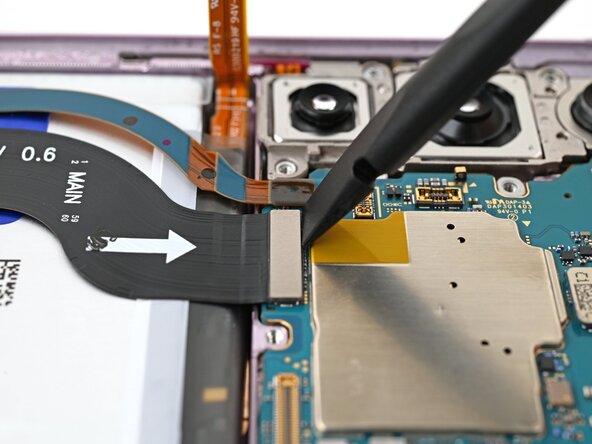
Los conectores a presión son de los más populares en dispositivos móviles, y con razón: tienen un perfil bajo, alta densidad y son fáciles de operar. Para retirar un conector a presión, simplemente colócate debajo de la parte superior plana con un spudger o la uña y haz palanca hacia arriba con suavidad. Para reinstalarlo, alinea los pines y presiona ligeramente hacia abajo hasta que sientas un clic táctil.
Existen muchos tamaños de estos; los pequeños se utilizan para conexiones periféricas como sensores de huellas dactilares, baterías y altavoces. Los más grandes se suelen utilizar para conexiones de pantalla, cámaras e interconexiones de placas base/hijas.
Se muestra en: Sustitución de la placa madre del Samsung Galaxy S23 Plus
 |  |
Mezzanine
Los tipos mezzanine son conectores fundamentales ya que vinculan funciones primarias como la alimentación y los datos dentro de subensamblajes de dispositivos. Vienen en muchas formas y muchos aprovechan los conectores ZIF mencionados anteriormente en electrónica de consumo compacta. En aplicaciones especializadas, existen otros conectores mezzanine únicos adecuados para casos de uso específicos.
High-Speed Data
Los conectores mezzanine centrados en datos de alta velocidad suelen utilizar muchos pines en una matriz y también pueden emplear pilares de alineación y mecanismos de bloqueo. Se centran en la intensidad y la integridad de la señal, y es importante tener cuidado con los pines (a menudo frágiles) que utilizan.
Se muestra en: Reemplazo de la tarjeta gráfica de Mac Pro a finales de 2013 / Molex HD Mezz Connector
 |  |
High-Power
Las interfaces mezzanine especializadas de alta potencia suelen utilizar cables de grueso calibre y grandes almohadillas de contacto para soportar altas corrientes. A menudo usan pines de alineación y una fuerte función de bloqueo, como lengüetas, pestillos o incluso tornillos en algunos casos.
Se muestra en: Desmontaje de Mac Pro 2009-2012 / Molex EXTreme Guardian Connector
 |  |
Edge / Compression
Los conectores de borde son únicos debido a su integración como partes físicas de las PCB que conectan. Utilizan almohadillas conductoras en combinación con interfaces de compresión con resorte para garantizar un contacto fiable. Esto es lo que también utilizan muchos de los conectores mezzanine de alta potencia mencionados anteriormente, ya que necesitan el máximo contacto para altas corrientes.
Sin embargo, no todos los casos de uso son tan especializados, y los siguientes conectores de resorte se utilizan en algunas de las interfaces más comunes de la electrónica.
Spring Fingers
Los muelles de contacto (Spring fingers) son esencialmente muelles que actúan como contactos entre las almohadillas conductoras en la PCB de acoplamiento y se conectan a las pistas en la PCB receptora, permitiendo la conexión eléctrica sin usar un cable.
Ejemplos en electrónica incluyen memoria expandible, almacenamiento y redes mediante el estándar M.2, los estándares DIMM y CAMM2, así como la interfaz de expansión PCIe. Además, muchos puertos IO (entrada/salida) también utilizan esta tecnología, incluidos USB y HDMI. Los enchufes de alimentación en la mayoría de las regiones también dependen de una versión a mayor escala de muelles de contacto para garantizar un ajuste por fricción y un buen contacto eléctrico.
Se muestra en: Memoria en Sustitución de la memoria LPCAMM2 del Lenovo ThinkPad T14 Gen 7 / Puerto USB en Sustitución del puerto USB-C del Lenovo ThinkPad T14 Gen 7
 |  |
 |  |
Pogo-Pins
Los pines de contacto con resorte (Pogo pins) son generalmente más grandes que los muelles de contacto y son adecuados para uso externo en electrónica de consumo. A menudo se conocen por su uso como interfaz para baterías extraíbles en teléfonos antiguos, pero también son vitales para los wearables modernos. Se muestra el ejemplo de una interfaz de carga basada en pogo-pins para auriculares inalámbricos.
Este tipo de conector es ideal para la expansión o para una carga por contacto sencilla en aplicaciones de baja potencia. Por lo general, los usuarios no son plenamente conscientes de que están operando un conector electrónico, y las reparaciones en dispositivos que aplican estos conectores son simples (a menos que el propio conector de compresión esté roto).
Se muestra en: Interfaz de carga Pogo-Pin en el Desmontaje de Nothing Ear (1)
 |  |
Zebra/Elastomeric
Los conectores Zebra también son un tipo de conector de compresión, ya que se asientan entre dos conjuntos de almohadillas conductoras. Son únicos porque están rayados, alternando entre trazas, lo que permite un mayor ancho de banda que con los conectores de compresión tradicionales. Esto les permite enviar datos básicos, no solo energía, haciéndolos capaces de enviar señales a pantallas LCD montadas en PCB, entre otras aplicaciones más especializadas.
Se muestra en: LCD Zebra Connector
 |  |
RF/Coaxial
Snap-On Coax
Uno de los conectores más comunes y, a la vez, más complicados de esta lista son los conectores coaxiales a presión. Son diminutos y pueden ser difíciles de alinear, especialmente en espacios reducidos dentro de dispositivos electrónicos de consumo compactos, donde se utilizan a menudo.
Para desinstalar un conector micro-coaxial, levanta la cabeza suavemente desde abajo con pinzas de precisión o un spudger, de forma similar a un conector a presión.
La reinstalación es más complicada y la alineación precisa es vital. Un enfoque común es sujetar la cabeza redonda del enchufe con unas pinzas de precisión y, una vez alineada sobre el pin del zócalo, presionar hacia abajo con un spudger o una uña.
Se muestra en: Sustitución del puerto de carga USB-C y la placa de carga del Samsung Galaxy S20 FE 5G
 |  |
Other Coax
No todos los conectores de radiofrecuencia utilizan la interfaz de cabeza redonda a presión; algunos ahora utilizan FPC/FFC convencionales junto con conectores ZIF o a presión.
Wire to Board
Dentro de los dispositivos, los FPC son cada vez más comunes, pero los cables convencionales (o haces de cables) todavía se utilizan a menudo y tienen su propia gama de tipos de conectores.
Headers
Los headers consisten en una matriz de pines, generalmente en una disposición rectangular, mientras que el enchufe consiste en una matriz de orificios que encajan en los pines y se mantienen en su lugar simplemente mediante fricción. Por lo general, no existe ningún método de retención en estos conectores, y un pequeño tirón los desconectará fácilmente. Los headers suelen estar orientados verticalmente, pero en algunos casos, pueden estar en horizontal sobre una PCB, especialmente en un borde o en un espacio reducido.
También se utilizan cabezales simples para la expansión interna de USB en ordenadores de sobremesa y son populares en microprocesadores como Arduino y Raspberry Pi.
 |  |
Box-Headers
Si bien la fricción entre los pines y el enchufe suele ser el método de retención principal en los headers convencionales, los Box-Headers utilizan una caja adicional alrededor de los pines para garantizar una unión más robusta. Estos conectores a menudo también utilizan una pequeña lengüeta o riel de retención para garantizar la alineación y evitar la extracción accidental. Estos conectores normalmente no tienen un mecanismo de bloqueo, y es seguro extraerlos aplicando una pequeña fuerza.
 |  |
 |  |
JST
Estos conectores, típicamente blancos, son increíblemente populares y se encuentran en la mayoría de los dispositivos electrónicos. Vienen tanto en tipos de header simple como de box-header, y con varios conteos de pines y tamaños. Algunas versiones también usan bloqueos para evitar la desconexión accidental.
No son necesariamente una categoría separada de las dos anteriores, sino que se superponen a ellas, y su popularidad merece una mención honorífica.
 |  |
 |  |
Locking Connectors
Algunos conectores adyacentes a headers utilizan mecanismos de bloqueo. Un ejemplo es SATA, que utiliza un box-header, pero con contactos tipo borde en una "hoja" en lugar de una simple matriz de pines. SATA es un cable de transferencia de datos interno estándar y utiliza una pestaña de bloqueo metálica para mantenerlo en su lugar. Es necesario apretar la pestaña de bloqueo antes de tirar del enchufe para extraerlo del header. Es común que los conectores internos de cable a placa tengan mecanismos de bloqueo para evitar que se suelten durante el transporte o el uso prolongado, y existen en varios formatos.
 |  |
Power Cable Connectors
Los cables de alimentación a menudo requieren haces de cables para conducir la electricidad de forma segura en un factor de forma menos frágil de lo que pueden acomodar los FPC. Por lo tanto, los conectores también deben ser más robustos; los conectores de los cables de alimentación son a menudo una combinación entre un box-header reforzado y un mecanismo de bloqueo seguro. Los modelos más frecuentes son la serie mini-fit de Molex, que se utilizan en varios dispositivos propietarios y en ordenadores de sobremesa de acuerdo con el estándar ATX.
Estos utilizan una simple pestaña de bloqueo oscilante en el exterior del conector en combinación con pines insertados profundamente que utilizan fricción para permanecer alineados. Algunos pueden requerir bastante fuerza para retirarlos debido a la cantidad de fricción entre el enchufe y el receptáculo. Asegúrate siempre de que el bloqueo esté desactivado antes de intentar retirar estos conectores para evitar daños.
 |  |
Sliding Headers
Cuando los headers se encuentran planos sobre una PCB, pueden utilizar una sola fila de pines para adaptarse a una restricción de perfil más bajo. La imagen a continuación muestra un header de formato plano con un acoplamiento horizontal. Esto sigue siendo, en última instancia, un header, pero uno que es un poco más complicado de operar debido a su orientación. Usando un spudger para deslizar suavemente el conector fuera de su alojamiento, posiblemente alternando de lado a lado para sacarlo con suavidad, estos conectores pueden ser un poco molestos, pero son relativamente robustos y predecibles.
Reconocimiento y desconexión de conectores de cable
 |  |
Molex Pico-EZmate
Estos conectores diminutos y frágiles parecen un header convencional, excepto que el enchufe debe retirarse verticalmente y en un ligero ángulo. Utilizan contactos más similares a los conectores de borde que a los headers de interfaz de pin simple, y se encuentran más comúnmente como conectores de ventilador en dispositivos compactos, ocupando el lugar de headers tipo JST más grandes.
Son extremadamente frágiles y se debe tener el máximo cuidado para evitar daños.
[Molex Pico-EZmate de https://www.ifixit.com/Guide/Mac+mini+(2...]
 |  |
Por favor, comenta o sugiere una edición si conoces algún conector de placa a placa que no esté listado.


0 comentarios