Saltar al contenido principal

Modelo A1989, EMC 3358. Una actualización del diseño existente, con opciones de procesador actualizadas y un cambio en los materiales del teclado. Disponible en plata y gris espacial. Lanzado en mayo de 2019.

identify CPU/RAM/Storage specs from a non-working board

the board doesn't turn on. how can I identify the CPU/RAM/Storage from the board? are there any markings on the notebook or the body itself?

Thanks

Contesta esta pregunta Yo también tengo este problema

Es esta una buena pregunta?

Puntuación 0
Agregar un comentario

3 Respuestas

Respuesta Más Útil

@garegin like @livfe already mentioned, the easiest way to identify your specs would be by using your computers serial number. It will give you the memory as well as the storage information.

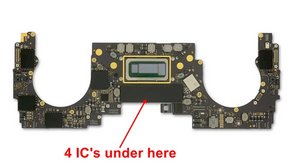
The only other way would be by looking at the memory IC's itself. Each one of the 8GB and 16GB configuration uses 3 different IC's, which leaves you with a total of 6 possibilities. Commonly used IC's are HYNIX, Micron, or Samsung. Apple, in it's habitual paranoid way, may have had those IC's marked with their own part numbers:

333S00125

333S00068

333S00166

333S00126

333S00070

333S00167

those are all LDDR3-2133 BGA178 IC's but are different and not just in capacity.

Block Image

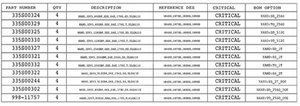
As for your "SSD" storage, again, you are dealing with NAND IC's Apple commonly uses Toshiba IC's for these (may or may not be marked in the APPLE Way :-) Here are the numbers for those

Block Image

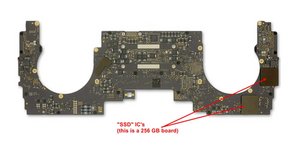
and here are the locations

Block Image

The boards with a higher storage capacity do have additional solder points. I do hope that this will help you out. Of course, you could also just post a couple of good pictures of your logic board (both sides and IC covering removed) so we could help you further with this.

Agregar imágenes a una pregunta existente

Fue útil esta respuesta?

Puntuación 1
Agregar un comentario

If you are trying to fix your system you’ll need to get ahold of the schematics and board view drawings.

Here’s a primer on how the board is laid out if that is what you are looking for Desmontaje de MacBook Pro 13" con dos puertos Thunderbolt 2019 reference Step 5.

Fue útil esta respuesta?

Puntuación 0

4 comentarios:

No, I'm not trying to fix the board. I simply want the RAM/Storage specs. But I'm going to sell the notebook as is. Also, mine is the MacBook Pro (13-inch, 2019, Four Thunderbolt 3 ports) model.

- de

@garegin - Identifying your exact config is a bit tricky as Apple no longer offers system details via the serial number. As it turns out Apple only offered two CPU configs:

- 2019 13” MacBook Pro Core i5 2.4GHz

- 2019 13” MacBook Pro Core i7 2.8 GHz

But the RAM & Storage came a few different setups. Do you still have your sales slip paperwork as that will have that listed. If you can get the system running long enough you can get the details within the About This Mac.

- de

The CPU is i7 2.8GHz. But the board itself has no indications of RAM/SSD?

- de

@garegin - The only way is to take note of the chips ID and Google it to see if you can find it. Or if you can find the systems schematics the chips ID will be listed. The RAM is within the SoC module and you could have two or four Flash chips.

- de

Agregar un comentario

You can try a Serial number lookup by using the serial number located on the underside cover.

A list of all 2019 Models might help also. Apples site has This model listed.

Fue útil esta respuesta?

Puntuación 0

4 comentarios:

@livfe - EveryMac can’t offer deeper details in the S/N lookup as Apple stopped referencing it within the S/N a few years ago in the newer models from 2016

- de

@danj Yes but it still helps to narrow down the model in question.

- de

@oldturkey03 MacBook Air (13-inch, 2017)

Purchase Date: September 2019

Serial Number: FVFZ8BBMJ1WK

That is all I get from that site... Everymac gives 2 models the 1.8 Ghz i5 & the 2.2 Ghz i7

- de

@livfe perfect. Thank you

- de

Agregar un comentario

Añadir tu respuesta

garegin estará eternamente agradecido.
Ver Estadísticas:

Ultimas 24 horas: 2

Ultimos 7 días: 6

Ultimos 30 días: 23

Todo El Tiempo: 188