
Saltar al contenido principal

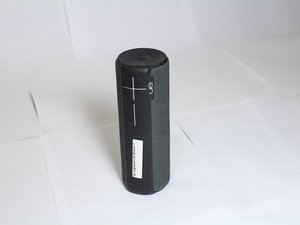
El Logitech UE Boom 2 es un altavoz Bluetooth portátil e impermeable, conocido por su sonido de 360 ​​grados. El Boom 2 está disponible en una gran variedad de vibrantes colores y diseños.

Factory Reset won't work...

This is quoted from another post:

Factory rest [for UE Boom 2]

Note that doing this many times in a row may harm your speaker, so refrain from doing this more than once or twice.

What does this mean exactly? I have tried resetting my UE Boom 2 and now the Bluetooth Sync light won't stop flashing when I try to turn it on. And it won't display on any devices either. Is this speaker toast? Thanks.

Contesta esta pregunta Yo también tengo este problema

Es esta una buena pregunta?

Puntuación 5

1 comentario:

I have exactly the same problem: I believe it is an incompatibility with the latest iOS update. My devices running the latest iOS software won’t connect. However my old iPad running an older version connects fine. I guess we’ll have to wait until Logitech provides us with an update :(

- de

Agregar un comentario

3 Respuestas

Im not really familiar with this device but I would recommend going to the manufacturers website or calling them, here is a link to their faqs.. and phone number.

https://support.ultimateears.com/en/boom...

Fue útil esta respuesta?

Puntuación 0

1 comentario:

Have u found a solution, I'm having the same problem with mine and I really can't find out how to fix it

- de

Agregar un comentario

I think it is the latest iOS. Old iPad connect. iPhone 7 running 11.3.1 doesn’t connect. Arghhhg

Fue útil esta respuesta?

Puntuación 0
Agregar un comentario

Step-by-step instructions

  1. Turn on the speaker: If the speaker is off, press the power button to turn it on.
  2. Press and hold the buttons: Press and hold both the power button (the circle button on top) and the "volume down" button at the same time.
  3. Wait for the sound: Continue holding the buttons for at least 5 seconds until you hear a second sound indicating the reset is complete.
  4. Release the buttons: The speaker will turn off automatically.
  5. Restart and pair: Turn the speaker back on. It will now be in pairing mode, ready to connect to a device as if it were new.

You can also watch this video to learn how

Fue útil esta respuesta?

Puntuación 0
Agregar un comentario

Añadir tu respuesta

emerich kaspar estará eternamente agradecido.
Ver Estadísticas:

Ultimas 24 horas: 1

Ultimos 7 días: 5

Ultimos 30 días: 18

Todo El Tiempo: 24,755

