
Saltar al contenido principal

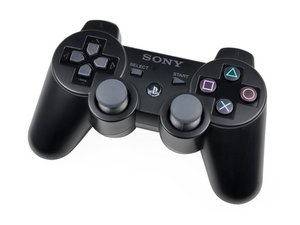
Reparación y soporte para los controladores que se enviaron con la PS3. Lanzado en noviembre de 2007 (solo en Japón) y 2008 (otros países), el controlador alimentado por batería de litio de seis ejes (CECHZC2) es fácil de reparar.

X O Triangle and Square buttons not working‏

Hello all,

I am having trouble with my PS3 controller, all X O Triangle and Square buttons are not working. I have taken the unit apart, placed tape between the ribbon as advised elsewhere, but still these buttons simply don't work. The select PS and start buttons are fine however along with the D pad.

Could anyone please advise on how this issue can be fixed?

Regards,

Oliver

Contesta esta pregunta Yo también tengo este problema

Es esta una buena pregunta?

Puntuación 8

3 comentarios

i have tried resetting the controller through the pin hole on the controller, but it just return to normal. still have problem, however will try to clean it

- de

I took the 4 screws on the back out and-after careful comparison of the 2 sides-I saw that where the #2 top buttons go in (the little assembly) was a bit wobbly on the right side. It doesn't have as clear-cut a fit as the other side. I also saw that #1 on that side was not fitting correctly into the rubber squishy thing. I had to play around with it for a while to get that side to fit in properly. The battery popped out twice, so I had to pop it back in, too. On the first 2 tries at reassembly, I was still getting the "ghost" button pressed--but I noticed that squeezing the 2 halves on the controller together fixed it (my Mortal Kombat player was stuck in a crouched position, blocking). That tipped me off to something not fitting in right, and causing a bulge somewhere. Finally, the numbers 1 and 2 buttons on both sides were protruding out correctly (and evenly, respective to each other). Now, the controller works even remotely--at first, it was only working when wire-connected...and sporadically, at that!

- de

The only inputs that work for me are :

Joysticks and Triangle.

I think its a faulty mob or input sheet

- de

Agregar un comentario

13 Respuestas

Respuesta Más Útil

Did you reset the controller? There is a small pin hole on the back of the controller.

Fue útil esta respuesta?

Puntuación 3

3 comentarios:

Andrew,

I have reset the unit already yes, but an still experiencing the same problem.

Cheers

Oliver

- de

I am having the same problems it feel as if it has a faulty response , maybe damaged motherboard or maybe it got wet idk because i let a friend borrow my dualshock for a few days.

- de

When I press O it doesn’t do anything and I’ve tried to reset it but it still doesn’t work

- de

Agregar un comentario

I know this is almost a decade late, but maybe it'll help someone in the future. There's a piece of rubber between the circuit board and the pushbuttons that tries to 'push' the electrical contacts of the flexible PCB onto the circuit board. Over the course of years, the rubber loses its bounce. Either replace the black rubber block (approx 3/4" x 3/8"), or I just used masking tape (~6 layers) to increase its thickness. Problem solved.

I use DS4 windows and an online joystick checker to test the controller to make sure that all the buttons were working again.

Fue útil esta respuesta?

Puntuación 1
Agregar un comentario

I know this is really old but maybe it can still help people by saveing some OEM controllers from going to trash.

There are 2 possible causes:

A. The ribbon does not touch the PCB properly ( solution, add some tape under the foam)

B. Corrosion on the ribbon cable -> buy replacement ribbon cable from china

My 2 cents is to go for option B as default because it's inexpensive and tackles multiple possible points of failure.

My controller was a B case and for the low price of 2€ for a new flex pcb I was finnaly able to fix it after more than 10 years

Fue útil esta respuesta?

Puntuación 1
Agregar un comentario

go to game stop and mabe its something wrong with either the buttons (faulty buttons) or the mother board has some loose solder to the buttons

Fue útil esta respuesta?

Puntuación 0
Agregar un comentario

I am having the exact same problem. I don't have a solution, but at least we have the exact same problem which means it's a repeating phenomena.

Fue útil esta respuesta?

Puntuación 0
Agregar un comentario

One more here! X button stuck. I've opened and replace the membrane board but the problem still. I must be something with the hard circuit board.

Fue útil esta respuesta?

Puntuación 0

1 comentario:

My problem is when I press X button it function as A and when pressing B it functions as X

- de

Agregar un comentario

Try putting some rubbing alcohol on a Q-Tip or Toilet paper and rubbing it on the contacts on the motherboard. Normally what happens is over time the conductive material on the back of the membrane rubs off on the contacts creating a barrier preventing the membrane from making contact. Try that and see if it works.

Fue útil esta respuesta?

Puntuación 0
Agregar un comentario

I have checked the diagram and these buttons along with R1 and R2 are paired up with a common pin and a resistor, I have the same problem and will try to figure out where is this resistor located and try to change it, will post if succed.

Fue útil esta respuesta?

Puntuación 0

1 comentario:

Hi,

Did you ever get an update here? I know it was some years ago, but I'd still like to know the answer! Could you also forward the diagram you have? Thank you :)

- de

Agregar un comentario

I have problem with my triangle button. One morning when I was going to play GOW I saw water all over my controller and nobody knows how it happens and I was like

Fue útil esta respuesta?

Puntuación 0
Agregar un comentario

the only buttons that work for me is the os button and the left analog i need help

Fue útil esta respuesta?

Puntuación 0

2 comentarios:

Yeah, even I have the exact same problem, and I need a solution for it ASAP...

- de

I'm having same problem O X ANGLE SQURE R1 and R2 NOT WORKING

- de

Agregar un comentario

https://youtu.be/75DXKep6-vs

This video helped

Fue útil esta respuesta?

Puntuación 0
Agregar un comentario

Get Someone to fix it maybe?

Fue útil esta respuesta?

Puntuación 0
Agregar un comentario

It could be a problem with the Input Board. This guide should help you replace it.

Fue útil esta respuesta?

Puntuación 0
Agregar un comentario

Añadir tu respuesta

Oliver estará eternamente agradecido.
Ver Estadísticas:

Ultimas 24 horas: 6

Ultimos 7 días: 62

Ultimos 30 días: 298

Todo El Tiempo: 58,136