Introducción
Utiliza esta guía para actualizar o sustituir la unidad de estado sólido de un MacBook Air 11" Mid 2012. Este MacBook Air utiliza un conector de unidad de almacenamiento propietario, y por lo tanto no es compatible con unidades M.2 comunes sin el uso de un adaptador.
Antes de realizar esta reparación, si es posible, haz una copia de seguridad de tu SSD actual. A continuación, familiarícese con internet recovery o create a bootable external drive para estar preparado para instalar macOS en la nueva unidad y migrar los datos a la nueva SSD.
Qué necesitas
-
-
Retira los siguientes 10 tornillos:
-
Dos tornillos Pentalobe de 5 Puntos de 8 mm
-
Ocho tornillos Pentalobe de 5 Puntos de 2.5 mm
-
-
-
-
Usa el extremo plano de un spudger para hacer palanca en ambos lados cortos del conector de la batería hacia arriba para desconectarlo de su zócalo en la placa lógica.
-
Dobla el cable de la batería ligeramente hacia afuera de la placa lógica para que el conector no entre en contacto accidentalmente con su zócalo.
-
-
-
Retire el único tornillo Torx T5 de 2,9 mm que fija el SSD a la placa lógica.
-


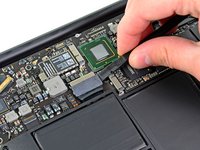


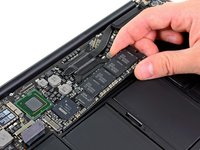
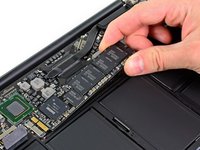
Para volver a montar el dispositivo, sigue estas instrucciones en orden inverso.
Cancelar: No complete esta guía.
52 personas más completaron esta guía.
Un agradecimiento especial a estos traductores:
100%

¡ Carlos López (España - Spain) nos está ayudando a reparar el mundo! ¿Quieres contribuir?
Empezar a traducir ›


4Guía Comentarios
Excellent instructions. Very easy to do. I used this screwdriver to remove the screws from the bottom of the case: https://www.amazon.com/gp/product/B00N1R...
and I used the Pentalobe-6 from this set to remove the screw holding in the OEM SSD:
https://www.amazon.com/gp/product/B01FE2...
After removing the stock drive, I installed a Samsung M.2 EVO 850 512Gb drive. It is working quite well. I used this adapter so that the M.2 drive fit in my 2012 Macbook Air:
How do we reinstall MacOS?
I am 10 years old I fixed the mac I did this even the Geek squad couldn’t do it and now it works! without your guide.
I have a MBA mid 2012 11” which no longer powers up. The battery has been in bad condition since a while and now the charging indicator remains amber no matter how long I charge it. So I assume it might be a battery issue. Unfortunately, I cannot find a supplier shipping batteries to Hawaii, but I found an identical machine on ebay (that will ship to Hawaii), except that it has 4GB RAM instead of 8GB. Provided my SSD is functional (which I assume) can I simply put my SSD into that 4GB RAM machine, and it will start up without any further modification?
