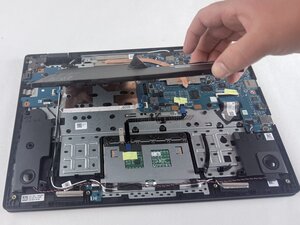
Altavoces internos
Esta traducción la ha hecho un programa y todavía no la ha revisado nadie. ¿Hablas este idioma? Revísala en.

No hay preguntas. ¡Sé el primero en hacer una pregunta!
Estas son algunas de las herramientas comunes que se utilizaron para trabajar en este dispositivo. Es posible que no necesites todas las herramientas para cada procedimiento.
El Acer Gateway Chromebook CBO314-1H es un portátil Chromebook económico diseñado para un uso básico y diario. Funciona con ChromeOS y se utiliza principalmente para navegar por la web, ver vídeos y trabajar con documentos. Tiene una pantalla Full HD de 14 pulgadas, un procesador Intel Celeron N4500, 4 GB de RAM y 64 GB o 128 GB de almacenamiento. También incluye Wi-Fi, Bluetooth, una cámara web y hasta unas 10 horas de autonomía de la batería. El dispositivo salió al mercado alrededor de 2021 y no ha sido descontinuado oficialmente. No existen registros públicos que indiquen cuántas unidades se vendieron, y está disponible en varias regiones, incluidos los Estados Unidos e internacionalmente a través de Internet. Está destinado principalmente a estudiantes, usuarios ocasionales y trabajadores remotos que necesitan un portátil asequible y sencillo. El precio habitual oscila entre unos 200 y 250 dólares, dependiendo del vendedor y la configuración.
No ha habido retiradas importantes, pero los problemas comunes incluyen un rendimiento lento al realizar varias tareas a la vez, almacenamiento limitado y desgaste general, como problemas con la batería o el puerto de carga con el paso del tiempo. Las reseñas suelen elogiar su bajo precio y su buena autonomía de la batería, pero mencionan que puede parecer lento. A pesar de estos inconvenientes, las reseñas de los consumidores suelen destacar su asequibilidad, portabilidad y gran autonomía de la batería como ventajas clave.
Este modelo forma parte de la familia Chromebook 314, que se centra en portátiles de bajo coste. En comparación con versiones anteriores, tiene un procesador más nuevo y mayor eficiencia. Los modelos más recientes que salieron después ofrecen un rendimiento ligeramente mejorado y opciones para más memoria, pero siguen dirigiéndose al mismo mercado económico.
Para identificar el Gateway Chromebook 314-CBO314-1H, comprueba primero el número de modelo, que se encuentra en la parte inferior del dispositivo y también puede encontrarse debajo de la batería. El Chromebook tiene una pantalla de 14 pulgadas y tiene un acabado gris o plateado. Otra forma de confirmar el modelo sería comprobando la configuración del sistema. Para ello, ve a “Settings” (Configuración) > “About Chrome OS” (Acerca de Chrome OS) > Device Specifications (Especificaciones del dispositivo), donde aparecerá el número de modelo exacto.
CPU: Procesador Intel® N4500 Celeron® de 1.10 GHz de doble núcleo (2 Core™)
GPU integrada: Intel® UHD Graphics
Pantalla: LCD de 14” 1080p a 60 Hz
Batería: Celda de iones de litio con una capacidad de 53 Wh y 10.5 horas de autonomía de la batería
Memoria: 4 GB LPDDR4X SDRAM
Disco duro: 64 GB eMMC
Puertos USB:
Compatibilidad con Bluetooth: Sí
Wi-Fi:
Cámara web: Sí
Ranura para MicroSD: Sí
Cámara: Cámara web de 0.3 MP 1280x720
Conector para auriculares: Sí
Audio: Altavoces estéreo en la parte inferior
Fuentes: Amazon, Acer, Newegg, Manual del usuario
Manual del usuario del Gateway Chromebook CBO314
Guía de extensión del ciclo de vida del Gateway Chromebook CBO314
UMASSD-EVANS-S26S1G2
Miembros de 4
60 Guías creadas
Ultimas 24 horas: 1
Ultimos 7 días: 13
Ultimos 30 días: 53
Todo El Tiempo: 224