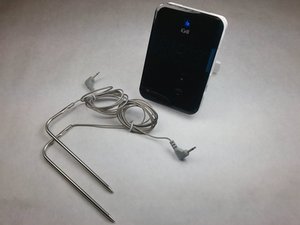
El iGrill no se enciende
Sustituir las baterías
Comprueba si las baterías tienen carga suficiente. Si las baterías no funcionan, tendrás que sustituirlas.
Comprobar la orientación de las baterías
Si las baterías tienen carga suficiente, comprueba si están insertadas en la orientación correcta en el dispositivo.
El software o el hardware pueden estar funcionando mal
Actualmente, este problema no tiene una solución mediante medidas normales.
Números parpadeando en la pantalla
Las sondas 1 o 2 no están conectadas al dispositivo
El dispositivo no reconoce una o ambas sondas. Si las muescas metálicas no tocan las sondas, es posible que debas repararlas.
Números distintos de 1 y 2 parpadeando en la pantalla
Es posible que tus baterías tengan poca carga o que haya un problema de software. Intenta corregir este problema sustituyendo las baterías; de lo contrario, puede que el problema no tenga solución mediante medidas normales.
El iGrill parpadea 8.8.8 o las luces LED continúan parpadeando
Las baterías tienen poca carga
Las baterías no funcionan correctamente o tienen poca carga. Sustituye las 4 baterías AA usadas y vuelve a intentarlo.
No se puede conectar al Bluetooth
Restablecer la configuración de Bluetooth
Si el dispositivo no puede ser detectado por un dispositivo de conexión o si el logotipo azul de Bluetooth no aparece en la pantalla, debes restablecer las configuraciones de Bluetooth. Mantén presionados los botones de más y menos, presiona el botón de encendido y luego repite. Después, mantén los tres botones presionados hasta que escuches un pitido largo y constante; tras el pitido, libera los botones.
Puede haber problemas con tu dispositivo
Intenta emparejar el dispositivo que quieres conectar a tu iGrill con otro dispositivo. Los problemas de conectividad pueden estar en el dispositivo que inicia el emparejamiento.
No sale audio de mi iGrill
Comprobar el componente de audio
Asegúrate de que la pieza de audio interna esté soldada correctamente.

Equipo

IUPUI, Team 3-4, Harley Spring 2016 Miembro de IUPUI, Team 3-4, Harley Spring 2016
IUPUI-HARLEY-S16S3G4
Miembros de 4
48 Guías creadas

14 comentarios
IGrill2 paired with my iPad but won't show up on my iPhone. Both have the Weber App. I initially paired with iPad and installed new firmware. When trying to pair with Iphone, the pairing icon flashes for about a second in the upper right of the app, then goes away. In Bluetooth settings, it shows up on my ipad but not on iPhone. I also have the mini, which shows up on both devices no problem. What do I need to do?
Steve - Contestar Compartir
They can only pair with one device at a time.
Greg Millar - Contestar Compartir
I've always had trouble getting mine to pair reliably. Here is is, Thanksgiving, and it refuses to pair.
fiedlerh - Contestar Compartir
So what does
"Software or Hardware Problem
Acurrent solution to this problem [not turning on] is not available by normal measures" mean, exactly?
My iGrill does. It turn on. Batteries are good and are correctly oriented. What are the abnormal means I can try?
This is very frustrating...
andreraiche - Contestar Compartir
i think its just a bit temperamental, mine constantly said bluetooth stopped working, i just kept trying to turn off the app and turn it on again - I could see that my phone (android) was pairing in the device settings, so i unpaired it to see if the app would pair it - eventually after about 10 times turning on and off various things it worked. frustrating. also why does the app have a sales pitch for a device i already have? just makes the app more confusing and less intuitive.
Mathew Williams - Contestar Compartir