Wiki con Contribuciónes de Estudiantes
Esta wiki ha sido creada por un increíble grupo de estudiantes de nuestro programa educativo.
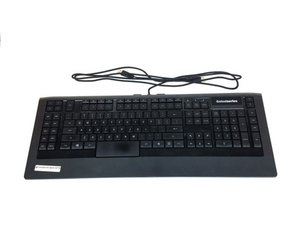
Esta página de resolución de problemas te ayudará a diagnosticar fallos en el SteelSeries Apex 64145.
Las teclas no responden
Algunas o todas las teclas no reaccionan al pulsarlas.
Puerto USB defectuoso
Cambia a otro puerto USB de tu ordenador al conectar el teclado. Existe la posibilidad de que el puerto del ordenador esté roto o no reconozca correctamente el dispositivo. Si el puerto está roto, consulta esta guía de sustitución Sustitución del conector del puerto USB del SteelSeries Apex 64145
Controlador dañado
Si el ordenador no detecta el teclado nada más conectarlo, intenta instalar la versión actualizada del controlador o una versión anterior que funcione desde el sitio web de SteelSeries usando este enlace.
Teclas rotas
Si las teclas han sufrido daños físicos (grietas, arañazos, posición desplazada), consulta nuestra guía de sustitución sobre cómo sustituir las teclas rotas. Sustitución de teclas del SteelSeries Apex 64145
Las luces LED no se encienden
No aparece ninguna luz en el teclado al conectarlo.
LED fundido
Tendrás que comprar luces LED nuevas y realizar la sustitución. Consulta nuestra guía sobre cómo sustituir los LED fundidos y qué tipo de LED comprar. Sustitución de los LED del SteelSeries Apex 64145
El teclado se siente inestable y desequilibrado
Faltan los soportes de goma o están dañados.
Los soportes actuales están demasiado desgastados o dañados
Sustituye los soportes desgastados actuales por los que vienen en la caja del teclado. Consulta nuestra guía sobre cómo sustituir los soportes. Sustitución de la base de goma del SteelSeries Apex 64145
Una de mis teclas está atascada
Las teclas no vuelven a su posición original después de pulsarlas.
La tecla está sucia
Levanta con cuidado la tecla hacia arriba hasta que salga, luego lava la tecla a fondo con agua a temperatura ambiente. Deja que la tecla se seque y, a continuación, vuelve a colocarla suavemente en su posición en el teclado.
El teclado no es reconocido por mi ordenador
El teclado no aparece entre los dispositivos del ordenador o no aparece en el SteelSeries Engine.
Conectado al puerto USB equivocado
Es posible que el teclado esté conectado a un tipo de puerto USB que tiene problemas para reconocerlo. Por ejemplo, si el teclado está conectado actualmente a un puerto USB 2.0, intenta conectarlo a un puerto USB 3.0. Asegúrate de que ambos conectores USB del teclado estén conectados al mismo tipo de puerto USB.
Controlador dañado o ausente
Asegúrate de que el controlador actual esté actualizado y correctamente instalado en tu ordenador. Ve al sitio web de SteelSeries para obtener instrucciones sobre cómo descargar su software usando este enlace.

Equipo

USF Tampa, Team S1-G1, Nance Spring 2017 Miembro de USF Tampa, Team S1-G1, Nance Spring 2017
USFT-NANCE-S17S1G1
Miembros de 4
60 Guías creadas

4 comentarios
PART-1
The problem I am having is that a few keys are not triggering anymore
the keys are as follows:
(the period key, greater-than key, question mark key, right shift key & finally the quotation mark key) I might have to get the plastic circuit sheets to replace the ones I have. because it seems that part of the plastic circuit sheets might be damaged some how. I was playing a video game and then poof out of no where all the lights on the keyboard went out and keyboard stopped responding
I unplugged the keyboard and even tested it on another computer and it didnt want to go back on
so i opened the keyboard to check if something burnt out, I cleaned everything with rubbing alcohol and let it dry. put everything back together and boom keyboard started to function only to have the keys mentioned above not working I re-opened the keyboard several times to make sure nothing was pinching anything.
Twsted - Contestar Compartir
PART-2
i even tested it by just pressing the circuit allocated connections from the 3 plastic circuits sheets under the membrain sheet within the within the keyboard and it would not type those keys out,
but it does it for all the other keys. So im sure the plastic circuit sheets are damaged for some odd reason hoping that if I call or email Steelseries, that I can purchased a new set of circuit sheets from them.
This is my favorite keyboard as I do LOVE chiclets keyboards
I wish Steelseries would make a newer version of this APEX-350 without taking away ANY of the sets of keys or layout it already has , but rather improve on it. and have every key lit up individually colored - I can only wish
If Steelseries could make a Chiclet `mechanical` keyboard that would be insane :)
like a APEX-350 MARK-II mechanical keyboard, I would be first in line to buy it.
Twsted - Contestar Compartir
I have a problem so I left on holiday 3 weeks ago my keyboard apex pro tkl 2023 wireless was fine but when I came home it would not work at all . The plugs are in everything is in but won’t work at all. The led wouldn’t turn on , it doesn’t even show the menu pad . Won’t show anything when I’m charging it either . Can somebody help ?
Geek - Contestar Compartir
some of my keys f9-f12 light up orange and my keyboard just stops working
Kayston Phillips - Contestar Compartir