Saltar al contenido principal

Información de reparación y desmontaje del teléfono inteligente Pixel 7 Pro de Google, lanzado en octubre de 2022. Identificado por el número de modelo GP4BC y GE2AE.

Replaced Pixel 7 pro screen and fingerprint reader not recognized

I replaced the screen on my Pixel 7 Pro, but the fingerprint reader appears to be non-responsive. I tried the troubleshooting guide, but I can't get to the screen to add fingerprints. I've rebooted several times, and tried the calibration reset twice, but it still doesn't show up.

Device Unlock only shows "Screen Lock" and "Face Unlock". There is no fingerprint unlock option displayed.

I search in the settings for "fingerprint", and find "Add fingerprint", but when I enter the requested security pin, it seems to crash and take me back to the search results.

Is my screen defective? Am I missing a step?

I've since found recommendations that I should have tried the fingerprint reader before securing the screen, but that doesn't help much now.

Update (09/03/24)

I contacted support and they're offering me a replacement or a refund. I bough a cheap replacement phone already, so I'm taking the refund and cutting my losses on this phone.

Contesta esta pregunta Yo también tengo este problema

Es esta una buena pregunta?

Puntuación 2
Agregar un comentario

2 Respuestas

Same problem here, having just replaced my Pixel 7 Pro screen. Despite restarting phone, I get "Can't use fingerprint sensor" & "Visit a repair provider or g.co/pixel/fingerprintunlock"

I tried the "How to Calibrate the Fingerprint Sensor in your Google Pixel Phone", but following the instructions exactly, the up-to-date Chrome browser does not detect my Pixel 7 Pro.

Fue útil esta respuesta?

Puntuación 0
Agregar un comentario

Hi,

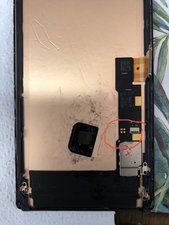
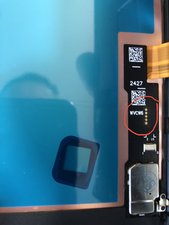
I have recently discovered that there are differences in screens at the fingerprint sensor contact (gold tabs) points align with the metal tab on the back of the flex.

You may need to check if you got the correct layout for your reader.

Block Image

Original

Block Image

Replacement

So I had to order another screen.

Fue útil esta respuesta?

Puntuación 0

2 comentarios:

Hi, Which screen you had purchased and what to check on the back of screen to see if fingerprint will work or not.

- de

Did you fit the fingerprint reader from the old screen onto the new one? Never had a problem with any I've replaced.

- de

Agregar un comentario

Añadir tu respuesta

Mike Schlueter estará eternamente agradecido.
Ver Estadísticas:

Ultimas 24 horas: 2

Ultimos 7 días: 5

Ultimos 30 días: 43

Todo El Tiempo: 681