
Saltar al contenido principal
Únete a la Comunidad de Reparación - Crear Cuenta

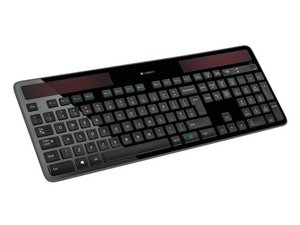
Información de reparación del teclado solar inalámbrico Logitech K750. Disponible por primera vez en Amazon en 2011. Números de modelo: 920-002912 (Windows), 920-003472 (Mac).

Changed battery but still no signs of life?

I have bought and replaced the battery with an Maxell ML2032, but the keyboard doesn't show any signs of life. There is no green or red LED in the top right corner and the keyboard is not found by the unifying software. Each of the solar panels gives about 1.5v output when tested with voltmeter and the battery itself gives just over 2.8v (the old battery has less charge and gives about 1.2v).

Is there anything else that I might be able to do to fix the keyboard, I don't want to have to replace it?

Thanks in advance for any suggestions.

Scott.

Contesta esta pregunta Yo también tengo este problema

Es esta una buena pregunta?

Puntuación 12
2 comentarios

same here. you are not alone

- de

Same here, My third K750 keyboard in 6 years this happens, 2 years of use then dead. So there is a 24 month kill timer inside for sure = design to fail. No more Logitech for me

- de

Agregar un comentario

4 Respuestas

Respuesta Más Útil

Turn the battery over. With the keyboard right side up you should see the smaller negative side up.

Fue útil esta respuesta?

Puntuación 4

1 comentario:

Just for clarification, the correct position of the battery is shown in the step 5 of how to change the battery: Reemplazo de la batería del teclado Logitech K750

- de

Agregar un comentario

You could have a look at the power (On Off) switch. On my K750, this switch is starting to fail causing symptoms like you describe.

Fue útil esta respuesta?

Puntuación 3

2 comentarios:

I have this problem (Logitech has put obsolescence on the switch too to kill the keyboard). Curiously, the switch is always "on" and drain the battery even if we do not use it.

Have you solve the problem ? How ?

Thanks.

- de

Turn the battery over before anything else

- de

Agregar un comentario

Hi Scott, my guess would be that the logic board may need to be replaced OR a cable could have come dis-connected from the board or the battery itself. I suggest trying to re-install the new battery.

Fue útil esta respuesta?

Puntuación 2

7 comentarios:

seems reinstall makes no difference. for me zero power even with new battery. how to fix worn power switch?

- de

I have two of theses, both went down within the last month, I changed ther ML2032 battery in both, still no life, Logitech are holding something back from us regarding the answer!

- de

Turn the battery over before anything else

- de

Turning battery over was the game changer, installed replacement wrong and then just put old one back in (battery goes in opposite of what you'd think). Also used a hack of turning off keyboard, holding CAPS LOCK down and pressing buttons for 5 seconds and then turning keyboard back while under direct light.... .those 2 things revived my keyboard.

- de

Larry Jackson and Rob Lazott, you both just made my K750 keyboard go from dead to back to life! Thanks so much for the tips on turning over the battery AND the CAPS LOCK trick. I'm back to seeing green! :D

- de

Mostrar 2 comentarios más

Agregar un comentario

If the battery and solar panels are providing correct voltage, the issue is likely not power-related. First, try resetting the keyboard: remove the battery, cover the solar panels, leave it disconnected for 30–60 minutes, then reinstall the battery under bright light. Also clean the battery contacts and PCB with isopropyl alcohol to remove oxidation. Check for loose ribbon cables or cracked solder joints, especially near the battery holder. If there’s no LED response and it’s not detected by Unifying, the power management IC or RF module may have failed, which is unfortunately not user-repairable. At that point, replacement may be the only option.

Fue útil esta respuesta?

Puntuación 1

1 comentario:

Thanks,

EDIT: Sadly this did not fixed it, so i have to open it. - I will remove the battery, cover the solar panels and leave it disconnected for 30–60 minutes. If that does not work i will open it. I found a guide here. Sadly i have already discarded my 2 older K750s.

- de

Agregar un comentario

Añadir tu respuesta

scott adam estará eternamente agradecido.
Ver Estadísticas:

Ultimas 24 horas: 3

Ultimos 7 días: 13

Ultimos 30 días: 112

Todo El Tiempo: 8,444