Introducción
Actualiza la memoria RAM en tu MacBook Pro 13 "Unibody a mediados de 2012.
Qué necesitas
-
-
Extrae los siguientes diez tornillos:
-
Tres tornillos Phillips #00 de 14.4 mm
-
Tres tornillos Phillips #00 de 3.5 mm
-
Cuatro tornillos de resalto Phillips #00 de 3.5 mm
-
-
-
-
Usa el borde de un spudger para levantar el conector de la batería haciendo palanca para extraer su toma de corriente de la placa madre.
-


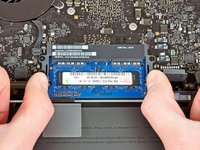
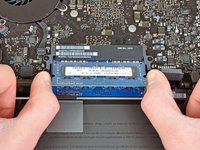

Para volver a montar tu dispositivo, sigue estas instrucciones en orden inverso.
Cancelar: No complete esta guía.
610 personas más completaron esta guía.
Un agradecimiento especial a estos traductores:
100%


Estos traductores nos están ayudando a reparar el mundo! ¿Quieres contribuir?
Empezar a traducir ›


49Guía Comentarios
Just replaced my 4GB with 16GB of PNY from Best Buy. AWESOME difference in performance!!
Any memory kit that is either validated by Apple or that has the proper channel configuration (9-9-9-24) is okay to use. If you are looking for pure performance RAM, a kit of Corsair Vengeance RAM is okay to use (again, check the channel configuration), but most people will benefit from a kit of Corsair Mac Memory or the kit that iFixit provides in the volume of your choice.
