Saltar al contenido principal
Únete a la Comunidad de Reparación - Crear Cuenta

NuVision 10.1 Atom Camera Replacement

Qué necesitas

    1. NuVision 10.1 Atom Camera  Replacement, Camera: paso 1, imagen 1 de 3 NuVision 10.1 Atom Camera  Replacement, Camera: paso 1, imagen 2 de 3 NuVision 10.1 Atom Camera  Replacement, Camera: paso 1, imagen 3 de 3
      • Turn the device screen side down.

      • Carefully remove the back piece with the iFixit opening tool.

      Pregunta a FixBot

      Agregar Comentario

    2. NuVision 10.1 Atom Camera  Replacement: paso 2, imagen 1 de 1
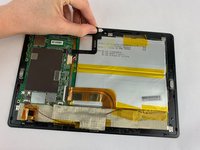
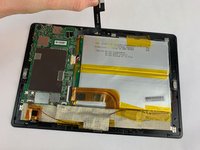
      • Remove the yellow tape covering the motherboard gently with your fingers.

      Pregunta a FixBot

      Agregar Comentario

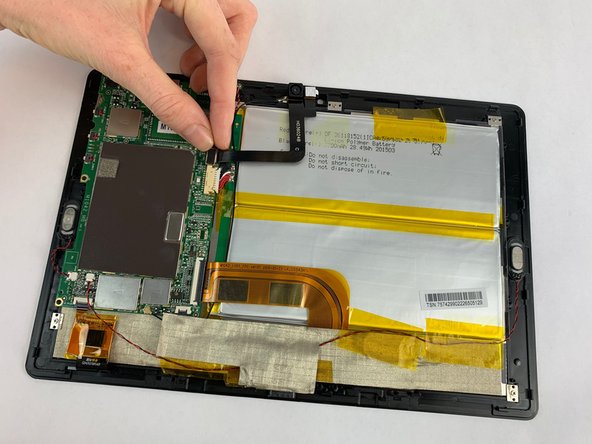
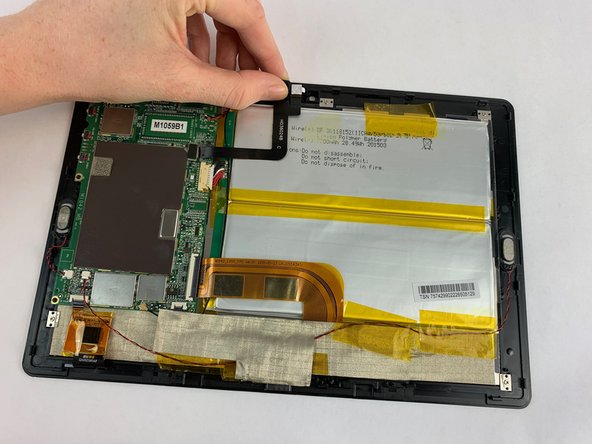
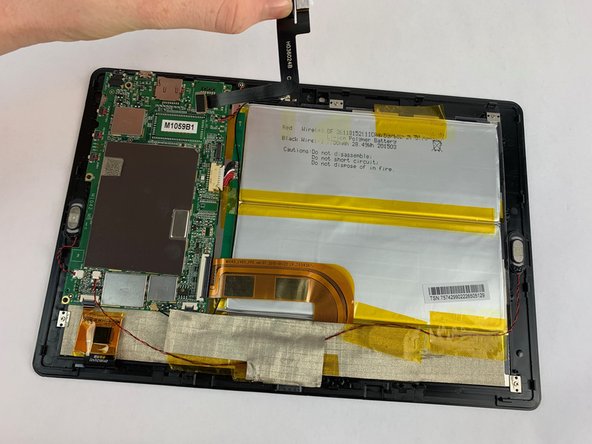
    3. NuVision 10.1 Atom Camera  Replacement: paso 3, imagen 1 de 3 NuVision 10.1 Atom Camera  Replacement: paso 3, imagen 2 de 3 NuVision 10.1 Atom Camera  Replacement: paso 3, imagen 3 de 3
      • Pull the camera plug upward and away from the motherboard with your fingers.

      • Gently pull the camera from the device. The camera is held by tension.

      Pregunta a FixBot

      Agregar Comentario

Conclusión

To reassemble your device, follow these instructions in reverse order.

Cancelar: No complete esta guía.

Carly Daniele

Miembro Desde 02/14/19

567 Reputación

5 Guías creadas

Equipo

USF Tampa, Team S1-G5, Leahy Spring 2019 Miembro de USF Tampa, Team S1-G5, Leahy Spring 2019

USFT-LEAHY-S19S1G5

Miembros de 5

6 Guías creadas

0Guía Comentarios

Agregar Comentario

Ver Estadísticas:

Ultimas 24 horas: 0

Ultimos 7 días: 3

Ultimos 30 días: 41

Todo El Tiempo: 485