Saltar al contenido principal
Únete a la Comunidad de Reparación - Crear Cuenta

Keyboard Replacement guide

Qué necesitas

  1. Keyboard Replacement guide, Keyboard: paso 1, imagen 1 de 1
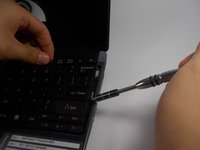
    • Locate the button right above the F8 key.

  2. Keyboard Replacement guide: paso 2, imagen 1 de 2 Keyboard Replacement guide: paso 2, imagen 2 de 2
    • Use a spudger or plastic opening tool to push the button away from you.

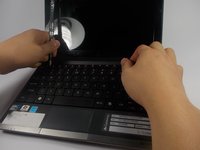
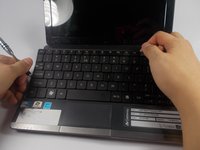
  3. Keyboard Replacement guide: paso 3, imagen 1 de 3 Keyboard Replacement guide: paso 3, imagen 2 de 3 Keyboard Replacement guide: paso 3, imagen 3 de 3
    • Insert the spudger under the keyboard and slide it along the length of the keyboard.

  4. Keyboard Replacement guide: paso 4, imagen 1 de 1
    • Do not attempt to remove the keyboard. It is still attached to the laptop by a ribbon cable.

  5. Keyboard Replacement guide: paso 5, imagen 1 de 1
    • Remove the ribbon cable from the connector.

Conclusión

To reassemble your device, follow these instructions in reverse order.

Steven Park

Miembro Desde 03/09/16

420 Reputación

3 Guías creadas

Equipo

UMass Dartmouth, Team 7-5, Catania Spring 2016 Miembro de UMass Dartmouth, Team 7-5, Catania Spring 2016

UMASSD-CATANIA-S16S7G5

Miembros de 3

10 Guías creadas

0Guía Comentarios

Agregar Comentario

Ver Estadísticas:

Ultimas 24 horas: 0

Ultimos 7 días: 1

Ultimos 30 días: 11

Todo El Tiempo: 1,214