Saltar al contenido principal
Únete a la Comunidad de Reparación - Crear Cuenta

IBM ThinkPad A30 RAM Replacement

Qué necesitas

  1. IBM ThinkPad A30 RAM Replacement, Battery: paso 1, imagen 1 de 2 IBM ThinkPad A30 RAM Replacement, Battery: paso 1, imagen 2 de 2
    • Flip the ThinkPad over so that it is upside down.

    • Slide the highlighted tab to the left.

    • With your finger on the tab, remove the battery by lifting it upwards away from the laptop.

    Pregunta a FixBot

    Agregar Comentario

  2. IBM ThinkPad A30 RAM Replacement, RAM: paso 2, imagen 1 de 2 IBM ThinkPad A30 RAM Replacement, RAM: paso 2, imagen 2 de 2
    • Remove the two 5.3mm cover screws.

    • Gently lift the cover containing the RAM.

    Pregunta a FixBot

    Agregar Comentario

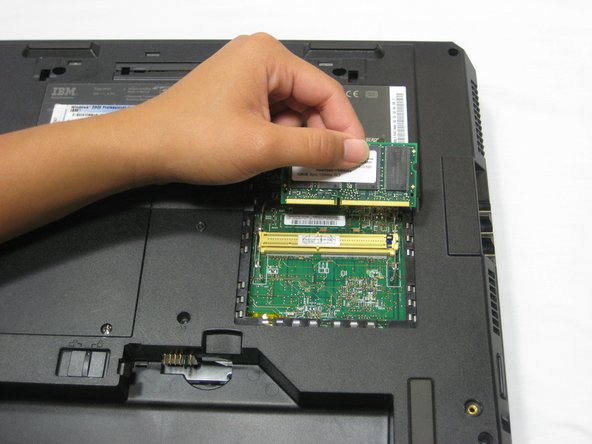
  3. IBM ThinkPad A30 RAM Replacement: paso 3, imagen 1 de 1
    • Remove RAM module by pressing the two metal pieces outward with your thumbs.

    Pregunta a FixBot

    Agregar Comentario

  4. IBM ThinkPad A30 RAM Replacement: paso 4, imagen 1 de 2 IBM ThinkPad A30 RAM Replacement: paso 4, imagen 2 de 2
    • Lift the RAM module up and out, away from the yellow connector.

    • Place the RAM module away from any magnets or static electricity prone areas.

    Pregunta a FixBot

    Agregar Comentario

Conclusión

To reassemble your device, follow these instructions in reverse order.

Cancelar: No complete esta guía.

Una persona más ha completado esta guía.

Jessica

Miembro Desde 10/06/10

162 Reputación

7 Guías creadas

Equipo

Cal Poly, Team 4-44, Amido Fall 2010 Miembro de Cal Poly, Team 4-44, Amido Fall 2010

CPSU-AMIDO-F10S4G44

Miembros de 4

26 Guías creadas

0Guía Comentarios

Agregar Comentario

Ver Estadísticas:

Ultimas 24 horas: 2

Ultimos 7 días: 10

Ultimos 30 días: 48

Todo El Tiempo: 3,569