Saltar al contenido principal

DualSense Controller V5 Middle Trim Replacement

Qué necesitas

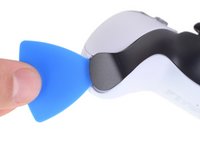
  1. DualSense Controller V5 Middle Trim Replacement, Unclip the right end of the middle trim: paso 1, imagen 1 de 2 DualSense Controller V5 Middle Trim Replacement, Unclip the right end of the middle trim: paso 1, imagen 2 de 2
    • Disconnect and power down your controller before you begin.

    • Insert an opening pick underneath the middle trim at the bottom-right corner of the controller to release the clips securing it to the case.

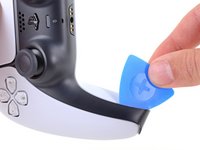
  2. DualSense Controller V5 Middle Trim Replacement, Unclip the lower-right edge of the middle trim: paso 2, imagen 1 de 3 DualSense Controller V5 Middle Trim Replacement, Unclip the lower-right edge of the middle trim: paso 2, imagen 2 de 3 DualSense Controller V5 Middle Trim Replacement, Unclip the lower-right edge of the middle trim: paso 2, imagen 3 de 3
    • Slide the opening pick along the lower-right edge of the middle trim to release the clips securing it to the case.

  3. DualSense Controller V5 Middle Trim Replacement, Unclip the left end of the middle trim: paso 3, imagen 1 de 2 DualSense Controller V5 Middle Trim Replacement, Unclip the left end of the middle trim: paso 3, imagen 2 de 2
    • Insert an opening pick underneath the middle trim at the bottom-left corner of the controller to release the clips securing it to the case.

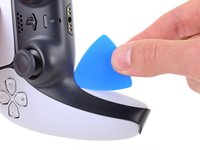
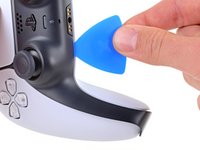
  4. DualSense Controller V5 Middle Trim Replacement, Unclip the lower-left edge of the middle trim: paso 4, imagen 1 de 3 DualSense Controller V5 Middle Trim Replacement, Unclip the lower-left edge of the middle trim: paso 4, imagen 2 de 3 DualSense Controller V5 Middle Trim Replacement, Unclip the lower-left edge of the middle trim: paso 4, imagen 3 de 3
    • Slide the opening pick along the lower-left edge of the middle trim to release the clips securing it to the case.

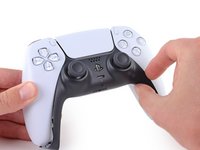
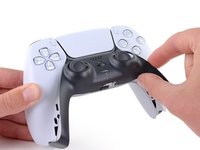
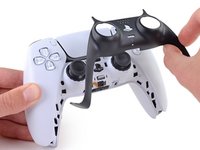
  5. DualSense Controller V5 Middle Trim Replacement, Remove the middle trim: paso 5, imagen 1 de 3 DualSense Controller V5 Middle Trim Replacement, Remove the middle trim: paso 5, imagen 2 de 3 DualSense Controller V5 Middle Trim Replacement, Remove the middle trim: paso 5, imagen 3 de 3
    • Use your fingers to lift up the bottom edge of the middle trim to release the remaining clips.

    • Lift the middle trim over the joysticks to remove it.

Conclusión

To reassemble your device, follow these instructions in reverse order.

Repair didn’t go as planned? Try some basic troubleshooting, or ask our Answers community for help.

Una persona más ha completado esta guía.

Spencer Day

Miembro Desde 09/14/22

149,628 Reputación

995 Guías creadas

Equipo

iFixit Miembro de iFixit

Staff

Miembros de 123

23,626 Guías creadas

0Guía Comentarios

Agregar Comentario

Ver Estadísticas:

Ultimas 24 horas: 3

Ultimos 7 días: 10

Ultimos 30 días: 40

Todo El Tiempo: 217