|
1 Respuesta 0 Puntaje |
Water damage of LogitechK710 keyboard |
Documentos
Información general
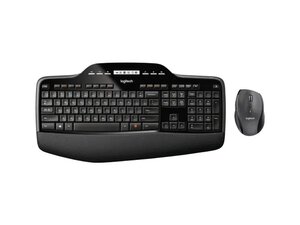
El Logitech Wireless Desktop MK710 es un combo de teclado de tamaño completo y ratón contorneado para diestros, diseñado para ofrecer comodidad y productividad. El teclado incluye una pantalla LCD integrada, teclado numérico y reposamanos, mientras que el ratón ofrece un seguimiento preciso, botones programables y desplazamiento hiperrápido. Este conjunto es una solución de escritorio inalámbrica que se vincula a través de un receptor USB y está fabricado con materiales duraderos para el uso diario a largo plazo. Está dirigido a usuarios de oficina y hogar que desean un set inalámbrico cómodo y completo.
Identificación
El Logitech Wireless Desktop MK710 se puede identificar por su número de modelo (M/N M-R0073). La etiqueta del modelo se encuentra en la parte inferior del teclado y en la base del ratón; las marcas de modelo/serie del receptor USB están impresas en la carcasa del mismo. Esta etiqueta enumera los números de modelo (M/N), de pieza (P/N) y de serie (S/N).
Especificaciones
- Nombre del producto: Combo de teclado y ratón inalámbricos MK710 Performance
- Modelo / SKU / MPN: 920-002416 (MPN: 920-002416)
- Factor de forma: Teclado de tamaño completo con teclado numérico + ratón contorneado para diestros (combo)
- Conectividad: Receptor USB inalámbrico (2.4 GHz; compatible con Unifying según se indica en los materiales de soporte; el modelo exacto de receptor no figura en la página del producto)
- Características del teclado: Diseño de tamaño completo con pantalla LCD integrada, teclado numérico y reposamanos
- Tipo de interruptor de tecla: Mecanismo de tecla de membrana / estilo tijera (el fabricante no se especifica en la página del producto)
- Características del ratón: Forma ergonómica contorneada, botones programables, seguimiento preciso y desplazamiento hiperrápido
- Contenido de la caja: Teclado, ratón, receptor USB (el modelo/número de pieza exacto del receptor no se especifica en la página del producto)
- Software / Firmware: Se recomienda Logi Options+ para la configuración del dispositivo; las utilidades heredadas de Logitech (Logitech Unifying, SetPoint, herramienta de actualización de firmware) están obsoletas según la documentación de soporte
- ID de producto / URL: productID: mk710-desktop-keyboard-mouse — https://www.logitech.com/en-us/shop/p/mk...
Resolución de Problemas
Los fallos comunes relevantes para la reparación incluyen baterías agotadas o débiles (dispositivo que no responde), problemas de conectividad inalámbrica o desconexiones (problemas con el receptor o de vinculación), y fallos en el desplazamiento o los botones del ratón. Realiza un diagnóstico cambiando las baterías por unas nuevas, moviendo o volviendo a conectar el receptor USB (o probándolo en otro PC), revisando los interruptores de encendido del teclado y el ratón, y verificando la configuración en Logi Options+; sustituye el receptor o los componentes del compartimento de las baterías si se confirman fallos de hardware.
Para obtener ayuda adicional sobre la resolución de problemas, visita: Visita https://support.logi.com para obtener soporte del producto, descargas y opciones de contacto; se recomienda Logi Options+ para la configuración.
Información adicional
Información de garantía
Consulta las páginas de garantía de Logitech para conocer los términos de garantía específicos de cada región; revisa tu documentación de compra o el sitio de soporte para presentar una reclamación.
Guía de inicio del Logitech Wireless Desktop MK710
Guía de inicio del Logitech Wireless Desktop MK710

