Preguntas populares del foro
Haz una preguntaNo hay preguntas. ¡Sé el primero en hacer una pregunta!
Información general
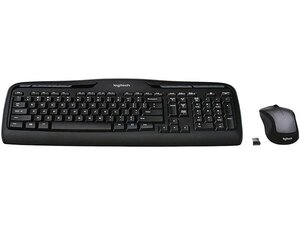
El Wireless Desktop MK335 es un conjunto de teclado y ratón de tamaño completo de Logitech diseñado para el uso diario en la oficina y el hogar. Su chasis utiliza plástico ABS duradero y teclas resistentes a salpicaduras para soportar la escritura regular y accidentes ocasionales. Las características clave incluyen un teclado numérico completo, teclas de membrana de perfil bajo para una escritura silenciosa, un ratón óptico inalámbrico ambidiestro y un nano receptor USB de 2.4 GHz para una conectividad plug-and-play. El kit destaca por su larga autonomía de la batería y un diseño simple y duradero para un uso diario fiable.
Identificación
El Logitech WIRELESS DESKTOP MK335 puede identificarse por el número de modelo (M/N M-R0050). La etiqueta del modelo se encuentra en la parte inferior del teclado y en la etiqueta del ratón. Esta etiqueta enumera el número de modelo (M/N), el número de pieza (P/N) y el número de serie (S/N).
Especificaciones
- Factor de forma: Teclado de tamaño completo con ratón óptico inalámbrico ambidiestro independiente (combo de escritorio)
- Distribución: QWERTY completo con teclado numérico independiente
- Tipo de interruptor: Teclas de membrana (cúpula de goma) de perfil bajo
- Fabricante de interruptores de tecla: No especificado por Logitech para este modelo (el fabricante no aparece en la página de soporte)
- Conectividad: Conectividad inalámbrica de 2.4 GHz mediante nano receptor USB (plug-and-play)
- Receptor USB: Nano receptor USB de 2.4 GHz (propietario de Logitech; no aparece explícitamente como Unifying en la página de soporte)
- Alimentación: Pilas alcalinas reemplazables para teclado y ratón (el número exacto de celdas no se especifica en el contenido de soporte proporcionado)
- Autonomía de la batería (clasificación del fabricante): El fabricante clasifica una larga autonomía de la batería para el uso diario (el teclado suele anunciarse hasta 36 meses; el ratón hasta ~18 meses dependiendo del uso)
- Compatibilidad: Soporte plug-and-play para Windows y sistemas operativos de escritorio comunes; soporte completo de funciones a través del software de Logitech donde esté disponible
- Materiales: Chasis de plástico ABS duradero y teclas resistentes a salpicaduras diseñadas para un uso diario prolongado
Resolución de Problemas
Las fallas comunes relevantes para la reparación incluyen teclas que no funcionan o no responden, el ratón no rastrea y problemas de emparejamiento con el receptor USB. Realiza un diagnóstico cambiando o retirando las pilas, alternando el interruptor de encendido/apagado del dispositivo, volviendo a conectar o probando el receptor USB en otro ordenador e inspeccionando los compartimentos de las pilas y los contactos en busca de corrosión o conexiones sueltas.
Para obtener ayuda adicional sobre la resolución de problemas, visita: Visita https://support.logi.com para controladores, descargas y soporte del producto (busca MK335 o Wireless Desktop).
Información adicional
Información de garantía
Logitech ofrece garantías de hardware limitadas que dependen de la región (normalmente 1 año); consulta las páginas de soporte/garantía de Logitech para obtener detalles específicos.

