Preguntas populares del foro
Haz una preguntaNo hay preguntas. ¡Sé el primero en hacer una pregunta!
Documentos
Información general
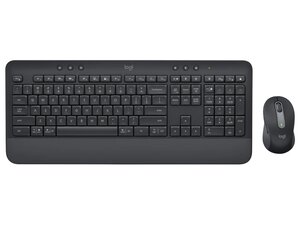
El Signature MK650 for Business es un conjunto inalámbrico de teclado y ratón diseñado para su uso en oficinas y entornos empresariales, que combina un teclado de tamaño completo y perfil bajo con un ratón compacto y ergonómico. El conjunto destaca por su escritura silenciosa y cómoda, con teclas de recorrido corto y un reposamanos acolchado para un uso prolongado. Las carcasas están fabricadas con plástico ABS resistente, teclas reforzadas y un diseño resistente a salpicaduras para soportar el desgaste diario en la oficina. Las características clave incluyen conectividad inalámbrica Bluetooth y Logi Bolt multidispositivo, seguridad de nivel empresarial y compatibilidad con Logi Options+ para la personalización.
Identificación
El Logitech Signature MK650 for Business se puede identificar por su número de modelo (M/N CU0021). La etiqueta del modelo se encuentra en la parte inferior de cada unidad. Esta etiqueta muestra el número de modelo (M/N), el número de pieza (P/N) y el número de serie (S/N).
Especificaciones
- Factor de forma: Teclado de tamaño completo y perfil bajo con teclado numérico + ratón inalámbrico compacto (conjunto)
- Componentes: Teclado (Signature MK650), ratón (Signature M650), receptor inalámbrico USB (Logi Bolt o Unifying según la región)
- Tipo de interruptor: Interruptores de tijera (membrana) de perfil bajo; teclas de recorrido corto para una escritura silenciosa
- Fabricante / Modelo de interruptor de tecla: No especificado en la documentación de soporte de Logitech (fabricante/modelo no revelado)
- Material de las teclas: Teclas de plástico ABS duradero; leyendas reforzadas (según el marketing del producto)
- Conectividad: Bluetooth Low Energy (multidispositivo) y receptor USB Logi Bolt (2,4 GHz)
- Alimentación: Pilas sustituibles por el usuario (teclado y ratón); el artículo de soporte de Logitech no especifica los tipos de celda exactos ni la duración
- Compatibilidad / Software: Compatible con Logi Options+ para la personalización; funciona con Windows, macOS y distribuciones comunes de Linux (funciones HID básicas)
- Durabilidad / Diseño: Diseño de teclas resistente a salpicaduras y carcasa de plástico ABS robusta destinada al uso en oficinas
- Seguridad / Empresa: Diseñado para implementaciones empresariales con soporte para Logi Bolt (seguridad inalámbrica de grado empresarial); firmware y gestión mediante herramientas empresariales de Logitech cuando estén disponibles
Resolución de Problemas
Los fallos comunes relevantes para la reparación incluyen problemas de alimentación/pilas, conectividad inalámbrica intermitente y teclas atascadas o que no responden. Realiza un diagnóstico cambiando las pilas por unas nuevas, probando las conexiones Bluetooth y del receptor (vuelve a emparejar si es necesario), inspeccionando/quitando las teclas para comprobar si hay residuos o mecanismos de tijera dañados, y verificando el receptor en otro puerto USB o sistema.
Para obtener ayuda adicional con la resolución de problemas, visita: Consulta el soporte de Logitech (https://support.logi.com) para registrar el producto, obtener controladores/software (Logi Options+) y ver las opciones de contacto.
Información adicional
Información sobre la garantía
Los términos de la garantía de fabricante varían según la región; consulta la Información de garantía de Logitech en el sitio de soporte para conocer la cobertura y los procedimientos de reclamación.
Matriz de comparación de combos de teclado y ratón Logitech para empresas
Logitech Signature MK650 Combo for Business – Hoja de datos
Logitech Signature MK650 Combo for Business – Hoja de datos
Logitech Signature MK650 Combo for Business – Hoja de datos
Logitech Signature MK650 Combo for Business – Hoja de datos
Logitech Signature MK650 Combo for Business – Hoja de datos
Logitech Signature MK650 Combo for Business – Hoja de datos
Logitech Signature MK650 Combo for Business – Hoja de datos
Logitech Signature MK650 Combo for Business – Hoja de datos
Logitech Signature MK650 Combo for Business – Hoja de datos
Logitech Signature MK650 Combo for Business – Hoja de datos
Logitech Signature MK650 Combo for Business – Hoja de datos
Logitech Signature MK650 Combo for Business – Hoja de datos
Logitech Signature MK650 Combo for Business – Hoja de datos
Logitech Signature MK650 Combo for Business – Hoja de datos
Logitech Signature MK650 Combo for Business – Hoja de datos
Logitech Signature MK650 Combo for Business – Hoja de datos

