Preguntas populares del foro
Haz una preguntaNo hay preguntas. ¡Sé el primero en hacer una pregunta!
Información general
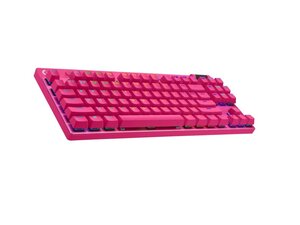
El PRO X TKL LIGHTSPEED es un teclado mecánico inalámbrico compacto, sin teclado numérico (tenkeyless), diseñado para el juego competitivo y la portabilidad. Utiliza materiales y una construcción duraderos pensados para un transporte frecuente y un uso intensivo, y cuenta con interruptores mecánicos personalizables e iluminación RGB por tecla. El teclado es compatible con la conectividad inalámbrica Logitech LIGHTSPEED de 2.4 GHz y con una conexión USB por cable para carga y una entrada de baja latencia. El diseño destaca por su modularidad, permitiendo al usuario sustituir los interruptores de las teclas y personalizar la iluminación integrada.
Identificación
El Logitech PRO X TKL LIGHTSPEED puede identificarse por el número de modelo (M/N CU0021). El teclado puede identificarse por su distribución sin teclado numérico, la marca Logitech G y una etiqueta de modelo en la parte inferior del teclado. Teclado: etiqueta de modelo/identificación en la parte inferior; Receptor: modelo/marcas en la carcasa del receptor USB (cuando está presente). Esta etiqueta indica los números de modelo (M/N), de pieza (P/N) y de serie (S/N).
Especificaciones
- Factor de forma: Sin teclado numérico (TKL, 87 teclas)
- Tipo de interruptor: Interruptores mecánicos Logitech GX (disponibles en GX Blue, GX Brown, GX Red; el modelo de interruptor varía según la referencia de venta)
- Montaje del interruptor: Zócalos de interruptor intercambiables en caliente (compatibles con los diseños comunes de interruptores mecánicos de 3 y 5 pines)
- Conectividad: Inalámbrica LIGHTSPEED de 2.4 GHz (receptor USB) y USB por cable (cable extraíble)
- Retroiluminación: RGB LIGHTSYNC por tecla
- Batería: Batería interna recargable (capacidad no especificada en la página de soporte de Logitech)
- Material de las teclas: Teclas estándar de ABS (juegos de teclas de reemplazo disponibles por separado)
- Memoria integrada: Almacenamiento integrado de perfiles para iluminación/macros (la capacidad exacta no aparece en la página de soporte)
- Componentes del paquete / Números de modelo: La página de soporte no enumera los números de modelo de las piezas de repuesto ni los números de modelo de los componentes por separado (la etiqueta del modelo del teclado se encuentra en la parte inferior; el modelo del receptor, en la carcasa)
- Firmware / Software: Gestionado a través del soporte/software de Logitech (Logi Options+/G HUB); la página de soporte indica que algunas herramientas de firmware antiguas están obsoletas
Resolución de Problemas
Los fallos comunes relevantes para la reparación incluyen teclas que no responden o que funcionan de forma intermitente (a menudo debido a interruptores defectuosos o suciedad), fallos en la conectividad inalámbrica/emparejamiento y problemas con la batería/carga. Pasos de diagnóstico: prueba el teclado con cable para descartar problemas inalámbricos, retira las teclas para inspeccionar e intercambiar los interruptores sospechosos (mediante intercambio en caliente o probando con un interruptor que se sepa que funciona bien) y comprueba el estado del receptor USB/emparejamiento y del software/firmware.
Para obtener ayuda adicional de resolución de problemas, visita: Visita https://support.logi.com para obtener controladores, descargas y artículos de soporte del producto específicos para el PRO X TKL LIGHTSPEED.
Información adicional
Información de garantía
La garantía limitada de hardware varía según la región; consulta la información de garantía de Logitech en el sitio de soporte para conocer los términos y los procedimientos de reclamación.

