Preguntas populares del foro
Haz una preguntaNo hay preguntas. ¡Sé el primero en hacer una pregunta!
Documentos
Información general
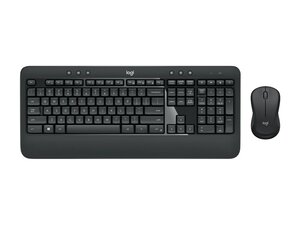
El MK540 Advanced es un combo de teclado inalámbrico de tamaño completo y ratón ambidiestro contorneado, diseñado para la productividad diaria. Ofrece una forma, tamaño y sensación de las teclas familiares, además de un receptor USB inalámbrico plug-and-play. El conjunto está fabricado con carcasas de plástico duradero diseñadas para un uso diario prolongado, poniendo énfasis en la comodidad y la fiabilidad. Las características principales destacadas por Logitech incluyen un diseño de teclado de tamaño completo, un ratón ergonómico contorneado y una conexión inalámbrica simple plug-and-play. La ficha del producto también menciona consideraciones de sostenibilidad, incluyendo un valor publicado de huella de carbono.
Identificación
El combo de teclado y ratón inalámbricos Logitech MK540 ADVANCED incluye el teclado (M/N Y-R0012), el ratón (M/N M-R0050) y el receptor USB (M/N C-U0007). Las etiquetas de modelo se encuentran en los siguientes lugares: teclado: en la etiqueta del producto en la parte inferior; ratón: en la etiqueta del producto en la parte inferior; receptor USB: impreso en la cara plana o en el lateral de la carcasa del receptor, cerca del conector USB. Cada componente lleva sus propios identificadores de modelo (M/N) y de serie (S/N).
Especificaciones
- Factor de forma: Teclado de tamaño completo (con teclado numérico) + ratón ambidiestro contorneado
- Tipo de interruptor: Teclas de membrana / cúpula de goma (fabricante/modelo no especificado en la página del producto)
- Conectividad: Nanorreceptor USB de 2.4 GHz plug-and-play (inalámbrico); la página del producto describe una conexión inalámbrica plug-and-play (modelo de receptor no especificado)
- Alimentación: Teclado y ratón con pilas (los tipos y capacidades exactos de las pilas no están especificados en la página del producto)
- Material: Carcasas de plástico duradero con diseño de ratón contorneado; comercializado para mayor comodidad y uso diario a largo plazo
- Sostenibilidad: Huella de carbono documentada: ~10.17 kg CO2e (valor publicado en la página del producto)
- Compatibilidad / Software: Funciona como un teclado/ratón HID básico; Logitech recomienda Logi Options+ para funciones extendidas (las páginas de producto/soporte hacen referencia a Logi Options+)
- En la caja / Piezas: Teclado, ratón, receptor inalámbrico USB — los números de pieza de repuesto específicos no figuran en las páginas de producto/soporte
- Disponibilidad de piezas de repuesto: La página de soporte indica que no hay piezas de repuesto enumeradas para este producto en el soporte de Logitech (no se proporcionan números de pieza)
- Otras características: Forma, tamaño y sensación de las teclas familiares; ratón ergonómico contorneado; énfasis en la facilidad plug-and-play y prácticas de fabricación responsables
Resolución de Problemas
Los fallos comunes relevantes para la reparación incluyen teclas que no responden, comportamiento pegajoso o intermitente de las teclas y fallos en la conectividad inalámbrica o en el reconocimiento del receptor. Pasos de diagnóstico: comprueba/sustituye las pilas, prueba el receptor en un puerto USB o PC diferente, vuelve a realizar el emparejamiento o reinstala Logi Options+ (o pruébalo como dispositivo HID básico) e inspecciona las teclas/membrana subyacente en busca de residuos o corrosión. Para problemas con el ratón, verifica los contactos de las pilas y pruébalo en otra superficie o sistema para aislar si el problema es del sensor o de RF.
Para obtener ayuda adicional con la resolución de problemas, visita: Visita https://support.logi.com para obtener soporte del producto, software (Logi Options+) e información de contacto de garantía.
Información adicional
Información de garantía
Logitech proporciona información sobre la garantía de hardware limitada regional a través de su sitio de soporte; consulta la página de Garantía de Logitech para conocer la duración y los términos.
Ficha técnica del combo inalámbrico de teclado y mouse Logitech MK540 Advanced
Hoja de datos del combo inalámbrico de teclado y mouse Logitech MK540 Advanced
Logitech MK540 Advanced Zestaw bezprzewodowej klawiatury i myszy — Dane techniczne
Logitech MK540 Advanced Combo de Teclado e Mouse sem Fio — Ficha Técnica
Logitech MK540 Advanced draadloze muis- en toetsenbordcombinatie — specificaties
Logitech MK540 Advanced ensemble clavier et souris sans fil – fiche technique
Logitech MK540 Fortschrittliches kabelloses Tastatur-Maus-Set – Technische Daten
Logitech MK540 korszerű vezeték nélküli billentyűzet-egér páros – Adatlap
Ficha de datos del combo inalámbrico Logitech MK540 Advanced
Logitech MK540 Advanced – Specifiche del kit mouse e tastiera wireless
Logitech MK540 Advanced — Specifikace bezdrátové sady klávesnice a myši

