Preguntas populares del foro
Haz una preguntaNo hay preguntas. ¡Sé el primero en hacer una pregunta!
Documentos
Información general
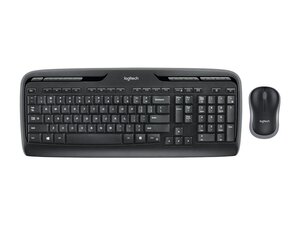
El Wireless Desktop MK320 es un combo de teclado Logitech de tamaño completo y un ratón compacto diseñado para la productividad diaria y la comodidad inalámbrica fiable. Cuenta con un teclado completo con teclado numérico integrado, teclas multimedia dedicadas y un nanorreceptor USB plug-and-play para conectividad inalámbrica de 2.4 GHz. Logitech anuncia que el MK320 está construido para durar y fabricado con materiales resistentes con contenido de plástico reciclado para mejorar la sostenibilidad. Sus características clave incluyen un diseño resistente a derrames y un ratón compacto y cómodo optimizado para un seguimiento fluido.
Identificación
El Logitech WIRELESS DESKTOP MK320 se puede identificar por su número de modelo (M/N CU0026). La etiqueta del modelo se encuentra en la parte inferior; Receptor: el nanorreceptor USB se guarda con el producto o se conecta al ordenador (modelo no impreso en el listado web). Esta etiqueta enumera el número de modelo (M/N), el número de pieza (P/N) y el número de serie (S/N).
Especificación
- Factor de forma: Teclado de tamaño completo con teclado numérico integrado + ratón compacto ambidiestro (combo)
- Modelo / SKU: 920-002836 (Combo de teclado y ratón inalámbricos MK320)
- ID del producto: portable-wireless-keyboard-mouse
- Conectividad: Inalámbrica de 2.4 GHz mediante nanorreceptor USB (plug-and-play)
- Interruptores de tecla: Membrana / teclas de cúpula de goma (fabricante no especificado por Logitech)
- Distribución: Inglés de EE. UU. (QWERTY), tamaño completo con teclas multimedia dedicadas y atajos de función
- Batería: Teclado: 2 × AA; Ratón: 1 × AA (configuración típica de combo Logitech según la documentación del producto)
- Materiales: Carcasa de plástico ABS con contenido de plástico reciclado; fabricado para mayor durabilidad y resistencia a derrames
- Compatibilidad: Plug-and-play en Windows y sistemas estándar compatibles con USB (operación básica sin controladores)
- Peso e identificadores de embalaje: Consulta el listado de productos de Logitech para conocer el peso de envío; combo listado bajo la página de producto de Logitech y SKU de soporte 920-002836
Resolución de Problemas
Los fallos comunes incluyen teclas que no funcionan o no responden (a menudo causados por una batería agotada, daños por líquidos o fallos en la membrana interna) y problemas de conectividad inalámbrica (receptor USB no reconocido o intermitente). Realiza un diagnóstico intercambiando las baterías, probando el receptor en otro puerto USB o PC, volviendo a insertar o reemplazando el nanorreceptor, inspeccionando el compartimento de la batería en busca de corrosión y comprobando visualmente si hay derrames o suciedad.
Para obtener ayuda adicional sobre la resolución de problemas, visita: https://support.logi.com — consulta la página de soporte del Wireless Desktop MK320 para obtener información sobre la garantía y consejos de resolución de problemas.
Información adicional
Información de garantía
Logitech ofrece una garantía de hardware limitada (típicamente de 1 año, varía según la región); consulta los términos de la garantía de Logitech para conocer la cobertura específica.
Guía de primeros pasos del Logitech Wireless Combo MK320
Guía de configuración del Logitech Wireless Combo MK320

