
Batería
Esta traducción la ha hecho un programa y todavía no la ha revisado nadie. ¿Hablas este idioma? Revísala en.
No hay preguntas. ¡Sé el primero en hacer una pregunta!
Estas son algunas de las herramientas comunes que se utilizaron para trabajar en este dispositivo. Es posible que no necesites todas las herramientas para cada procedimiento.
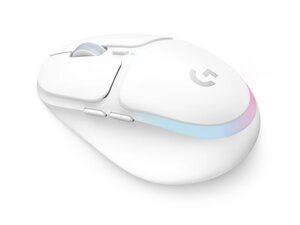
El ratón inalámbrico para juegos G705 es un ratón inalámbrico Logitech LIGHTSPEED diseñado para ofrecer un rendimiento de baja latencia y compatibilidad con varios dispositivos mediante Bluetooth. Cuenta con iluminación RGB LIGHTSYNC de tres zonas, seis botones programables y una batería de iones de litio recargable por USB-C que ofrece hasta 40 horas de autonomía de la batería con la iluminación activada. El ratón se envía con un receptor inalámbrico LIGHTSPEED y un cable extensor de datos/carga para una colocación flexible del USB. El diseño utiliza plásticos duraderos y componentes internos reforzados pensados para un uso prolongado en juegos.
El ratón inalámbrico para juegos Logitech G705 incluye el ratón (M/N MR0093) y un receptor USB (M/N CU0021). Las etiquetas de modelo se encuentran en las siguientes ubicaciones: Ratón: en la etiqueta del producto en la parte inferior; Receptor USB: impreso en la cara plana o el lateral de la carcasa del receptor, cerca del conector USB. Cada componente cuenta con sus propios identificadores de modelo (M/N) y de serie (S/N).
Los fallos comunes relevantes para la reparación incluyen la pérdida de conectividad inalámbrica, que la batería no se carga, y botones o rueda de desplazamiento fallidos o ruidosos. Diagnostica la conectividad comprobando el botón de encendido debajo del ratón, volviendo a emparejar o recolocando el receptor LIGHTSPEED, probando el modo Bluetooth y verificando el funcionamiento del cable/puerto de carga; diagnostica los problemas de batería probando con un cable USB-C que sepas que funciona y midiendo la corriente de carga. Para problemas mecánicos de los botones o de desplazamiento, inspecciona las conexiones de los interruptores internos y el codificador de desplazamiento después de quitar la carcasa.
Para obtener ayuda adicional sobre la resolución de problemas, visita: Visita el soporte de Logitech (support.logi.com) para obtener controladores, software G HUB y opciones de contacto.
Los detalles de la garantía se proporcionan en el sitio web de Logitech; consulta la página de garantía de Logitech específica de tu región para conocer los términos y los procedimientos de reclamación.
Ultimas 24 horas: 3
Ultimos 7 días: 24
Ultimos 30 días: 98
Todo El Tiempo: 652


