Preguntas populares del foro
Haz una preguntaNo hay preguntas. ¡Sé el primero en hacer una pregunta!
Información general
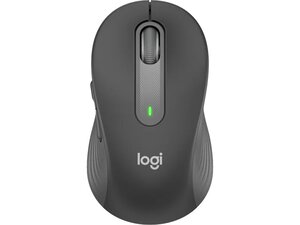
El Logitech M650 Signature for Business está diseñado para ofrecer comodidad durante todo el día y para su implementación en empresas. Su carcasa utiliza plástico duradero con rieles laterales de goma y una zona suave para el pulgar que mejora el agarre y la resistencia al desgaste a largo plazo. Sus características clave incluyen interruptores silenciosos Silent Touch, una rueda inteligente (Smart Wheel) que alterna entre el desplazamiento línea a línea y el desplazamiento superrápido, y conectividad dual mediante el receptor USB Logi Bolt o Bluetooth de bajo consumo. El diseño está disponible en varios tamaños y optimizado para la seguridad y la implementación masiva en entornos empresariales.
Identificación
El Logitech M650 Signature for Business puede identificarse por el número de modelo (M/N A00106). La etiqueta del modelo se encuentra en la parte inferior del ratón (ejemplos: MPN 910-006272 / SKU 910-006272). Esta etiqueta enumera los números de modelo (M/N), de pieza (P/N) y de serie (S/N).
Especificación
- Modelo de producto / SKU: MPN/SKU: 910-006272, 910-006273, 910-006346, 910-006347
- Factor de forma: Ratón inalámbrico contorneado para diestros; disponible en tamaños pequeño, mediano y grande
- Interruptores: Interruptores mecánicos silenciosos Silent Touch (interruptores Silent Touch diseñados por Logitech)
- Conectividad: Receptor USB Logi Bolt (preemparejado) y Bluetooth de bajo consumo
- Alcance inalámbrico: Hasta 10 m (33 pies) utilizando la tecnología inalámbrica Logi Bolt
- Batería: Una sola pila AA; autonomía de la batería de hasta 24 meses (varía según el uso)
- Botones: Cinco botones: izquierdo, derecho, clic central (rueda), atrás, adelante
- Desplazamiento: Rueda inteligente (Smart Wheel) con modos de precisión línea a línea y desplazamiento superrápido
- Seguridad: Compatible con FIPS cuando se empareja con Logi Bolt (modo de seguridad 1, nivel de seguridad 4)
- Materiales y agarre: Carcasa de plástico duradero con rieles laterales de goma y superficie suave para el pulgar
- Compatibilidad: Windows, macOS, Linux, Chrome OS, iPadOS, Android (funciones básicas sin software); compatible con Logi Options+ en Windows/macOS
Resolución de Problemas
Los fallos comunes relevantes para la reparación incluyen botones que no responden (a menudo debido a interruptores desgastados), desplazamiento errático (suciedad en el conjunto de la rueda) y pérdida de conectividad. Para diagnosticar, cambia la pila AA o prueba con una pila en buen estado, vuelve a emparejar o sustituye el receptor Logi Bolt, prueba en otro equipo e inspecciona o limpia la rueda de desplazamiento y las zonas de los interruptores; sustituye los conjuntos de interruptores si se confirma el fallo mecánico.
Para obtener ayuda adicional con la resolución de problemas, visita: Visita https://support.logi.com para obtener soporte del producto, descargas y opciones de contacto (busca 'Signature M650' o 'Blueberry').
Información adicional
Información sobre la garantía
Consulta los términos de garantía de Logitech en support.logi.com/warranty para conocer la garantía limitada de hardware y los procedimientos de reclamación específicos de cada región.

