Saltar al contenido principal
Únete a la Comunidad de Reparación - Crear Cuenta

Qué necesitas

Este desmontaje no es una guía de reparación. Para reparar tu Picstart Plus Development Programmer, utiliza nuestros manuales de servicio .

    1. Picstart Plus Development Programmer Teardown, Picstart Plus Development Programmer Teardown: paso 1, imagen 1 de 3 Picstart Plus Development Programmer Teardown, Picstart Plus Development Programmer Teardown: paso 1, imagen 2 de 3 Picstart Plus Development Programmer Teardown, Picstart Plus Development Programmer Teardown: paso 1, imagen 3 de 3
      • Remove 4 Phillips screws located on the back side of the holding plate.

      • After the screws are removed, remove the case of the development programmer.

      • Carefully take out the circuit board with component side facing up. Put the case aside.

      Pregunta a FixBot

      Agregar Comentario

    2. Picstart Plus Development Programmer Teardown: paso 2, imagen 1 de 2 Picstart Plus Development Programmer Teardown: paso 2, imagen 2 de 2
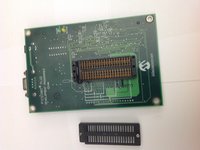
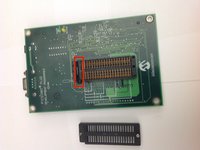
      • Disconnect the microcontroller module from the main board using a spudger or a similar tool.

      • Set the microcontroller module aside.

      Pregunta a FixBot

      Agregar Comentario

    3. Picstart Plus Development Programmer Teardown: paso 3, imagen 1 de 2 Picstart Plus Development Programmer Teardown: paso 3, imagen 2 de 2
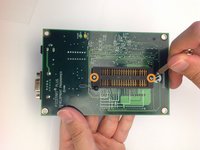
      • Flip over the mainboard so that the component side is facing down and remove the small Pan head screws that holds the cover of the IC holder

      • Remove the cover of the IC holder.

      Pregunta a FixBot

      Agregar Comentario

    4. Picstart Plus Development Programmer Teardown: paso 4, imagen 1 de 2 Picstart Plus Development Programmer Teardown: paso 4, imagen 2 de 2
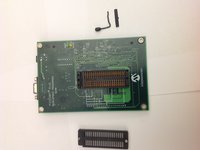
      • Remove the IC holder lever along with the small metal plate that covers the lever.

      • Set the lever and the lever cover aside.

      Pregunta a FixBot

      Agregar Comentario

    5. Picstart Plus Development Programmer Teardown: paso 5, imagen 1 de 1
      • Congratulations! You have completely dismantled the PICSTART Plus Development Programmer!

      • All the extracted components are shown in the picture.

      Pregunta a FixBot

      Agregar Comentario

Brad

Miembro Desde 11/17/13

656 Reputación

2 Guías creadas

0Guía Comentarios

Agregar Comentario

Ver Estadísticas:

Ultimas 24 horas: 2

Ultimos 7 días: 12

Ultimos 30 días: 46

Todo El Tiempo: 3,126