
My keyboard is not working
My keyboard is not working except the power button do i need to reset this laptop ?thank you.
Es esta una buena pregunta?
Puntuación
2

Rep: 25
 1
1
 1
1
My keyboard is not working except the power button do i need to reset this laptop ?thank you.
Es esta una buena pregunta?

Rep: 25
2
Hello @sherwinundug,
First of all connect an external keyboard with usb and then try to download manually your drivers or delete device from device manager and then restart your laptop. It should be ok. If problem remains, then you should check if the connector is ok and then replace it.
Fue útil esta respuesta?

Hey @sherwinundug , i had the same issue twice!
The keyboard is a entire piece with the superior frame, so for fix, you need a replace this piece.
The piece Number in my case the Aspire 3 A315/A515 is AP28Z000300-HA25.
Or you can Jump the board and add a Switch for boot up.
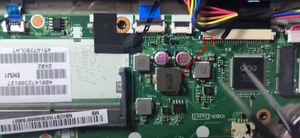
Pins 1 and 2
Fue útil esta respuesta?

Rep: 1
3
1
Well I will suggest you to update the keyboard driver some time any outdated keyboard driver can also cause this kind of issue as well.
Fue útil esta respuesta?
@gtip a update don't work, i tried!
Is a common issue in this model. My laptop, i replace this entire frame twice, and works like 2 years and fail again, a believe is a programmed obsolecense
Hola quetal la verdad es que Ami me pasaba mucho cuando lo tuve, no sé si es lo mismo que te sucede pero por lo que as dicho es igual a lo que me pasaba , después de una larga investigación en esos tiempos me di cuenta que era por una combinación de teclas.
Ultimas 24 horas: 3
Ultimos 7 días: 14
Ultimos 30 días: 70
Todo El Tiempo: 1,113

Sherwin, have you tried plugging in a USB keyboard? That may get you by while you try to fix it.
- de Jerry Wheeler