Saltar al contenido principal

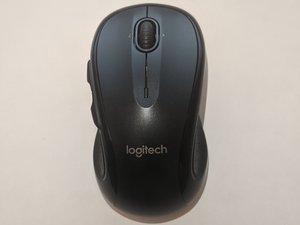
Logitech M510, lanzado en 2010. Ratón (mouse) inalámbrico a pilas tipo AA con sensor láser,.

How to connect Logitech M510 Mouse to a non unifying receiver?

I have lost the unifying receiver.

I have a spare logitech non-unifying receiver with me.

Can someone help on how to connect/pair the M510 mouse with non-unifying receiver?

Many videos suggest to press the connect button in the mouse, which I'm not able to locate it in the mouse.

Contestado! Ver respuesta Yo también tengo este problema

Es esta una buena pregunta?

Puntuación 1
Agregar un comentario

1 Respuesta

Solución Elegida

Hi @jayaramv

1. you can try downloading and install Logitech Connection Utility

https://support.logi.com/hc/en-my/articl...

Run the app and follow the instructions to pair the mouse with the usb receiver.

2. Another alternative is to get another replacement logitech unifying receiver. https://support.logi.com/hc/en-us/articl...

download and install. Follow the instructions to pair the new receiver with your mouse.

Fue útil esta respuesta?

Puntuación 2

1 comentario:

I do not have the unifying receiver with me. Is there a way to get one? (It is very expensive in India)

- de

Agregar un comentario

Añadir tu respuesta

JAYARAM V estará eternamente agradecido.
Ver Estadísticas:

Ultimas 24 horas: 2

Ultimos 7 días: 45

Ultimos 30 días: 163

Todo El Tiempo: 1,191