
 1
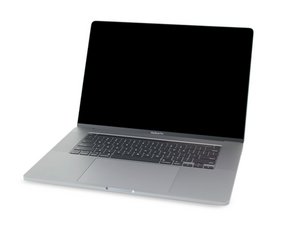
1 MacBook turns off randomly during high CPU load after battery replace
I followed the battery replacement instructions and while plugged into power there are no issues. Laptop continues to run just fine when I unplug the power. However, if there is something that causes the fans to really kick into gear while running on battery alone the Macbook will randomly turn off sometimes. The fan will make a loud "gasp" as it powers off. I can turn it back on but unless I plug into power it will likely turn off again during boot because this is causing the fan to run hard. How do I diagnose this?
Update (04/21/23)
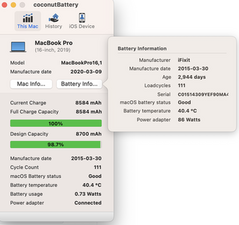
Here is the image from CoconutBattery FWIW I wasn't seeing this issue prior to swapping the battery. Nothing else has changed other than the new iFitxit battery.
Es esta una buena pregunta?
Puntuación
0

 338
338  974
974 
6 comentarios
@briancardarella - Well the good news is the battery and charger look good! So this is looking like a cooling issue.
- de DanJ
how do I address that? When I had the case open I took the opportunity to completely clear out all of the debris blocking the fan ports and air-pressure sprayed the fans to expel anything in there. From what I can tell there shouldn't be any restriction on airflow
- de Brian Cardarella
@briancardarella - Time to get TG-Pro installed to see what it sees.
- de DanJ
yup I got it installed, does it write to a log? Otherwise the system will shut off and I lose the historical temp data
- de Brian Cardarella
actually, in the Diagnostics section it says:
Last shutdown/sleep: Forced - Battery temperature over limit
- de Brian Cardarella
Mostrar 1 comentario más