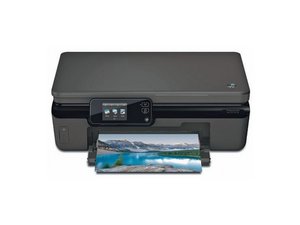
Why are the copy/scan functions not working?
my HP Envy 5530 printer will print from computer but if I try to make copies or scan, the screen says " now copying" but doesn't do anything
Es esta una buena pregunta?
Puntuación
17

Rep: 229
 3
3
 2
2
 1
1
my HP Envy 5530 printer will print from computer but if I try to make copies or scan, the screen says " now copying" but doesn't do anything
Es esta una buena pregunta?

Rep: 595
2
1
2
I had this problem too. Printer works. Scanner and copier won't work. Uninstalled drivers, and reinstalled drivers, numerous times. Didn't help! Did hard reboot. Didn't help. Got mad! lifted right side of printer 6 inches and dropped it on the desk. Lifted right side of printer 6 inches and dropped it on the desk. That fixed it. Now it is working as it should. the problem was not a software issue, but a hardware issue. I suspect, a small short in a contact somewhere inside, Which may very well reoccur. NOT MUCH HELP FROM HP
Fue útil esta respuesta?
It worked!! Thank you.
Holy Cow!! That worked for me too! I had to do it twice, but the second time worked like a charm. So hey, whatever works... thanks for posting this Garland! You just saved me $$$; was just about to throw this printer in the trash and go buy a non-HP printer. Now I'll know how to fix it next time it does this :-)
It worked for me too. Thanks
After getting so frustrated - like everyone else I decided not to be so gentle - pulled the top up, banged in down and it worked...technology eh!!? Thanks
You are a great technician. The method is simple but great. It worked at the first attempt.
And it was enough with 10cm, on the left once and on the right another. Insuperable. Gracias (Thanks).

Rep: 73
1
1
Oh it worked!!!
This is a nice printer. Very frustrating not being able to make a copy and a waste to just give up and toss it in the trash. I would have kept it as a regular printer minus the bells and whistles. Really hated seeing recommendations on HP Doctor and needing Windows. Regardless, came across this site and thread and tried it. It took a couple of tries but when I removed it from the glass desk and dropped it on the carpeted floor, I hit copy and sure enough, out came a printed copy. Thank you AND I will be RETURNING THE NEW HP PRINTER I JUST PURCHASED TO REPLACE THIS ONE. The new one is a higher model number, newer class and yet, cheaper quality.
Looking back and finding the secret menu to reset/partial reset blah blah blah, I just have to laugh at this resolution. THANK YOU AGAIN!
Fue útil esta respuesta?
Thanks a lot.
It worked for my Brother Printer DCP 9070DC that has the same issue of not scanning and copy but print.
I raised it 8in and dropped it on the ground at the left side and repeated for right side. It worked Thanks

Rep: 37
1
I was amazed. I thought it was a joke but since I didn't have another answer and figured I'd have to buy another printer I had nothing to lose. Dropping the top wasn't enough. I had to actually drop the printer once on either side. Go figure.
Fue útil esta respuesta?
And who says taking a hammer to it doesn't work!!?

Rep: 37
1
To say I was sceptical of this would be an understatement, but, yes, it worked. Must be something in the mechanism which jams and the jolt frees it up. Scanning and copying working perfectly.
Fue útil esta respuesta?
Pumps out thick black lines.

Rep: 37
1
Miraculous! Thanks for tip. Hope HP is taking a note on this. Can’t believe none the resolutions recommended by the “HP Print and Scan Doctor” works, but this. I too thought it was a joke initially and thanks to all the positive feedbacks from all - convincing me to try. And, It works like a charm.
Fue útil esta respuesta?
Rep: 37
1
I, too, thought this was a hack-joke but figured I didn’t have anything to lose since I was about to buy a new printer (and not an HP again!). After the first two drops the printer started behaving differently, like the “Cancel” started working (but didn’t complete). Persistence paid off and after the fourth drop of both sides the Copy function began working. Will wonders never cease!! Thanks for this great tip!
Fue útil esta respuesta?

Rep: 37
1
This is unbelievable. It really works. I have tried everything and a simple solution of dropping the printer a couple times really works. Go figure.
Fue útil esta respuesta?
It worked for me also...
Printer now does copies again...
Rep: 229
3
2
1
I first used this solution a couple years ago and was also amazed that it worked. I don't use my printer a lot and I have found that I have to use this procedure from time to time. Just to let people know this may not be a one-time fix, but it doesn't seem to harm the printer if you have to repeat it every once in awhile.
Fue útil esta respuesta?
Lord have mercy!!! Slammed the lid down and it worked!

Rep: 25
1
Genius! Thank you so much. Worked like a charm. I can finally make copies after 8 months!
Fue útil esta respuesta?

Rep: 25
1
Well, just slap me on the ass and call me mama! I just spent 4 hours fighting with my printer. Dropping it on the carpeted floor worked!
Fue útil esta respuesta?

Can’t believe it!!! After trying uninstalling software, etc. I tried this!! 3 times and back in business!!!!
Fue útil esta respuesta?
I'm a believer! I'm amazed it worked. At first it was just going through the motions of printing, so I tried it again on the other side. Still was printing blanks, so I just took out and put back in my ink cartridges and that did it. Thank you so much.

To my amazement, this worked! I was very frustrated, and didn't know what to do. I dropped it from about 4-6 inches on both sides. It worked like a charm. Thanks a lot.
Fue útil esta respuesta?

This fix is amazing! Thank you, thank you!
Fue útil esta respuesta?

Thanks! I banged the crap out of my printer on my deck and now the scanner works again!
Fue útil esta respuesta?

I suspected something (hardware) was frozen and tried jarring it but not hard enough. After reading this, I dropped it twice on the cement garage floor from about 6 inches up and now it works perfectly!
Fue útil esta respuesta?

I can't believe it! It really did work!! I had to raise it about 4 inches off my desk and drop it. Worked!
Fue útil esta respuesta?

Yep, I agree with everyone. It worked! Now making copies
Fue útil esta respuesta?

It worked!!! Thank you! Amazing solution.
Fue útil esta respuesta?

WOW - Yep, I had to beat it a little but its working now!! Thank you!!!!
Fue útil esta respuesta?


It worked for me also. Just dropped it from about 4”. Had to do it again after a couple of months and it’s worked again.
Fue útil esta respuesta?

Wow! After several hours of searching HP and the internet, and trying EVERYTHING, this actually worked! UNBELIEVABLE. Thank you!!!!!
Fue útil esta respuesta?

Worked like a charm!! Thanks to everyone who posted here.
Fue útil esta respuesta?

Rep: 13
2
Bingo!!! HP ENVY 4500, prints fine but never scans/copies when I press the button. Couldn't finish an ink replacement because it needed to do an alignment and then scan the printed page. After a good 6" drop from both sides, shazam, now I can copy.
Fue útil esta respuesta?
I seriously can't believe this worked. I bought a used HP ENVY 5530 that would get stuck when doing a copy or scan. Giving it a few 4-6" drops fixed it! Thank you so much!
Fue útil esta respuesta?

I never thought it would work but it did
Fue útil esta respuesta?
Ultimas 24 horas: 2
Ultimos 7 días: 10
Ultimos 30 días: 108
Todo El Tiempo: 20,676

7 comentarios
still not working....uph...
- de susaneustace.translationcrew
It unbelievably worked....
Printer will now copy again...
- de peterclar@aol.com
Worked for me too. How crazy.
- de Bill
I tried it and my printer died. Would not recommend this fix.
- de Kelly Schoch
I just did it and the printer works now......that is so odd.
- de Faye Shipp
Mostrar 2 comentarios más