Introducción
Quitar la memoria RAM es una tarea fácil ya que no requiere de ninguna herramienta
Qué necesitas
-
-
Posiciona tus dedos en las depresiones marcadas en la cubierta inferior.
-
Rota la cubierta inferior en sentido contrario a las agujas del reloj hasta el el punto blanco pintado en la parte inferior esté alineado con el anillo inscripto en la carcasa exterior.
-
-
-
-
Suelte las pestañas de cada lado del chip RAM empujando simultáneamente cada pestaña hacia afuera del chip.
-
Una vez que el chip RAM haya salido, sáquelo de su zócalo.
-


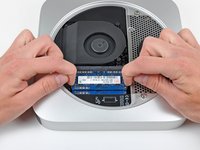
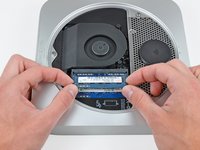
Para remontar tu dispositivo, sigue las instrucciones al revés
Cancelar: No complete esta guía.
184 personas más completaron esta guía.
Un agradecimiento especial a estos traductores:
100%

¡ Iker NH nos está ayudando a reparar el mundo! ¿Quieres contribuir?
Empezar a traducir ›




7Guía Comentarios
So if I were to replace the Ram on my mac mini I would only have the option to choose between the 2 gb chip or the 4gb chip? I know dumb question lol.
2x8GB is as much as those motherboards can handle.
Dear everyone,
Does this mac mini accept :
KINGSTON DDR3 PC3-12800 - 2 x 4 Go (8 Go) 1600 MHZ - CAS 10 - HyperX Fury Black Series
Thank you.
I always consult Crucial's memory configuration tool. For a late-2012 Mac mini, see http://www.crucial.com/usa/en/compatible....
According to them, this Mac can go up to 16GB (2 SO-DIMMs of 8GB each). The SO-DIMMs should be DDRL3L-1600 (DDR3L PC3L-12800, CL=11, unbuffered, non-ECC, DDR3L-1600, 1.35v)
The SO-DIMMs you mentioned seem like they should be compatible (CL=10 should work fine in a computer that can accept CL=11). But I would only buy from a vendor that has a compatibility guarantee. If there's a problem, I would want to be able to return them for a refund.
The SODIMMs don't need to be low voltage DDR3L (i.e. 1.35 volt). In fact Apple recommends (https://support.apple.com/en-gb/HT202593) regular 1.5 volt DDR3 and most late 2012 Mac Minis were shipped with it. So is Crucial wrong? The truth is that either will work.
