Saltar al contenido principal
Únete a la Comunidad de Reparación - Crear Cuenta

Motorola Droid Turbo Dual LED Flash Board Replacement

Qué necesitas

    1. Motorola Droid Turbo Dual LED Flash Board Replacement, Rear Case: paso 1, imagen 1 de 1
      • Prepare an iOpener and lay it over the rear case to soften the adhesive on securing the rear case to the phone.

      Pregunta a FixBot

      Agregar Comentario

    2. Motorola Droid Turbo Dual LED Flash Board Replacement: paso 2, imagen 1 de 2 Motorola Droid Turbo Dual LED Flash Board Replacement: paso 2, imagen 2 de 2
      • Use a plastic opening tool to pry the rear case off of the rest of the device.

      • Remove the rear case.

      • The wireless charging coil may try to stick to the rear case, so make sure to remove it from the case before fully separating the rear case from the rest of the device.

      Pregunta a FixBot

      Agregar Comentario

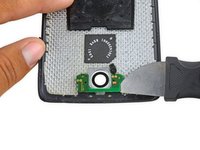
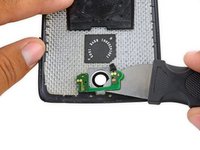
    1. Motorola Droid Turbo Dual LED Flash Board Replacement, Dual LED Flash Board: paso 3, imagen 1 de 2 Motorola Droid Turbo Dual LED Flash Board Replacement, Dual LED Flash Board: paso 3, imagen 2 de 2
      • Use a Jimmy to separate the dual LED flash board from the rear case.

      • The board is secured with some light adhesive, so some force may be required.

      Pregunta a FixBot

      Agregar Comentario

Conclusión

To reassemble your device, follow these instructions in reverse order.

Cancelar: No complete esta guía.

Una persona más ha completado esta guía.

Geoff Wacker

Miembro Desde 09/30/13

93,084 Reputación

88 Guías creadas

1Guía Comentario

Gostaria se possível alguem tenha o manual de serviço do Moto maxx XT 1225 ou 1254. Porf favor , ddani8260@gmail.com

Daniel Gomes - Contestar Compartir

Agregar Comentario

Ver Estadísticas:

Ultimas 24 horas: 3

Ultimos 7 días: 28

Ultimos 30 días: 101

Todo El Tiempo: 1,555