Saltar al contenido principal
Únete a la Comunidad de Reparación - Crear Cuenta

Huawei P9 Front Facing Camera Replacement

Qué necesitas

  1. Huawei P9 Front Facing Camera Replacement, Back Cover: paso 1, imagen 1 de 3 Huawei P9 Front Facing Camera Replacement, Back Cover: paso 1, imagen 2 de 3 Huawei P9 Front Facing Camera Replacement, Back Cover: paso 1, imagen 3 de 3
    • First switch off your phone and remove the SIM card tray.

    • Unscrew the two Pentalobe P2 screws located at the bottom next to the device's USB C port.

    • If the screen is cracked you might want to use some tape to protect your eyes from glass shreds and get a better grip to open the phone.

    Pregunta a FixBot

    Agregar Comentario

  2. Huawei P9 Front Facing Camera Replacement: paso 2, imagen 1 de 2 Huawei P9 Front Facing Camera Replacement: paso 2, imagen 2 de 2
    • Avoid to lift only the display instead of the whole phone assembly as doing so may cause damage to the screen.

    • Use an iSclack or a suction handle to separate the phone assembly from the rear panel.

    • In case you can‘t manage to lift the phone assembly out of the rear panel you can insert the pointed end of a spudger in the headphone jack opening and press the phone assembly upwards until you create a gap between assembly and rear panel. Then use the spudger to lever the phone assembly out of the panel.

    • Don't remove the rear panel completely yet. There is a cable connected to it! It is running from the finger print sensor to the display unit.

    Pregunta a FixBot

    Agregar Comentario

  3. Huawei P9 Front Facing Camera Replacement, Fingerprint sensor: paso 3, imagen 1 de 2 Huawei P9 Front Facing Camera Replacement, Fingerprint sensor: paso 3, imagen 2 de 2
    • Disconnect the fingerprint sensor using a spudger.

    Pregunta a FixBot

    Agregar Comentario

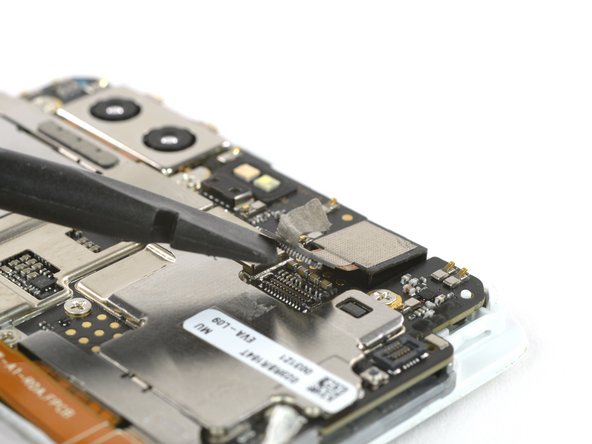
  4. Huawei P9 Front Facing Camera Replacement, Front Facing Camera: paso 4, imagen 1 de 3 Huawei P9 Front Facing Camera Replacement, Front Facing Camera: paso 4, imagen 2 de 3 Huawei P9 Front Facing Camera Replacement, Front Facing Camera: paso 4, imagen 3 de 3
    • Peel off the conducting fabric.

    • You will have to transfer it to the new camera (careful it's sticky).

    • Unplug the camera connector.

    • Now you can remove the front camera.

    Pregunta a FixBot

    Agregar Comentario

Conclusión

To reassemble your device, follow these instructions in reverse order.

Cancelar: No complete esta guía.

Una persona más ha completado esta guía.

Equipo

iFixit EU Team Miembro de iFixit EU Team

Staff

Miembros de 37

1,226 Guías creadas

0Guía Comentarios

Agregar Comentario

Ver Estadísticas:

Ultimas 24 horas: 2

Ultimos 7 días: 14

Ultimos 30 días: 105

Todo El Tiempo: 2,232