Saltar al contenido principal

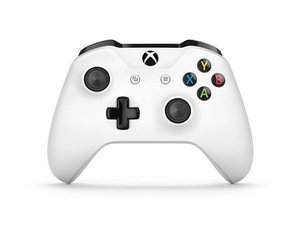
El mando (controlador) Xbox One se presentó en 2016 con el lanzamiento de Xbox One S y agrega compatibilidad con Bluetooth para Windows 10. Este controlador corrige muchas de los fallos de diseño encontrados en los controladores Modelo 1537/1697 y es mucho más confiable. Este controlador ha sido reemplazado por el controlador Modelo 1914.

Controller doesn't want to work via USB connection

Hello! I’m using my Xbox controller plugged in via USB cable without batteries. Yesterday, it just simply stopped working. It seemed like a driver issue at first, the controller buzzed when plugged into USB port, but was not connected. It also takes power from the USB port and when I’m pressing the middle button it connects via Bluetooth normally. tried reinstalling the drivers, testing 2 other cables and plugging the controller into my laptop. So It doesn’t work with any of my cables or my PC or laptop, it does take the power from the USB but doesn’t connect via USB.

Any ideas on how Can I fix it? I know I technically can use the cable as batteries and connect my controller via Bluetooth, but due to various medical devices I use I would prefer to avoid it.

Contesta esta pregunta Yo también tengo este problema

Es esta una buena pregunta?

Puntuación 1

1 comentario:

I have this same problem as well, have you found a solution?

- de

Agregar un comentario

2 Respuestas

Stupid question but have you tried plugging the cable into different USB ports? USB ports can partially die and switch to only giving USB power.

Fue útil esta respuesta?

Puntuación 0

5 comentarios:

Yes. 3.0 USB ports, 2.0 USB ports, different cables, different PC's. It simply doesn't detect it as a device. The controller gives one buzz and it is supplied in terms of energy, but it doesn't want to connect. via the cable.

- de

@themiziko OK, pretty sure your controller stopped sending any USB data.

RIP your controller 2021-2021

- de

Even if it is taking the power? Can't it be something with the motherboard? or one of the 5 connectors in the USB port? it kind of doesn't make sense to me that all of a sudden it just .. died? it didn't even fall or anything

- de

@themiziko Sounds like either a damaged port or a damaged controller. Have you made sure there aren't any missing or bent pins in the port?

- de

@spudpiggy Yes indeed! the pins look perfectly, all of them are connected, and the cable sits firm in the controller and doesn't move in any direction so it's not loose. I guess it's time to buy a new one :) but I was just surprised that I took such good care of it, it never fell or was damaged, and it just died. but I guess it's my luck :)

- de

Agregar un comentario

blue controller xbox not play good fine usb

Fue útil esta respuesta?

Puntuación 0
Agregar un comentario

Añadir tu respuesta

Divine Kataroshie estará eternamente agradecido.
Ver Estadísticas:

Ultimas 24 horas: 7

Ultimos 7 días: 47

Ultimos 30 días: 171

Todo El Tiempo: 3,354