
What do I do if I have an error 07 message?
My xbox has the red and green blinking light, the disk drive won't open, and it reads "07" in the top left corner of my TV screen when I turn my xbox on.
Es esta una buena pregunta?
Guías de reparación
Aprende a reparar algo con nuestras guías paso a paso.
Aplicación
Tu ayudante de reparación de bolsillo.
FixBot
El simpático asistente de reparación de la IA.
Reparabilidad
Descubre por qué los productos reparables tienen sentido.
Desmontajes
Echa un vistazo a los últimos gadgets.
Foro de respuestas
Comparte soluciones y consigue ayuda de un amigo.
Encuentra tu comunidad
Encuentra equipos, eventos y compañeros fixers.
Ayuda
Ayuda a que los conocimientos sobre reparación sean gratuitos y accesibles para todos.
Right to Repair
Consulta más sobre el movimiento del "Derecho a reparar" y cómo convertirte en un defensor del mismo.
Destacado
Partes y herramientas de alta calidad respaldadas por nuestra garantía perpetua.
Herramientas
Elige de nuestra amplia selección de herramientas de precisión.
Partes
Selecciona partes respaldadas por nuestra garantía de calidad.
Baterías del iPhone
Baterías probadas y garantizadas, además de un kit con todo lo que necesitas.
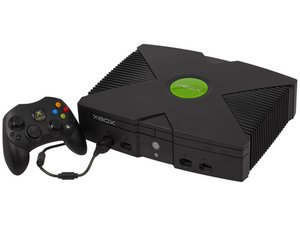
La Xbox original es el primer sistema de videojuegos de Microsoft con amplia popularidad. Posee una carcasa negra fácilmente identificable con «XBOX» grabado en la parte superior y frontal. La reparación es sencilla usando herramientas comunes.
My xbox has the red and green blinking light, the disk drive won't open, and it reads "07" in the top left corner of my TV screen when I turn my xbox on.
Hi,
07 - kernel - HDD timeout
Most of the times, the IDE cable is not properly connected when you see this error. Please reattach the ide cable. Not only to the harddisk drive but also to the dvd drive. ALso try to reconnect the ide cable to the motherboard.
Press pretty hard so it goes all the way in. Make sure it is seated straight and proper in the drives and the motherboard. If you still have an error 7. Try another ide cable. If that won't work try another harddisk. If there is still no go, try to set the jumpers on the rearside of the harddisk drive. Set it to master or cable select.
Ultimas 24 horas: 2
Ultimos 7 días: 18
Ultimos 30 días: 52
Todo El Tiempo: 8,427
