Saltar al contenido principal
Únete a la Comunidad de Reparación - Crear Cuenta

iMac Intel 17" IR Board Replacement

Vistas: 6.8 k

Ver estadísticas:

Últimas 24 horas:
2
Últimos 7 días:
20
Últimos 30 días:
107
Todo El Tiempo:
6,802
Comentarios: 18

18 comments on steps.

Completado: 3

3 personas han marcado esta guía como "completada". ¿Serás tú la próxima persona en hacerlo?

Favoritos: 2

2 personas han marcado como "Favorita" y se han suscrito a esta guía. ¿Serás tú la próxima persona en hacerlo?

Tiempo Requerido: Sin estimación
Dificultad: Moderado
iMac Intel 17" IR Board Replacement

Introducción

Ir al paso 1 ↓

This guide will show you how to replace the IR Board in your iMac.

Qué necesitas

Herramientas

    1. iMac Intel 17" IR Board Replacement, Access Door: paso 1, imagen 1 de 2 iMac Intel 17" IR Board Replacement, Access Door: paso 1, imagen 2 de 2
      • Loosen the two captive Phillips screws securing the access door to the iMac.

      • Remove the access door from the iMac.

      • Before beginning the repair, unplug the computer and press and hold the power switch for 20-30 seconds, to discharge internal capacitors.

      Pregunta a FixBot

      Agregar Comentario

    1. iMac Intel 17" IR Board Replacement, Front Bezel: paso 2, imagen 1 de 1
      • Remove the following four screws:

      • Three 6 mm T8 Torx.

      • One 8 mm T8 Torx.

      Pregunta a FixBot

      Agregar Comentario

    2. iMac Intel 17" IR Board Replacement: paso 3, imagen 1 de 2 iMac Intel 17" IR Board Replacement: paso 3, imagen 2 de 2
      • Flip your iMac over and lay it stand-side down on a flat surface.

      • To lift the front bezel off the iMac, simultaneously:

      • Use your thumbs to press in the RAM arms and hold the iMac down.

      • Use your index fingers to pull the small bridge of material on the front bezel toward yourself.

      • Pull the Front bezel up with your index fingers.

      • Once the small bridge of material has cleared the RAM arms, lift the front bezel by its lower edge just enough to clear the bottom edge of the rear case.

      Pregunta a FixBot

      Agregar Comentario

    3. iMac Intel 17" IR Board Replacement: paso 4, imagen 1 de 3 iMac Intel 17" IR Board Replacement: paso 4, imagen 2 de 3 iMac Intel 17" IR Board Replacement: paso 4, imagen 3 de 3
      Herramienta utilizada en este paso:
      Plastic Cards
      $2.99
      • Re-orient your iMac so it sits upright on the stand.

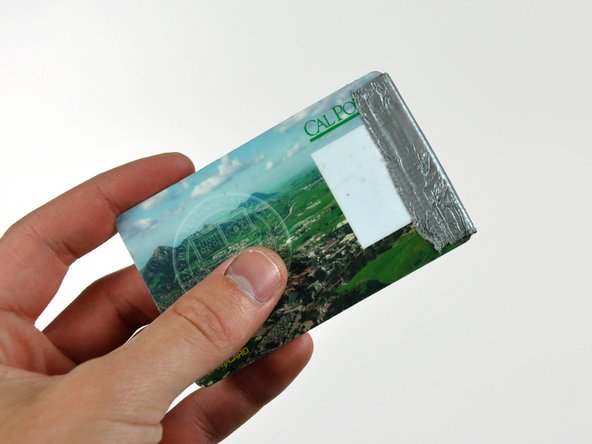
      • Insert a plastic card up into the corner of the air vent slot near the top of the rear case.

      • Push the card toward the top of the iMac to release the front bezel latch.

      • Pull the front bezel away from the rear case.

      • Repeat this process for the other side of the front bezel.

      • It may be necessary to apply several layers of duct tape to the top of the access card to aid in releasing the latches.

      • If the bezel refuses to release, try pressing the lower edge back onto the rear case and repeat this opening process.

      Pregunta a FixBot

      Agregar Comentario

    4. iMac Intel 17" IR Board Replacement: paso 5, imagen 1 de 1
      • Lay your iMac stand-side down on a table.

      • Lift the front bezel from its lower edge and rotate it away from the rest of your iMac, minding the RAM arms that may get caught.

      • Lay the front bezel above the rest of the iMac.

      Pregunta a FixBot

      Agregar Comentario

    5. iMac Intel 17" IR Board Replacement: paso 6, imagen 1 de 1
      • If necessary, remove the piece of kapton tape(it is ok to toss this) wrapped around the microphone and camera cables.

      Pregunta a FixBot

      Agregar Comentario

    6. iMac Intel 17" IR Board Replacement: paso 7, imagen 1 de 2 iMac Intel 17" IR Board Replacement: paso 7, imagen 2 de 2
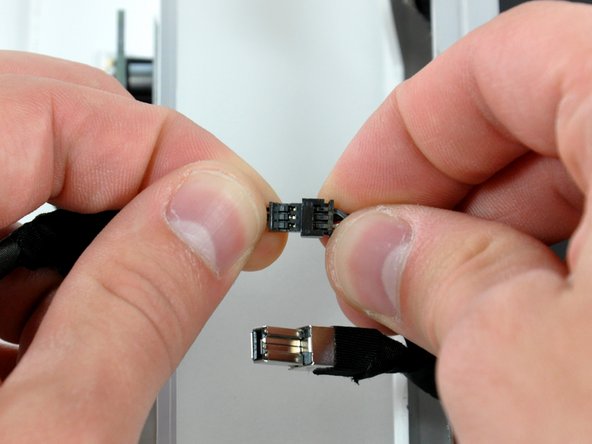
      • Disconnect both the camera and microphone cables.

      Pregunta a FixBot

      Agregar Comentario

    1. iMac Intel 17" IR Board Replacement, IR Board: paso 8, imagen 1 de 1
      • Remove the two T8 Torx screws securing the IR Board to the rear case.

      • The IR board should fall away from the logic board after removing these screws.

      Pregunta a FixBot

      Agregar Comentario

    2. iMac Intel 17" IR Board Replacement: paso 9, imagen 1 de 1
      • Disconnect the IR Board cable from its socket on the IR Board.

      Pregunta a FixBot

      Agregar Comentario

Conclusión

To reassemble your device, follow these instructions in reverse order.

Cancelar: No complete esta guía.

3 personas más completaron esta guía.

0Guía Comentarios

Agregar Comentario

Ver Estadísticas:

Ultimas 24 horas: 2

Ultimos 7 días: 20

Ultimos 30 días: 107

Todo El Tiempo: 6,802