Saltar al contenido principal
Únete a la Comunidad de Reparación - Crear Cuenta

Xbox Samsung DVD Drive Disassembly

Vistas: 27 k

Ver estadísticas:

Últimas 24 horas:
10
Últimos 7 días:
81
Últimos 30 días:
334
Todo El Tiempo:
26,779
Comentarios: 18

15 comments on steps, 3 guide comments.

Go to guide comments
Completado: 7

7 personas han marcado esta guía como "completada". ¿Serás tú la próxima persona en hacerlo?

Favoritos: 4

4 personas han marcado como "Favorita" y se han suscrito a esta guía. ¿Serás tú la próxima persona en hacerlo?

Tiempo Requerido: 30 - 45 minutos
Dificultad: Fácil
Guía aportada por comunidad

Un miembro increíble de nuestra comunidad escribió esta guía. No ha sido creada por el personal de iFixit.

Xbox Samsung DVD Drive Disassembly

Introducción

Ir al paso 1 ↓

This guide will explain how to disassemble the Xbox DVD Drive in order to preform repairs or remove a stuck game by manually ejecting the drive.

Qué necesitas

Partes

Herramientas

    1. Xbox Samsung DVD Drive Disassembly, Hard Drive: paso 1, imagen 1 de 1
      • Make sure your Xbox is safely unplugged and is laying on a flat, stable surface.

      Pregunta a FixBot

      Agregar Comentario

    2. Xbox Samsung DVD Drive Disassembly: paso 2, imagen 1 de 1
      • Turn the Xbox over to reveal the four rubber feet.

      • Use a metal spudger to pry off the four rubber feet.

      Pregunta a FixBot

      Agregar Comentario

    3. Xbox Samsung DVD Drive Disassembly: paso 3, imagen 1 de 2 Xbox Samsung DVD Drive Disassembly: paso 3, imagen 2 de 2
      • There are 2 more screws hidden under the two labels on the bottom of the case.

      • You can either remove the labels or simply feel for the screw holes through the labels and then cut or punch a hole through them.

      Pregunta a FixBot

      Agregar Comentario

    4. Xbox Samsung DVD Drive Disassembly: paso 4, imagen 1 de 1
      • Remove the six T20 Torx screws securing the top cover to the bottom cover.

      Pregunta a FixBot

      Agregar Comentario

    5. Xbox Samsung DVD Drive Disassembly: paso 5, imagen 1 de 2 Xbox Samsung DVD Drive Disassembly: paso 5, imagen 2 de 2
      • Once the bottom and top shells are no longer attached, carefully turn the Xbox right-side-up, lift and remove the top cover.

      Pregunta a FixBot

      Agregar Comentario

    6. Xbox Samsung DVD Drive Disassembly: paso 6, imagen 1 de 2 Xbox Samsung DVD Drive Disassembly: paso 6, imagen 2 de 2
      • Remove the three 3 mm T10 screws securing the hard drive to the Xbox.

      • There is one screw on the rear left side of the hard drive that is only visible when the IDE ribbon cable is lifted up. The other two are at the front right and left sides of the hard drive.

      • The screw on the lower left corner of the disk drive is not in the hole that it appears to be in, but rather just closer to the corner.

      • Only the screw under the ribbon cable is for the hard drive, while the other two are for the disk drive. But it's easiest to remove all three during this step, as they are the same T10 screws.

      Pregunta a FixBot

      Agregar Comentario

    7. Xbox Samsung DVD Drive Disassembly: paso 7, imagen 1 de 2 Xbox Samsung DVD Drive Disassembly: paso 7, imagen 2 de 2
      • Free the hard drive power cable from the carrier for sufficient slack to lift the hard drive out.

      • Lift the plastic hard drive carrier out of the Xbox case.

      Pregunta a FixBot

      Agregar Comentario

    8. Xbox Samsung DVD Drive Disassembly: paso 8, imagen 1 de 3 Xbox Samsung DVD Drive Disassembly: paso 8, imagen 2 de 3 Xbox Samsung DVD Drive Disassembly: paso 8, imagen 3 de 3
      • Remove the four 3.4 mm T15 Torx screws from the plastic hard drive carrier (two screws per side).

      • Carefully remove the hard drive from the plastic carrier. Gentle rocking will see the hard drive come out quite easily.

      Pregunta a FixBot

      Agregar Comentario

    9. Xbox Samsung DVD Drive Disassembly: paso 9, imagen 1 de 2 Xbox Samsung DVD Drive Disassembly: paso 9, imagen 2 de 2
      • Pull both the hard drive data ribbon cable and the power cable straight up from the hard drive.

      • They may be firmly seated, so be careful trying to remove them. DO NOT pull the wires as you may damage the cable assembly.

      Pregunta a FixBot

      Agregar Comentario

    1. Xbox Samsung DVD Drive Disassembly, Disc Drive: paso 10, imagen 1 de 3 Xbox Samsung DVD Drive Disassembly, Disc Drive: paso 10, imagen 2 de 3 Xbox Samsung DVD Drive Disassembly, Disc Drive: paso 10, imagen 3 de 3
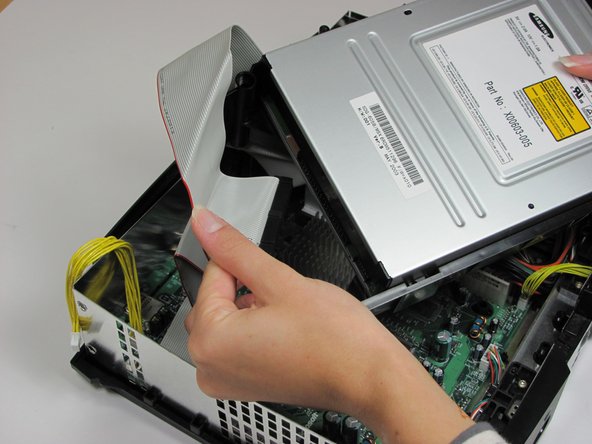
      • Remove the disk drive. It should come right out.

      • Unplug the ribbon cable and yellow cables from back of disk drive.

      Pregunta a FixBot

      Agregar Comentario

    2. Xbox Samsung DVD Drive Disassembly: paso 11, imagen 1 de 1
      • Pry back the black plastic tabs around the disk drive in order to remove it from its housing. Once removed, set the drive aside.

      • If you are removing the disk drive in order to gain access to the motherboard underneath, you do not need to remove the plastic housing.

      Pregunta a FixBot

      Agregar Comentario

    1. Xbox Samsung DVD Drive Disassembly, Remove DVD Drive Casing: paso 12, imagen 1 de 3 Xbox Samsung DVD Drive Disassembly, Remove DVD Drive Casing: paso 12, imagen 2 de 3 Xbox Samsung DVD Drive Disassembly, Remove DVD Drive Casing: paso 12, imagen 3 de 3
      • Remove 4 PH1 Screws

      • Once screws are removed, lift the bottom half of the case up and away from the drive.

      • Flip the drive over and remove the top half of the case.

      Pregunta a FixBot

      Agregar Comentario

    2. Xbox Samsung DVD Drive Disassembly, Drive PCB: paso 13, imagen 1 de 3 Xbox Samsung DVD Drive Disassembly, Drive PCB: paso 13, imagen 2 de 3 Xbox Samsung DVD Drive Disassembly, Drive PCB: paso 13, imagen 3 de 3
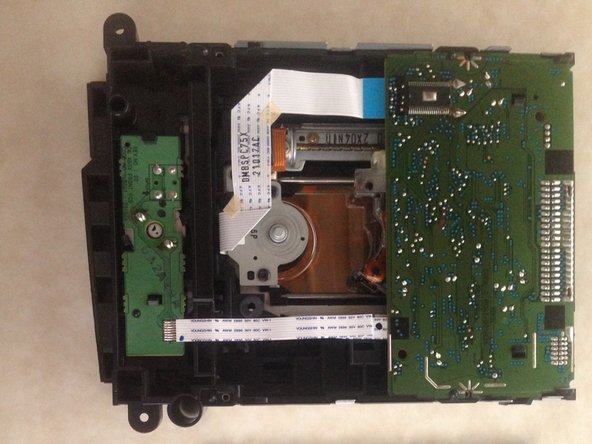
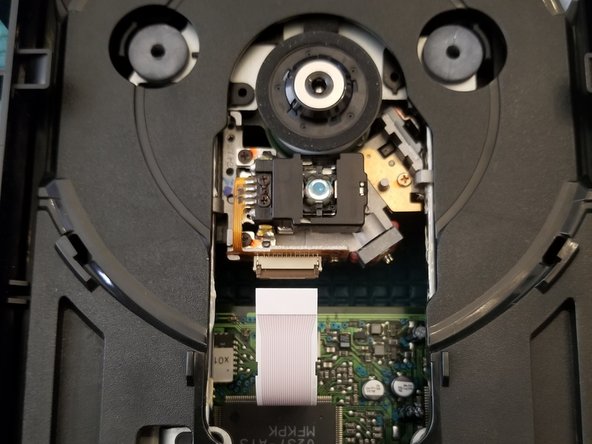
      • Gently press back on the ribbon retention tab and pull back on the ribbon cable

      Pregunta a FixBot

      Agregar Comentario

    3. Xbox Samsung DVD Drive Disassembly, Drive PCB Continued: paso 14, imagen 1 de 2 Xbox Samsung DVD Drive Disassembly, Drive PCB Continued: paso 14, imagen 2 de 2
      • Press outwards on the 2 plastic retaining tabs

      • Gently lift PCB over tabs

      • Only remove these ribbon cables if you need to remove the entire PCB. These are friction fit ribbon cables. In my case, they have a piece of tape holding the ribbon to the connector

      • If your drive is "dead" this is where I would suggest replacing the electrolytic capacitors on the board. The Samsung [Ver. B] has 13 (9 Radial/4 SMD)

      Pregunta a FixBot

      Agregar Comentario

    4. Xbox Samsung DVD Drive Disassembly, Manually Ejecting the Drive: paso 15, imagen 1 de 3 Xbox Samsung DVD Drive Disassembly, Manually Ejecting the Drive: paso 15, imagen 2 de 3 Xbox Samsung DVD Drive Disassembly, Manually Ejecting the Drive: paso 15, imagen 3 de 3
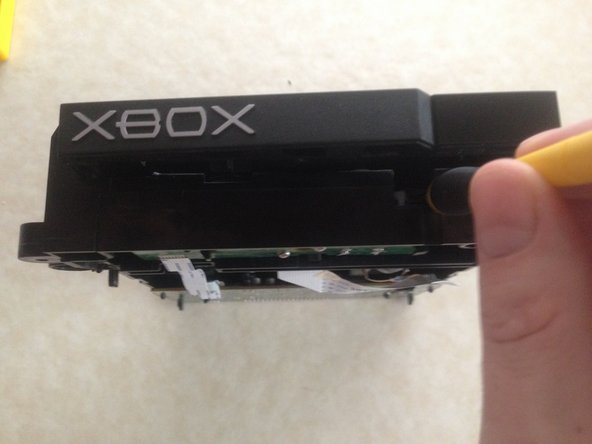
      • Using your screwdriver, or anything slim enough to fit, gently push the white lever back. Put your object on the right hand side of the lever, slightly pushing right as you push back.

      • The lens will drop down and your drive door will open about a quarter inch.

      • Gently pull the tray to its open position. If you have a game stuck in your drive, this would be the ideal time to remove it.

      • If your drive door sticks when pressing the eject button now is the ideal time to replace the drive belt.

      • Remove the drive belt and replace it with a new one. Belts approximate location highlighted.

      • Don't forget to reset the white lever during reassembly.

      Pregunta a FixBot

      Agregar Comentario

Conclusión

To reassemble your device, follow these instructions in reverse order.

Cancelar: No complete esta guía.

7 personas más completaron esta guía.

Navy Vet 2015

Miembro Desde 06/25/15

8,411 Reputación

15 Guías creadas

3Guía Comentarios

What is the easiest way to clean the laser in the original xbox?

Brayan Hernandez - Contestar Compartir

Hit it with a can of air duster. If further cleaning is required apply a small amount of rubbing alcohol on a Q-tip and gently clean the lens. I hope this helps.

Navy Vet 2015 - Contestar Compartir

It there any trouble shooting guide for this drive or similar. I replaced the laser on mine but it still will not read disks. Not sure if it is a bad part.

maddigor - Contestar Compartir

Agregar Comentario

Ver Estadísticas:

Ultimas 24 horas: 10

Ultimos 7 días: 81

Ultimos 30 días: 334

Todo El Tiempo: 26,779