Saltar al contenido principal
Únete a la Comunidad de Reparación - Crear Cuenta

Syntus ST150 Ultrasonic Plate Replacement

Qué necesitas

    1. Syntus ST150 Ultrasonic Plate Replacement, Ultrasonic Plate: paso 1, imagen 1 de 1
      • First, make sure the water tank inside the diffuser is completely dry to avoid any water from contacting the internal components.

      • Make sure the diffuser is disconnected from the power source to avoid electrical hazards.

      Pregunta a FixBot

      Agregar Comentario

    2. Syntus ST150 Ultrasonic Plate Replacement: paso 2, imagen 1 de 2 Syntus ST150 Ultrasonic Plate Replacement: paso 2, imagen 2 de 2
      • With a Phillips #1 screwdriver, remove the three 10 mm screws on the bottom of the diffuser.

      Pregunta a FixBot

      Agregar Comentario

    3. Syntus ST150 Ultrasonic Plate Replacement: paso 3, imagen 1 de 3 Syntus ST150 Ultrasonic Plate Replacement: paso 3, imagen 2 de 3 Syntus ST150 Ultrasonic Plate Replacement: paso 3, imagen 3 de 3
      • Lift the water tank while holding the base of the diffuser.

      • Disconnect the three cables form the board.

      • Make sure when reassembling the diffuser to plug in each cable to its assigned port.

      Pregunta a FixBot

      Agregar Comentario

    4. Syntus ST150 Ultrasonic Plate Replacement: paso 4, imagen 1 de 3 Syntus ST150 Ultrasonic Plate Replacement: paso 4, imagen 2 de 3 Syntus ST150 Ultrasonic Plate Replacement: paso 4, imagen 3 de 3
      • To separate the board from the water tank, unscrew the three Phillips #1 10 mm screws securing the board.

      Pregunta a FixBot

      Agregar Comentario

    5. Syntus ST150 Ultrasonic Plate Replacement: paso 5, imagen 1 de 3 Syntus ST150 Ultrasonic Plate Replacement: paso 5, imagen 2 de 3 Syntus ST150 Ultrasonic Plate Replacement: paso 5, imagen 3 de 3
      • With a Phillips #0 screwdriver, remove the three 7 mm screws from the ultrasonic sensor cover.

      • Remove the cover to expose the ultrasonic sensor.

      Pregunta a FixBot

      Agregar Comentario

    6. Syntus ST150 Ultrasonic Plate Replacement: paso 6, imagen 1 de 3 Syntus ST150 Ultrasonic Plate Replacement: paso 6, imagen 2 de 3 Syntus ST150 Ultrasonic Plate Replacement: paso 6, imagen 3 de 3
      • Detach the ultrasonic sensor from the water tank.

      • Detach the ultrasonic sensor connector from the board.

      Pregunta a FixBot

      Agregar Comentario

    7. Syntus ST150 Ultrasonic Plate Replacement: paso 7, imagen 1 de 1
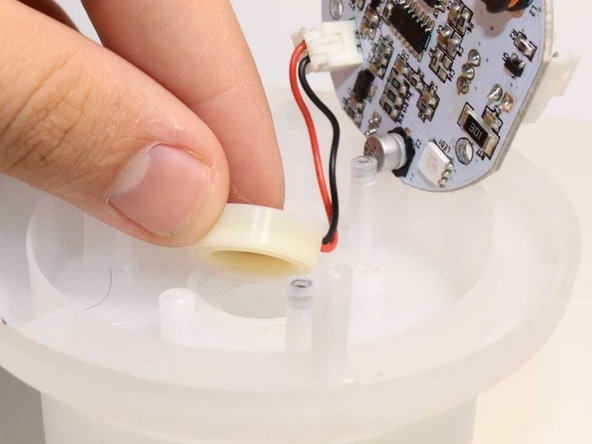
      • Remove the rubber cover from the ultrasonic plate.

      Pregunta a FixBot

      Agregar Comentario

    8. Syntus ST150 Ultrasonic Plate Replacement: paso 8, imagen 1 de 1
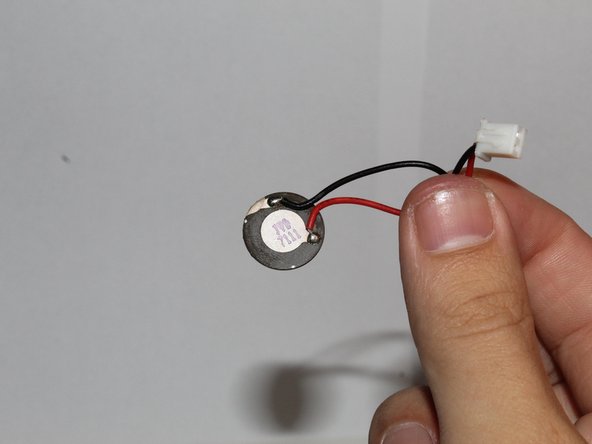
      • Now you can replace the ultrasonic plate of your diffuser.

      Pregunta a FixBot

      Agregar Comentario

Conclusión

To reassemble your device, follow these instructions in reverse order.

Cancelar: No complete esta guía.

0Guía Comentarios

Agregar Comentario

Ver Estadísticas:

Ultimas 24 horas: 4

Ultimos 7 días: 30

Ultimos 30 días: 105

Todo El Tiempo: 1,894