Esta traducción la ha hecho un programa y todavía no la ha revisado nadie. ¿Hablas este idioma? Échale un vistazo.

Sustitución del ensamblaje de la pantalla del Asus ZenBook UX303U

Última actualización: 1 de ago. de 2026
Vistas: 9.6 k
Ver estadísticas:
- Últimas 24 horas:
- 3
- Últimos 7 días:
- 21
- Últimos 30 días:
- 99
- Todo El Tiempo:
- 9,577
Comentarios: 17
10 comentarios sobre los pasos, 7 comentarios sobre la guía.
Ir a los comentarios de la guíaCompletado: 8 9
8 personas han marcado esta guía como "completada". ¿Serás tú la próxima persona en hacerlo?
9 persona acaba de marcar esta guía como "completada". ¡Incluyéndote, excelente trabajo!
Favoritos: 0 1
Nadie ha marcado como "Favorita" ni se ha suscrito a esta guía. ¿Quieres hacerlo tú?
1 persona marcó (y se suscribió) a esta guía como favorita, ¡y ese eres tú!
Introducción
Ir al paso 1 ↓Esta guía te mostrará cómo sustituir la pantalla de un portátil Asus ZenBook UX303U.
Qué necesitas
Herramientas


-
-
-
Remueve los dos pies de goma redondos en el borde- bisagra de la portátil.
 Pregunta a FixBot
-
-
-
Remueve los once tornillos de 4 mm Phillips #00 del panel trasero.
-
-
-
Con una herramienta de apertura de plástico levanta el panel para quitarlo de la portátil.
-
-
-
-
-
-
Retira el cable que conecta el ensamblaje de pantalla a la placa madre.
-
-
-
Quita los tres tornillos Phillips #00 de 4 mm de la bisagra para aflojar el ventilador de la placa madre.
-
Levanta la bisagra.
-
-
-
Quita los tres tornillos Phillips #00 que fijan la bisagra a la placa de E/S.
-
-
-
Retira la tarjeta Wi-Fi tirando de ella directamente hacia afuera de su conector.
-
-
-
Levanta todo el ensamblaje inferior para separarlo de las bisagras que lo mantienen en su lugar.
-
-


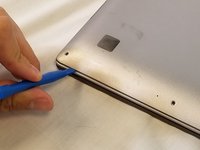
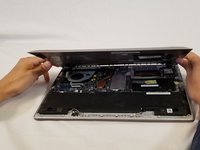


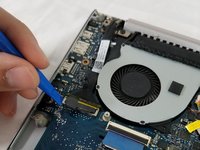
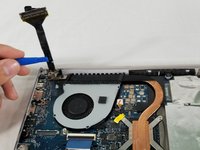


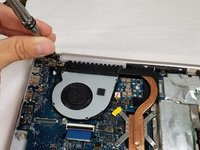
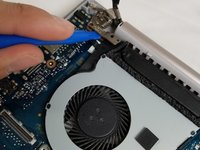
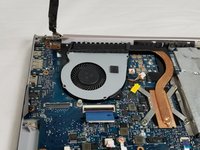


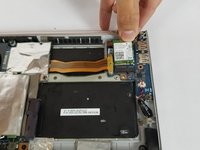
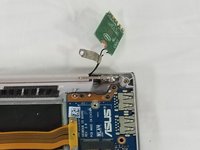


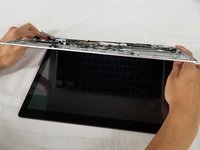
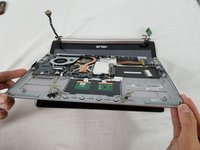
Para volver a montar tu dispositivo, sigue estas instrucciones en orden inverso.
Cancelar: No complete esta guía.
8 personas más completaron esta guía.

Equipo

USF Tampa, Team S3-G5, Nance Spring 2018 Miembro de USF Tampa, Team S3-G5, Nance Spring 2018
USFT-NANCE-S18S3G5
Miembros de 3
60 Guías creadas
7Guía Comentarios
If anyone knows of a good, reliable source to buy a replacement screen assembly let me know, please. I have a 303U with the 1800 screen and I accidentally sat something heavy enough on top of the laptop to crack the screen on the right-third of the screen. I can’t use half of the touch screen and it’s fairly obvious depending on the color/brightness of the content I’m looking at. Would like to be able to replace this and these steps are pretty easy for me to follow so I’m confident I can have a newish looking laptop again if I can find a replacement screen.
Hi ! Did you manage to find one? I’m trying to do the same thing :)
The bottom of the pictured device may feature Phillips #00 screws, but I also have this laptop and the screws around the edge of the bottom panel are Torx T5s on my device.
Same here, asus ux303u screen side hinge is stuffed. But I think it may actually be the plastic screen cover itself where the hinge attaches, not just the hinge.
