Esta traducción la ha hecho un programa y todavía no la ha revisado nadie. ¿Hablas este idioma? Échale un vistazo.

Sustitución de las teclas del Casio LK-170

Última actualización: 15 de ago. de 2026
Vistas: 3.2 k
Ver estadísticas:
- Últimas 24 horas:
- 2
- Últimos 7 días:
- 22
- Últimos 30 días:
- 90
- Todo El Tiempo:
- 3,248
Comentarios: 3
1 comentario sobre los pasos, 2 comentarios sobre la guía.
Ir a los comentarios de la guíaCompletado: 2 3
2 personas han marcado esta guía como "completada". ¿Serás tú la próxima persona en hacerlo?
3 persona acaba de marcar esta guía como "completada". ¡Incluyéndote, excelente trabajo!
Favoritos: 1 2
1 persona ha marcado como "Favorita" y se ha suscrito a esta guía. ¿Serás tú la próxima persona en hacerlo?
2 personas marcaron como favorita (y se suscribieron) esta guía, ¡incluyéndote a ti!
Introducción
Ir al paso 1 ↓¿Tienes una tecla atascada o rota? No hay problema. Sustituye conjuntos de teclas en poco tiempo con la ayuda de un destornillador.
Qué necesitas
Herramientas

-
-
-
Comienza retirando los 4 tornillos de cada lado del piano, marcados con un círculo rojo.
-
A continuación, retira los cuatro tornillos que están un poco ocultos, marcados con un círculo naranja.
-
Después, retira los dos tornillos del centro del piano, así como los tres tornillos de la parte superior del piano, marcados con un círculo amarillo.
 Pregunta a FixBot
-
-
-
-
Después de darle la vuelta al teclado, retira con cuidado el panel frontal del panel trasero del teclado usando las manos.
-
Ahora deberías ver los tornillos que sujetan las teclas en su lugar.
-
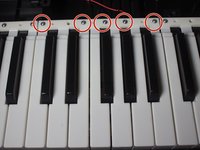
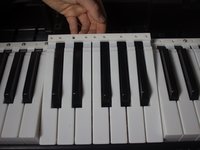
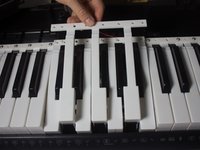
Con una punta JIS-1, desatornilla los cinco tornillos de la sección donde se encuentra la tecla que quieres sustituir.
-
-




Para volver a montar tu dispositivo, sigue estas instrucciones en orden inverso.
Cancelar: No complete esta guía.
2 personas más completaron esta guía.

Equipo

Cal Poly, Team 13-2, Banghart Winter 2017 Miembro de Cal Poly, Team 13-2, Banghart Winter 2017
CPSU-BANGHART-W17S13G2
Miembros de 3
60 Guías creadas
2Guía Comentarios
This guide also works for the Casio LK-175.
The keys are in small groups and you will need to purchase the correct ones. Unfortunately, the ones I received from a seller did not match. I think he thought the part was compatible between my keyboard and the one he pulled them from. I very carefully tried super-gluing the key back onto it's section and so far so good (a few hours). Hopefully, the repair will hold.
Thank you for the guide Samantha.
Do you know if this exposes the circuit board(s)? I need to open my Casio LK175 to figure out why it's only working with batteries. I need to test the power adapter with a load...but the easiest way to do that would probably be measuring the voltage on the pins inside the board.
Thanks for posting this BTW. I saw so many screws on the bottom. I figured a lot of em were holding the keys. I was afraid to open it up, because I figured I'd mess it up. This is very helpful!
