Esta traducción la ha hecho un programa y todavía no la ha revisado nadie. ¿Hablas este idioma? Échale un vistazo.

Sustitución de la tarjeta de memoria de la Casio Exilim EX-Z70

Última actualización: 14 de ago. de 2026
Vistas: 5.1 k
Ver estadísticas:
- Últimas 24 horas:
- 3
- Últimos 7 días:
- 24
- Últimos 30 días:
- 140
- Todo El Tiempo:
- 5,131
Comentarios: 3
3 comentarios sobre la guía.
Ir a los comentarios de la guíaCompletado: 2 3
2 personas han marcado esta guía como "completada". ¿Serás tú la próxima persona en hacerlo?
3 persona acaba de marcar esta guía como "completada". ¡Incluyéndote, excelente trabajo!
Favoritos: 0 1
Nadie ha marcado como "Favorita" ni se ha suscrito a esta guía. ¿Quieres hacerlo tú?
1 persona marcó (y se suscribió) a esta guía como favorita, ¡y ese eres tú!
Introducción
Ir al paso 1 ↓Si tu cámara muestra un mensaje de que la memoria está «bloqueada», esta guía te mostrará cómo corregirlo. Primero verás dónde se encuentra la tarjeta de memoria y cómo extraerla. Si ya sabes cómo hacerlo, puedes pasar directamente al paso 3 para desbloquear tu tarjeta de memoria.
-
-
-
Orienta la cámara con el objetivo hacia la derecha y la parte inferior de la cámara hacia ti.
-
Sujetando la cámara firmemente, premotor hacia abajo sobre la pieza con la etiqueta y deslízala hacia la pantalla LCD (hacia la izquierda).
-
La solapa se abrirá hacia arriba.
 Pregunta a FixBot
-
-
-
-
Presiona la tarjeta de memoria (situada detrás de la batería) y luego libera la presión por completo.
-
Sujeta la tarjeta de memoria por ambos lados y deslízala suavemente fuera de su compartimento para extraerla.
-
-
-
Si tu tarjeta de memoria está bloqueada, hay un cursor de bloqueo metálico en el lado izquierdo que puedes mover hacia arriba para desbloquearla.
-
-


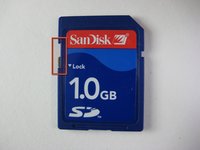
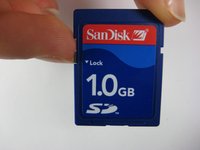
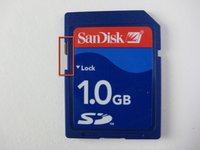
Para volver a montar tu dispositivo, sigue estas instrucciones en orden inverso.
Cancelar: No complete esta guía.
2 personas más completaron esta guía.

Equipo

Cal Poly, Team 17-28, Amido Spring 2012 Miembro de Cal Poly, Team 17-28, Amido Spring 2012
CPSU-AMIDO-S12S17G28
Miembros de 4
84 Guías creadas
3Guía Comentarios
My Casio camera works great until I insert the memory card. When it doesn't have the memory card, it turns on, the lenses come out and everything but as soon as I insert the memory card, the lenses will come out have way, and then the camera shuts off like that. The only way to get the lenses to get inside and the camera to turn on, is to remove the memory card. HELP ME PLEASE!
I have a similar issue. My camera won’t recognize the SD card! It’ll turn on & take pic’s in the Memory area, but them it’s FULL after a few. Isn’t there something that can be done?
I see NO ONE HAS ANSWERED THE LAST PERSONS QUESTION….????????????
