Introducción
Has your Samsung Impression smartphone stopped working after countless fixes? Is the battery still functional, but the phone cannot boot up?
You may have a shorted circuit board. The circuit board of the Samsung Impression contains all systems necessary to make the cell phone function: memory, CPU, radio antennas, and oscillators.
Well don't retire your cellphone just yet! A circuit board replacement can help you save money and keep your phone. This step-by-step guide will help you easily remove and replace your phone's circuit board within 15 minutes.
Prior to reading these instructions, purchase a circuit board from the official Samsung parts website at https://www.samsungparts.com/Default.asp.... Once you've received the new circuit board, power off the Samsung Impression and carefully follow these step-by-step instructions for replacing the circuit board with the necessary tools listed below.
Qué necesitas
-
-
Orient the phone with the screen facing downward.
-
Slide the panel away from the camera using your thumb. This will expose the battery.
-
-
-
Remove the six 3.5 mm screws using a Phillips #000 screwdriver. Unscrew in a counterclockwise direction.
-
-
-
Carefully pry the back speaker upwards with a spudger.
-
Disconnect the speaker by lifting the clear plastic piece attached to the wire.
-
-
-
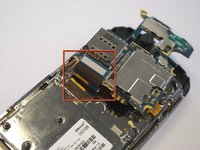
Gently remove the black wire to free the circuit board.
-
Remove the wire by gently prying up the gold terminator attached to the green circuit board.
-


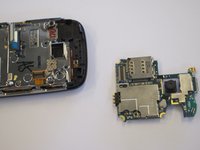
To reassemble the device, carefully follow these instructions in reverse order. With a new circuit board installed, your phone should be functional again! For more guides on Samsung Impression maintenance, visit www.ifixit.com.



Equipo

Cal Poly, Team 8-10, Regan Spring 2011 Miembro de Cal Poly, Team 8-10, Regan Spring 2011
CPSU-REGAN-S11S8G10
Miembros de 4
23 Guías creadas
