Saltar al contenido principal
Únete a la Comunidad de Reparación - Crear Cuenta

Samsung Galaxy J7 V Earpiece Speaker Replacement

Qué necesitas

    1. Samsung Galaxy J7 V Earpiece Speaker Replacement, Screen: paso 1, imagen 1 de 1
      • Be very careful during this step. The OLED (organic light-emitting diode) display is very fragile and can break easily.

      • Insert a Jimmy tool under one of the corners of the display and gently raise the display.

      Pregunta a FixBot

      Agregar Comentario

    2. Samsung Galaxy J7 V Earpiece Speaker Replacement: paso 2, imagen 1 de 1
      • Gently slide the Jimmy tool around the entire perimeter of the phone.

      Pregunta a FixBot

      Agregar Comentario

    3. Samsung Galaxy J7 V Earpiece Speaker Replacement: paso 3, imagen 1 de 1
      • Be extra careful with the display's ribbon cables. They are fragile.

      • Carefully lift the display to remove it.

      Pregunta a FixBot

      Agregar Comentario

    1. Samsung Galaxy J7 V Earpiece Speaker Replacement, Home button: paso 4, imagen 1 de 1
      • Locate the socket of the home button.

      • Fit the metal spudger in between the socket and the home button.

      Pregunta a FixBot

      Agregar Comentario

    2. Samsung Galaxy J7 V Earpiece Speaker Replacement: paso 5, imagen 1 de 1
      • Take the metal spudger and slide it underneath the home button.

      • Lift up until the home button is removed from its socket.

      Pregunta a FixBot

      Agregar Comentario

    1. Samsung Galaxy J7 V Earpiece Speaker Replacement, Motherboard: paso 6, imagen 1 de 1
      • Remove fourteen screws from the midframe using a Phillips #00 screwdriver.

      Pregunta a FixBot

      Agregar Comentario

    2. Samsung Galaxy J7 V Earpiece Speaker Replacement: paso 7, imagen 1 de 1
      • Flip the phone to the back side where the battery was removed.

      • Apply pressure with your hands to pop the midframe off.

      Pregunta a FixBot

      Agregar Comentario

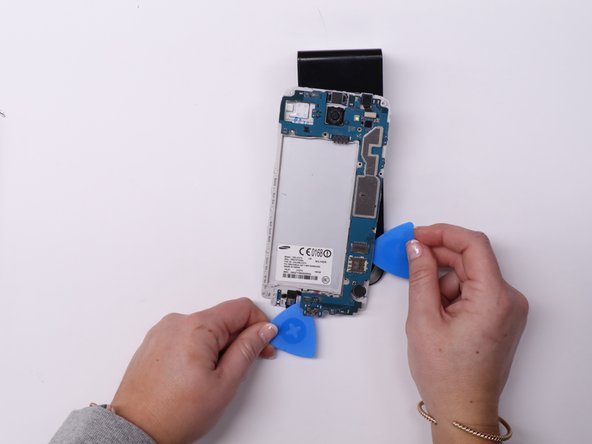
    3. Samsung Galaxy J7 V Earpiece Speaker Replacement: paso 8, imagen 1 de 2 Samsung Galaxy J7 V Earpiece Speaker Replacement: paso 8, imagen 2 de 2
      • Flip the phone back over.

      • Remove the single black screw from the motherboard using a Phillips #00 screwdriver.

      • Place a few iFixit opening picks beneath the motherboard.

      • Spread the opening picks evenly around the motherboard to ensure it does not bend as you remove it.

      • Lift the motherboard using the iFixit opening picks.

      Pregunta a FixBot

      Agregar Comentario

    1. Samsung Galaxy J7 V Earpiece Speaker Replacement, Earpiece Speaker: paso 9, imagen 1 de 1
      Herramienta utilizada en este paso:
      Tweezers
      $4.99
      • Use the tweezers to remove the back of the earpiece speaker.

      Pregunta a FixBot

      Agregar Comentario

Conclusión

To reassemble your device, follow these instructions in reverse order.

Cancelar: No complete esta guía.

4 personas más completaron esta guía.

0Guía Comentarios

Agregar Comentario

Ver Estadísticas:

Ultimas 24 horas: 6

Ultimos 7 días: 27

Ultimos 30 días: 82

Todo El Tiempo: 1,688