Saltar al contenido principal

Envío gratis en pedidos nacionales de $75 o más

Samsung Galaxy J3 Emerge Motherboard Replacement

Vistas: 1.8 k

Ver estadísticas:

Últimas 24 horas:
1
Últimos 7 días:
10
Últimos 30 días:
53
Todo El Tiempo:
1,847
Comentarios: 0

Nadie ha escrito comentarios en esta guía. ¿Quieres escribir el primero?

Ir a los comentarios de la guía
Completado: 0

Nadie ha marcado esta guía como "completada". ¿Quieres marcarla tú?

Favoritos: 0

Nadie ha marcado como "Favorita" ni se ha suscrito a esta guía. ¿Quieres hacerlo tú?

Tiempo Requerido: 10 Minuto
Dificultad: Moderado
Samsung Galaxy J3 Emerge Motherboard Replacement

Introducción

Ir al paso 1 ↓

Motherboard replacement guide for the Galaxy J3 Emerge. The motherboard is the core of the phone's hardware. Everything is attached to it. This will be replaced when the phone stops functioning completely. Also, many parts are under the motherboard, like the camera and speakers.

Qué necesitas

Herramientas

    1. Samsung Galaxy J3 Emerge Motherboard Replacement, Screen: paso 1, imagen 1 de 3 Samsung Galaxy J3 Emerge Motherboard Replacement, Screen: paso 1, imagen 2 de 3 Samsung Galaxy J3 Emerge Motherboard Replacement, Screen: paso 1, imagen 3 de 3
      • Heat up the edges of the screen with a hair dryer.

      • Put the iFixit Opening Tool between the screen and body to open the edge of the screen up.

      • Work the iFixit Opening Tools around the whole screen to break the glue.

      Pregunta a FixBot

      Agregar Comentario

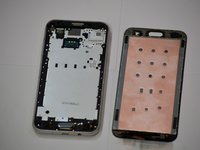
    2. Samsung Galaxy J3 Emerge Motherboard Replacement: paso 2, imagen 1 de 2 Samsung Galaxy J3 Emerge Motherboard Replacement: paso 2, imagen 2 de 2
      • Lift the screen up from the bottom.

      • The screen could crack when lifting it up.

      • Pry the gray cover open.

      Pregunta a FixBot

      Agregar Comentario

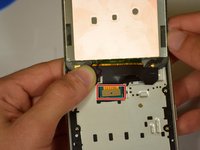
    3. Samsung Galaxy J3 Emerge Motherboard Replacement: paso 3, imagen 1 de 2 Samsung Galaxy J3 Emerge Motherboard Replacement: paso 3, imagen 2 de 2
      • Pry the connector off of the motherboard by using a clean nail or the iFixit opening tool.

      Pregunta a FixBot

      Agregar Comentario

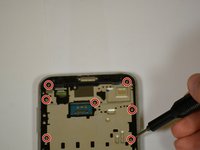
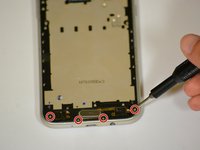
    1. Samsung Galaxy J3 Emerge Motherboard Replacement, Motherboard: paso 4, imagen 1 de 2 Samsung Galaxy J3 Emerge Motherboard Replacement, Motherboard: paso 4, imagen 2 de 2
      • Remove the eleven Phillips #00 3.5mm screws.

      • If the screws get stuck when removing, try using tape to get them out. Place the adhesive side of tape on the screws and pull the tape off the spot.

      Pregunta a FixBot

      Agregar Comentario

    2. Samsung Galaxy J3 Emerge Motherboard Replacement: paso 5, imagen 1 de 1
      • Turn the phone over and push down where the battery was.

      • There will be a loud clicking noise when applying pressure.

      Pregunta a FixBot

      Agregar Comentario

    3. Samsung Galaxy J3 Emerge Motherboard Replacement: paso 6, imagen 1 de 1
      • Insert the iFixit Opening Pick between the motherboard and the panel.

      • Work the iFixit Opening Pick around the outside of the motherboard.

      Pregunta a FixBot

      Agregar Comentario

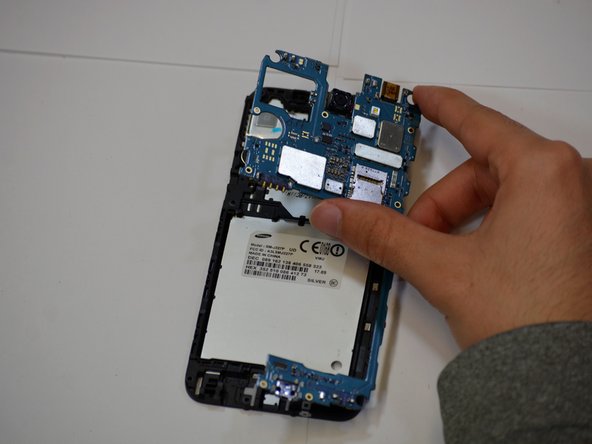
    4. Samsung Galaxy J3 Emerge Motherboard Replacement: paso 7, imagen 1 de 2 Samsung Galaxy J3 Emerge Motherboard Replacement: paso 7, imagen 2 de 2
      • Pry the motherboard away from the phone using your hand.

      Pregunta a FixBot

      Agregar Comentario

Conclusión

To reassemble your device, follow these instructions in reverse order.

Cancelar: No complete esta guía.

Autor

con

Hugh Cosculluela

Miembro Desde 01/24/19

531 Reputación

4 Guías creadas

Equipo

Cal Poly, Team S19-G2, White Winter 2019 Miembro de Cal Poly, Team S19-G2, White Winter 2019

CPSU-WHITE-W19S19G2

Miembros de 4

60 Guías creadas

0Guía Comentarios

Agregar Comentario

Ver Estadísticas:

Ultimas 24 horas: 1

Ultimos 7 días: 10

Ultimos 30 días: 53

Todo El Tiempo: 1,847