Saltar al contenido principal
Únete a la Comunidad de Reparación - Crear Cuenta

Samsung Galaxy J3 Emerge Camera Replacement

Qué necesitas

    1. Samsung Galaxy J3 Emerge Camera Replacement, Screen: paso 1, imagen 1 de 3 Samsung Galaxy J3 Emerge Camera Replacement, Screen: paso 1, imagen 2 de 3 Samsung Galaxy J3 Emerge Camera Replacement, Screen: paso 1, imagen 3 de 3
      • Heat up the edges of the screen with a hair dryer.

      • Put the iFixit Opening Tool between the screen and body to open the edge of the screen up.

      • Work the iFixit Opening Tools around the whole screen to break the glue.

      Pregunta a FixBot

      Agregar Comentario

    2. Samsung Galaxy J3 Emerge Camera Replacement: paso 2, imagen 1 de 2 Samsung Galaxy J3 Emerge Camera Replacement: paso 2, imagen 2 de 2
      • Lift the screen up from the bottom.

      • The screen could crack when lifting it up.

      • Pry the gray cover open.

      Pregunta a FixBot

      Agregar Comentario

    3. Samsung Galaxy J3 Emerge Camera Replacement: paso 3, imagen 1 de 2 Samsung Galaxy J3 Emerge Camera Replacement: paso 3, imagen 2 de 2
      • Pry the connector off of the motherboard by using a clean nail or the iFixit opening tool.

      Pregunta a FixBot

      Agregar Comentario

    1. Samsung Galaxy J3 Emerge Camera Replacement, Motherboard: paso 4, imagen 1 de 2 Samsung Galaxy J3 Emerge Camera Replacement, Motherboard: paso 4, imagen 2 de 2
      • Remove the eleven Phillips #00 3.5mm screws.

      • If the screws get stuck when removing, try using tape to get them out. Place the adhesive side of tape on the screws and pull the tape off the spot.

      Pregunta a FixBot

      Agregar Comentario

    2. Samsung Galaxy J3 Emerge Camera Replacement: paso 5, imagen 1 de 1
      • Turn the phone over and push down where the battery was.

      • There will be a loud clicking noise when applying pressure.

      Pregunta a FixBot

      Agregar Comentario

    3. Samsung Galaxy J3 Emerge Camera Replacement: paso 6, imagen 1 de 1
      • Insert the iFixit Opening Pick between the motherboard and the panel.

      • Work the iFixit Opening Pick around the outside of the motherboard.

      Pregunta a FixBot

      Agregar Comentario

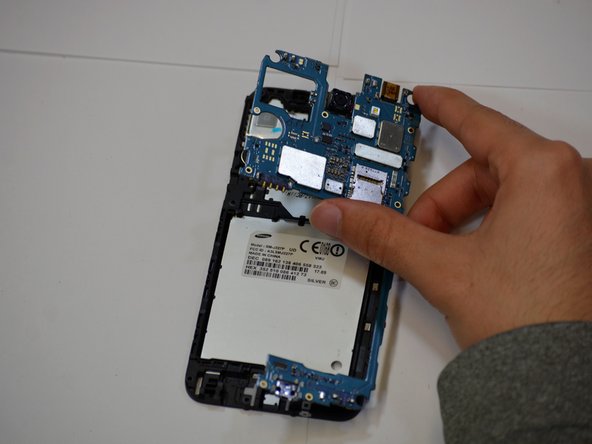
    4. Samsung Galaxy J3 Emerge Camera Replacement: paso 7, imagen 1 de 2 Samsung Galaxy J3 Emerge Camera Replacement: paso 7, imagen 2 de 2
      • Pry the motherboard away from the phone using your hand.

      Pregunta a FixBot

      Agregar Comentario

    1. Samsung Galaxy J3 Emerge Camera Replacement, Camera: paso 8, imagen 1 de 1
      • Pull the green tape over the connectors off.

      Pregunta a FixBot

      Agregar Comentario

    2. Samsung Galaxy J3 Emerge Camera Replacement: paso 9, imagen 1 de 1
      • Lift up the tabs to reveal the ribbons.

      Pregunta a FixBot

      Agregar Comentario

    3. Samsung Galaxy J3 Emerge Camera Replacement: paso 10, imagen 1 de 2 Samsung Galaxy J3 Emerge Camera Replacement: paso 10, imagen 2 de 2
      • Pull the two camera ribbons away from the connectors.

      Pregunta a FixBot

      Agregar Comentario

Conclusión

To reassemble your device, follow these instructions in reverse order.

Cancelar: No complete esta guía.

Equipo

Cal Poly, Team S19-G2, White Winter 2019 Miembro de Cal Poly, Team S19-G2, White Winter 2019

CPSU-WHITE-W19S19G2

Miembros de 4

60 Guías creadas

0Guía Comentarios

Agregar Comentario

Ver Estadísticas:

Ultimas 24 horas: 1

Ultimos 7 días: 10

Ultimos 30 días: 31

Todo El Tiempo: 940