Saltar al contenido principal
Únete a la Comunidad de Reparación - Crear Cuenta

Samsung Galaxy Core Prime Volume Buttons Replacement

Qué necesitas

    1. Samsung Galaxy Core Prime Volume Buttons Replacement, Battery: paso 1, imagen 1 de 1
      • Turn the smartphone off by using the power button on the right-hand side.

      Pregunta a FixBot

      Agregar Comentario

    2. Samsung Galaxy Core Prime Volume Buttons Replacement: paso 2, imagen 1 de 1
      • Turn the smartphone over so that the rear camera is face up.

      Pregunta a FixBot

      Agregar Comentario

    3. Samsung Galaxy Core Prime Volume Buttons Replacement: paso 3, imagen 1 de 1
      • Use your fingernail or a flat tool to lift the back cover.

      Pregunta a FixBot

      Agregar Comentario

    4. Samsung Galaxy Core Prime Volume Buttons Replacement: paso 4, imagen 1 de 2 Samsung Galaxy Core Prime Volume Buttons Replacement: paso 4, imagen 2 de 2
      • Locate the battery near the bottom of the phone. The battery is square, flat, and is labeled 'SAMSUNG'.

      Pregunta a FixBot

      Agregar Comentario

    5. Samsung Galaxy Core Prime Volume Buttons Replacement: paso 5, imagen 1 de 1
      • Use your fingernail or a flat tool to lift the battery out.

      Pregunta a FixBot

      Agregar Comentario

    1. Samsung Galaxy Core Prime Volume Buttons Replacement, Volume Button: paso 6, imagen 1 de 2 Samsung Galaxy Core Prime Volume Buttons Replacement, Volume Button: paso 6, imagen 2 de 2
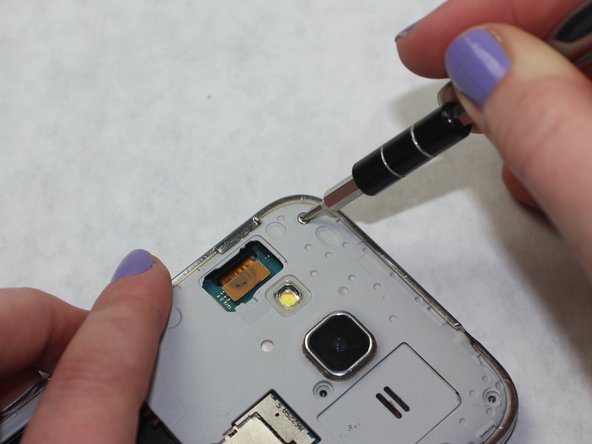
      • Use a Phillips #00 screwdriver to remove the eight 4mm screws from the midframe.

      Pregunta a FixBot

      Agregar Comentario

    2. Samsung Galaxy Core Prime Volume Buttons Replacement: paso 7, imagen 1 de 1
      Herramienta utilizada en este paso:
      iOpener
      $24.95
      • Flip the phone over (screen up). Use an iOpener to heat the frame. Do this until the adhesive is loose.

      • Use care when handling these heating tools!

      Pregunta a FixBot

      Agregar Comentario

    3. Samsung Galaxy Core Prime Volume Buttons Replacement: paso 8, imagen 1 de 2 Samsung Galaxy Core Prime Volume Buttons Replacement: paso 8, imagen 2 de 2
      Herramienta utilizada en este paso:
      iFixit Opening Tool
      $1.99
      • Use an iFixit Opening Tool or a similarly shaped tool like a guitar pick to lift the mid-frame.

      Pregunta a FixBot

      Agregar Comentario

    4. Samsung Galaxy Core Prime Volume Buttons Replacement: paso 9, imagen 1 de 2 Samsung Galaxy Core Prime Volume Buttons Replacement: paso 9, imagen 2 de 2
      Herramienta utilizada en este paso:
      Tweezers
      $4.99
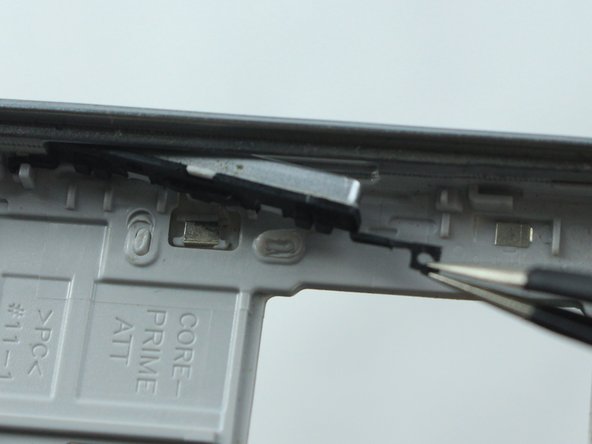
      • Use tweezers to unhook both of the rubber fixtures holding the volume button to the frame.

      Pregunta a FixBot

      Agregar Comentario

Conclusión

To reassemble your device, follow these instructions in reverse order.

Cancelar: No complete esta guía.

3 personas más completaron esta guía.

Equipo

0Guía Comentarios

Agregar Comentario

Ver Estadísticas:

Ultimas 24 horas: 2

Ultimos 7 días: 9

Ultimos 30 días: 35

Todo El Tiempo: 1,367