Saltar al contenido principal
Únete a la Comunidad de Reparación - Crear Cuenta

Samsung Galaxy Amp 2 Speaker Replacement

Vistas: 883

Ver estadísticas:

Últimas 24 horas:
0
Últimos 7 días:
11
Últimos 30 días:
61
Todo El Tiempo:
883
Comentarios: 0

Nadie ha escrito comentarios en esta guía. ¿Quieres escribir el primero?

Go to guide comments
Completado: 1

1 persona ha marcado esta guía como "completada". ¿Serás tú la próxima persona en hacerlo?

Favoritos: 0

Nadie ha marcado como "Favorita" ni se ha suscrito a esta guía. ¿Quieres hacerlo tú?

Tiempo Requerido: 30 Minuto
Dificultad: Difícil
Samsung Galaxy Amp 2 Speaker Replacement

Introducción

Ir al paso 1 ↓

Disassemble a Galaxy Amp 2 phone in order to replace the speaker. You might need to remove this piece if you can't hear the other person on the line during phone calls, or if your phone can't play music. This guide requires the careful use of a heat gun or blow dryer, and careful use is advised to avoid damaging the phone.

Qué necesitas

Herramientas

    1. Samsung Galaxy Amp 2 Speaker Replacement, Battery: paso 1, imagen 1 de 2 Samsung Galaxy Amp 2 Speaker Replacement, Battery: paso 1, imagen 2 de 2
      • Insert your fingernail or an opening tool into the divot on the side of the phone. The divot is located to the left of the rear-facing camera.

      • Lift upwards and gently pry the rear panel off of the phone.

      Pregunta a FixBot

      Agregar Comentario

    2. Samsung Galaxy Amp 2 Speaker Replacement: paso 2, imagen 1 de 3 Samsung Galaxy Amp 2 Speaker Replacement: paso 2, imagen 2 de 3 Samsung Galaxy Amp 2 Speaker Replacement: paso 2, imagen 3 de 3
      • Insert a fingernail or plastic opening tool into the gap in the bottom right corner of the battery and lift upward.

      • Grip the battery and safely remove it from the phone.

      Pregunta a FixBot

      Agregar Comentario

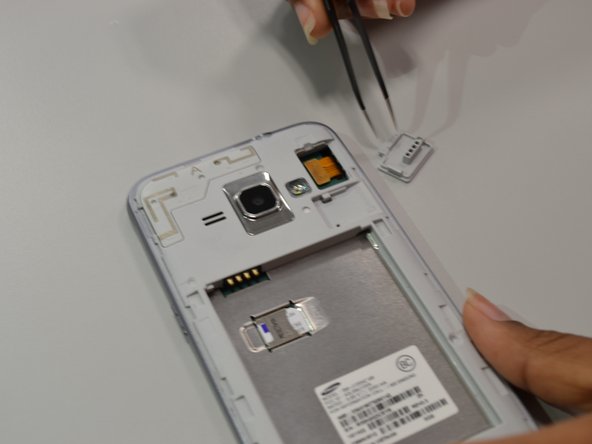
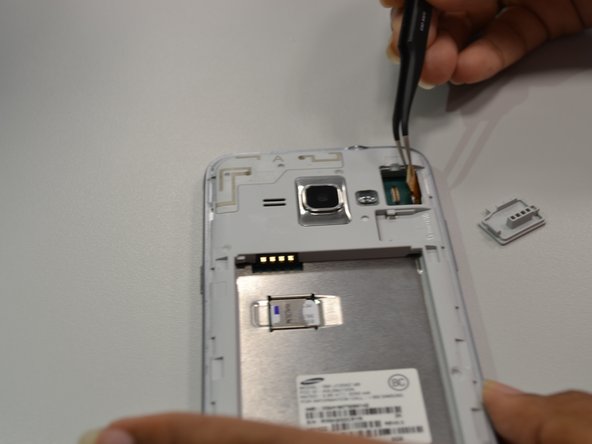
    1. Samsung Galaxy Amp 2 Speaker Replacement, Screen: paso 3, imagen 1 de 3 Samsung Galaxy Amp 2 Speaker Replacement, Screen: paso 3, imagen 2 de 3 Samsung Galaxy Amp 2 Speaker Replacement, Screen: paso 3, imagen 3 de 3
      Herramienta utilizada en este paso:
      Tweezers
      $3.99
      • Using angled tweezers, lift the small rectangular guard at upper right corner of the phone.

      • Disconnect the connector piece from the back panel.

      Pregunta a FixBot

      Agregar Comentario

    2. Samsung Galaxy Amp 2 Speaker Replacement: paso 4, imagen 1 de 1
      • Apply heat from heat gun or blow dryer on periphery of the screen for one to two minutes.

      Pregunta a FixBot

      Agregar Comentario

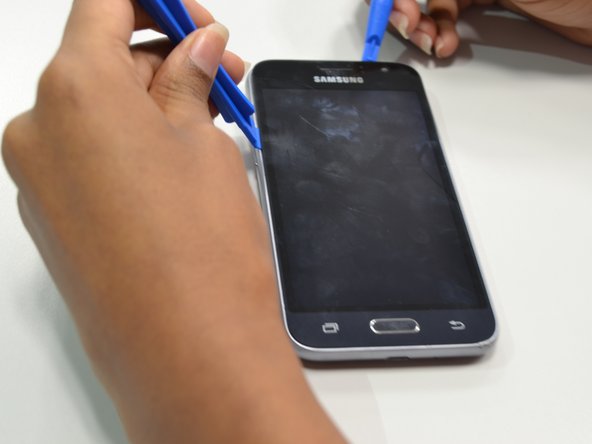
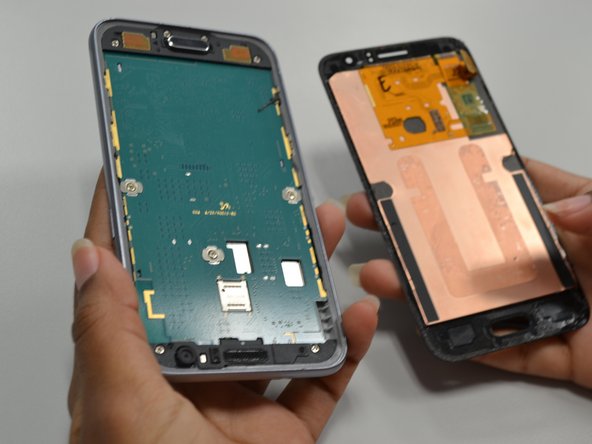
    3. Samsung Galaxy Amp 2 Speaker Replacement: paso 5, imagen 1 de 3 Samsung Galaxy Amp 2 Speaker Replacement: paso 5, imagen 2 de 3 Samsung Galaxy Amp 2 Speaker Replacement: paso 5, imagen 3 de 3
      • Use four plastic opening tools to gently pry off the screen.

      • Optional: Use a suction tool to pull the screen off.

      Pregunta a FixBot

      Agregar Comentario

    1. Samsung Galaxy Amp 2 Speaker Replacement, Motherboard: paso 6, imagen 1 de 3 Samsung Galaxy Amp 2 Speaker Replacement, Motherboard: paso 6, imagen 2 de 3 Samsung Galaxy Amp 2 Speaker Replacement, Motherboard: paso 6, imagen 3 de 3
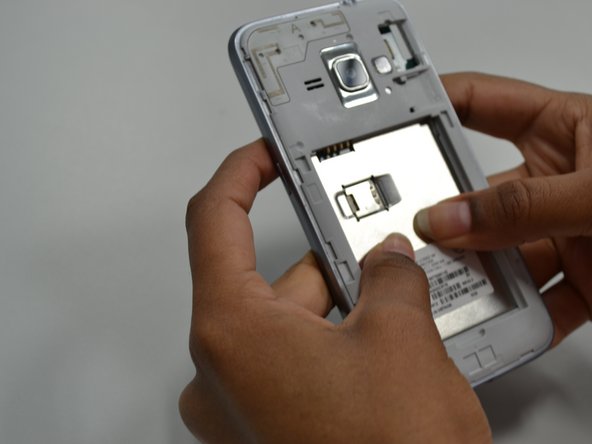
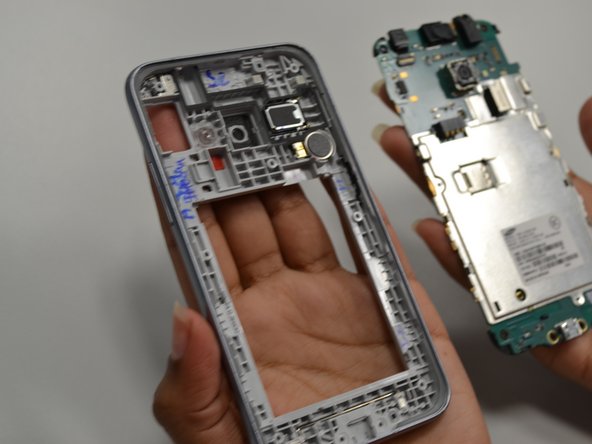
      • Unscrew the nine 4.5mm PH screws using a screwdriver with a PH000 bit.

      • Push from the back panel to remove the bottom part of the motherboard.

      • Push from the front panel to remove the top part of the motherboard.

      Pregunta a FixBot

      Agregar Comentario

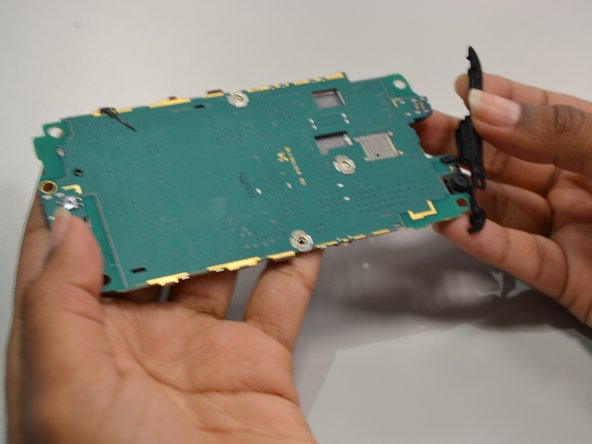
    1. Samsung Galaxy Amp 2 Speaker Replacement, Speaker: paso 7, imagen 1 de 2 Samsung Galaxy Amp 2 Speaker Replacement, Speaker: paso 7, imagen 2 de 2
      • Gently pull the black piece that is connected to the top of the motherboard. This is the speaker.

      Pregunta a FixBot

      Agregar Comentario

Conclusión

To reassemble your device, follow these instructions in reverse order.

Cancelar: No complete esta guía.

Una persona más ha completado esta guía.

Equipo

UW Tacoma, Team S1-G1, Cardinal Summer 2018 Miembro de UW Tacoma, Team S1-G1, Cardinal Summer 2018

UWT-CARDINAL-SU18S1G1

Miembros de 4

60 Guías creadas

0Guía Comentarios

Agregar Comentario

Ver Estadísticas:

Ultimas 24 horas: 0

Ultimos 7 días: 11

Ultimos 30 días: 61

Todo El Tiempo: 883