Saltar al contenido principal
Únete a la Comunidad de Reparación - Crear Cuenta

Samsung Admire Speaker Replacement

Vistas: 1.3 k

Ver estadísticas:

Últimas 24 horas:
2
Últimos 7 días:
18
Últimos 30 días:
95
Todo El Tiempo:
1,343
Comentarios: 0

Nadie ha escrito comentarios en esta guía. ¿Quieres escribir el primero?

Go to guide comments
Completado: 2

2 personas han marcado esta guía como "completada". ¿Serás tú la próxima persona en hacerlo?

Favoritos: 2

2 personas han marcado como "Favorita" y se han suscrito a esta guía. ¿Serás tú la próxima persona en hacerlo?

Tiempo Requerido: 10 - 20 minutos
Dificultad: Moderado
Samsung Admire Speaker Replacement

Introducción

Ir al paso 1 ↓

This step-by-step guide illustrates how to remove and replace the speaker of Samsung Admire.

Qué necesitas

Herramientas

    1. Samsung Admire Speaker Replacement, Back Cover: paso 1, imagen 1 de 1
      • Use your fingernail or plastic opening tool to pull up the back cover of the phone from under the slit.

      Pregunta a FixBot

      Agregar Comentario

    2. Samsung Admire Speaker Replacement, Remove the battery: paso 2, imagen 1 de 1
      • Carefully remove the battery by placing your fingernail underneath the hole and pulling out the battery.

      • Your hands should not be wet.

      Pregunta a FixBot

      Agregar Comentario

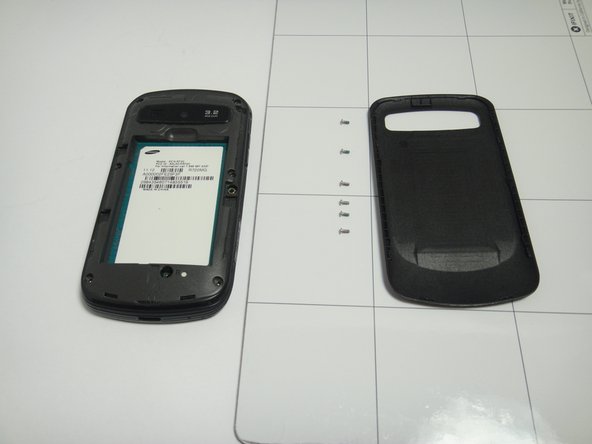
    3. Samsung Admire Speaker Replacement, Remove the screws: paso 3, imagen 1 de 3 Samsung Admire Speaker Replacement, Remove the screws: paso 3, imagen 2 de 3 Samsung Admire Speaker Replacement, Remove the screws: paso 3, imagen 3 de 3
      • Use the Phillips #00 Precision Screwdriver to remove the six screws in the back of the phone.

      Pregunta a FixBot

      Agregar Comentario

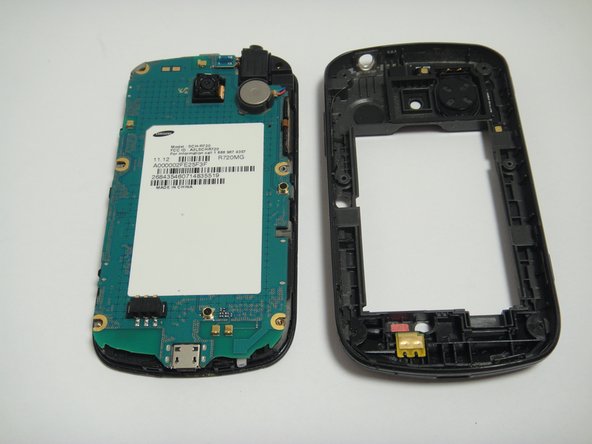
    4. Samsung Admire Speaker Replacement, Inside back cover: paso 4, imagen 1 de 3 Samsung Admire Speaker Replacement, Inside back cover: paso 4, imagen 2 de 3 Samsung Admire Speaker Replacement, Inside back cover: paso 4, imagen 3 de 3
      • Use the plastic opening tools to remove the inside back cover.

      • Place the plastic opening tools on the outside rim of the inside back cover.

      • Carefully lift the cover and circle around the rim to open the inside back cover completely.

      • Carefully disconnect ribbon cables and slowly lift the inside back cover to remove it.

      Pregunta a FixBot

      Agregar Comentario

    5. Samsung Admire Speaker Replacement, Speaker: paso 5, imagen 1 de 2 Samsung Admire Speaker Replacement, Speaker: paso 5, imagen 2 de 2
      • The speaker is located within the inside of the back cover.

      • Simply remove it by lifting it off with the plastic opening tool.

      Pregunta a FixBot

      Agregar Comentario

Conclusión

To reassemble your device, follow these instructions in reverse order.

Cancelar: No complete esta guía.

2 personas más completaron esta guía.

Thao Uyen Do

Miembro Desde 01/20/15

944 Reputación

4 Guías creadas

Equipo

USF Tampa, Team 7-5, Remmell Winter 2015 Miembro de USF Tampa, Team 7-5, Remmell Winter 2015

USFT-REMMELL-W15S7G5

Miembros de 4

48 Guías creadas

0Guía Comentarios

Agregar Comentario

Ver Estadísticas:

Ultimas 24 horas: 2

Ultimos 7 días: 18

Ultimos 30 días: 95

Todo El Tiempo: 1,343