
Samsung Admire Screen Replacement

Última actualización: 15 de dic. de 2023
Vistas: 2.4 k
Ver estadísticas:
- Últimas 24 horas:
- 1
- Últimos 7 días:
- 15
- Últimos 30 días:
- 87
- Todo El Tiempo:
- 2,436
Comentarios: 0
Nadie ha escrito comentarios en esta guía. ¿Quieres escribir el primero?
Ir a los comentarios de la guíaCompletado: 12 13
12 personas han marcado esta guía como "completada". ¿Serás tú la próxima persona en hacerlo?
13 persona acaba de marcar esta guía como "completada". ¡Incluyéndote, excelente trabajo!
Favoritos: 4 5
4 personas han marcado como "Favorita" y se han suscrito a esta guía. ¿Serás tú la próxima persona en hacerlo?
5 personas marcaron como favorita (y se suscribieron) esta guía, ¡incluyéndote a ti!
Rebanar y Trocear
Los pasos de esta guía deben ser divididos y convertidos en una serie de guías de prerrequisitos.
Faltan Detalles
Algunos de los detalles de este guía están ausentes. Ayuda a los usuarios agregando herramientas, dificultad o tiempo.
Introducción
Ir al paso 1 ↓If you carry a Samsung Admire, this guide can help you step by step on how to replace your phone's screen if it ever cracks, feels in any way uncomfortable, or is unadjusted.
Before using this guide make sure:
- to have the correct Samsung Admire phone model (Samsung Admire SCH-R720)
- to power off your phone completely and disconnect any external power sources
- to have the screen replacement ready ( please complete research to make sure you have correct screen replacement)
*
Qué necesitas
Herramientas


-
-
-
Slide your fingernail or plastic opening tool under the slit and pull the cover up.
 Pregunta a FixBot
-
-
-
Place your fingernail or plastic tool into the hole beneath the camera and carefully lift out the battery.
-
-
-
Use a Phillips #00 precision screwdriver to remove the six screws from the back of the phone.
-
-
-
-
Use the plastic opening tool to remove the inside back cover.
-
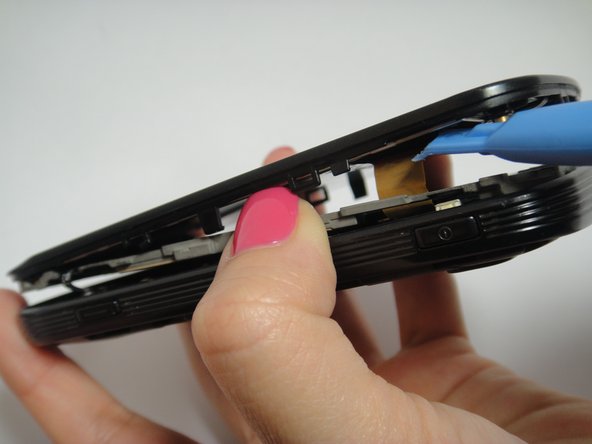
Use the plastic opening to pry the front and the back case apart.
-
As you lift the cover, move the plastic tool around the phone to pry up all of the screen.
-
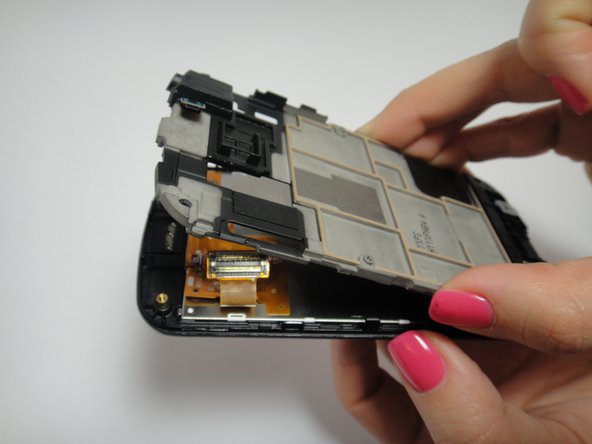
Carefully disconnect the ribbon cables and slowly lift the inside back cover to remove it.
-
-
-
Lift the motherboard slowly.
-
Carefully disconnect the volume button from the motherboard.
-
Disconnect the two ribbon cables from the back of the motherboard.
-
-
-
Pull back on the five clips on the sides of the phone to remove the shield.
-
-
-
Use the plastic opening tool to unlatch the ribbon cable to disconnect it.
-
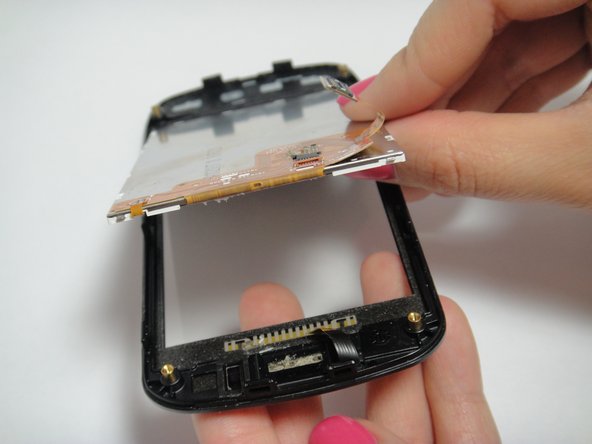
Place the plastic opening tool under the edge of the screen and lift the screen up carefully.
-
-
-
Insert new screen into the phone frame and reconnect the ribbon cable.
-
-








To reassemble your device, follow these instructions in reverse order.
Cancelar: No complete esta guía.
12 personas más completaron esta guía.

Equipo

USF Tampa, Team 7-5, Remmell Winter 2015 Miembro de USF Tampa, Team 7-5, Remmell Winter 2015
USFT-REMMELL-W15S7G5
Miembros de 4
48 Guías creadas
